Downloadable Files
You can download Hole Maker for free from the end of this page.
Precise Hole Creation in Blender with Hole Maker
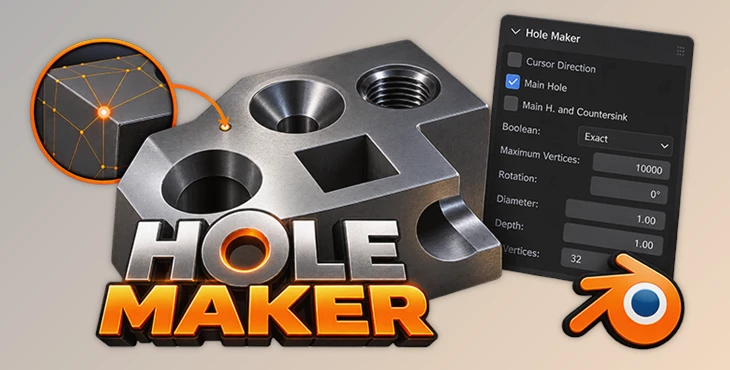
This Blender add-on is designed to create holes in a mesh with controlled dimensions and placement. Instead of relying on approximate positioning, the add-on uses a selected vertex as the center of the hole and provides direct control over its diameter, depth, direction, rotation, and geometry.
Create Precisely Positioned Holes from Selected Vertices
The core workflow of Hole Maker is based on vertex selection in Blender. Once the add-on is installed, its tools are available from the Edit menu while working in Edit Mode.
Select a vertex on the mesh and choose Make Hole(s). The selected vertex becomes the center point for the hole, while the add-on opens its main controls for defining how the hole should be generated.
Because Blender already provides multiple ways to manipulate and position vertices, the center of a hole can be established by positioning the corresponding vertex where it is needed.
The basic workflow is:
Enter Edit Mode → Select a vertex → Choose Make Hole(s) → Configure the hole → Create the result
Control Hole Direction
Hole Maker provides two methods for determining the direction in which a hole is created.
By default, the hole follows the normal direction of the selected vertex. Alternatively, the Cursor Direction option can be enabled to use the direction of Blender's 3D cursor.
This provides control over both the location and orientation of the operation without changing the fundamental vertex-based workflow.
Main Holes and Countersinks
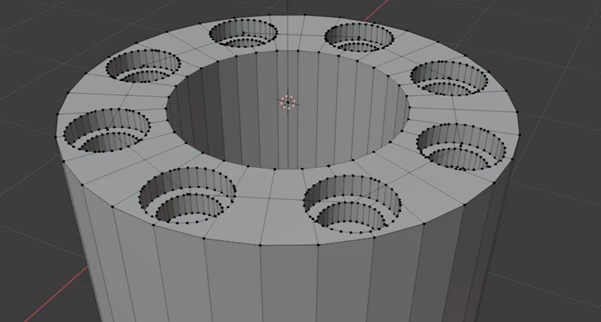
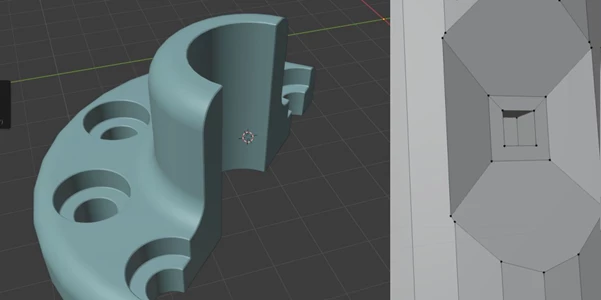
The add-on can create either a single straight hole or a combination of a main hole and a countersink.
With Main Hole selected, Hole Maker creates one straight hole using the specified dimensions. Enabling Main H. and Countersink adds a second hole and displays an additional column of settings for controlling its properties.
The main hole uses a single diameter. The countersink provides separate Top Diameter and Bottom Diameter values, allowing its shape to widen or narrow between the two ends. The top diameter is measured at the plane of the selected center vertex.
This means both the primary opening and the countersink geometry can be configured from the same Hole Maker interface.
Boolean Calculation: Exact, Fast, and Manifold
Hole Maker creates its holes through Boolean operations. The add-on provides Exact and Fast Boolean options, allowing the calculation method to be changed depending on the mesh and result.
According to the product information, Exact generally works better, although there are situations where Fast can produce a better result.
Hole Maker also supports Manifold Boolean, providing another available Boolean method for creating the holes.
Diameter, Depth, Rotation, and Geometry Controls
Beyond placement and direction, Hole Maker includes several parameters for defining the actual geometry of a hole.
Rotation rotates the hole around its own axis, with the hole axis acting as the center of rotation.
The diameter controls define the dimensions of the opening. A standard main hole has one diameter, while countersinks use separate top and bottom diameter settings. Hole depth can also be specified, giving direct control over how far the operation extends into the mesh.
The Vertices setting controls the number of vertices used for the circle that forms the hole. This setting can also change the character of the opening rather than simply its smoothness. Setting the value to 4, for instance, produces a square hole instead of a circular one.
Maximum Vertices Protection
Hole Maker includes a Maximum Vertices setting to help prevent an accidental selection of too many vertices from overwhelming the computer during hole generation.
This is particularly relevant because the tool is driven by vertex selection. The limit provides a safeguard when more vertices than intended have been selected before running the operation.
Working with the Generated Cutters
Boolean operations are executed in Object Mode to address self-intersection issues and improve the resulting geometry, while the way the user operates Hole Maker remains the same.
During this process, two collections can be created:
Main Cutter
Counter Sink
These collections can be removed when they are no longer required. Hole Maker creates them again when new holes are generated.

Files Password : gfxplugin.com OR 123456