Downloadable Files
You can download ShotLink for free from the bottom of this page.
Bring Unreal Engine Directly Into Your After Effects Composition
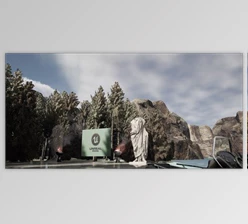
ShotLink connects Adobe After Effects directly to a running Unreal Engine project, turning an Unreal camera render into a live layer inside an After Effects composition. Instead of exporting frames or image sequences from Unreal and importing them again whenever the scene changes, you can keep working in After Effects while Unreal handles the rendering.
The connection goes beyond displaying a flat render. ShotLink can bring beauty, depth, normals, object mattes, and Post Process material passes into After Effects as separate layers, while also linking cameras, animation, and 3D positions between the two applications.
Live Unreal Engine Rendering Inside After Effects
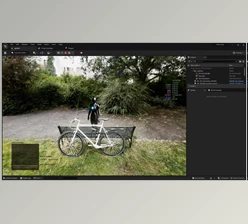
ShotLink is designed around a direct connection between After Effects and Unreal Engine. From the plugin's Source menu, you select a ShotLink camera from the running Unreal project, and its render appears in the composition as a layer.
The connection is built to survive an Unreal restart, so the camera source does not have to be configured again each time the engine is reopened.
Realtime Mode keeps the Unreal view continuously updating. Changes made to lights, materials, objects, or the scene itself can therefore appear in the After Effects composition while you work.
This removes the need to repeatedly render and import new frames while the Unreal scene is still being adjusted.
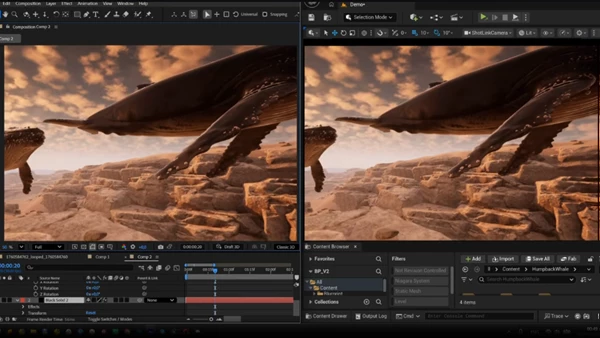
Multiple Render Passes and Object Masks
ShotLink can send more than the beauty image to After Effects. Several cameras can render simultaneously, and different types of visual data can arrive as independent layers.
Available output includes:
Beauty
Depth
Normals
Object mattes
Post Process material passes
Post Process materials can be used as additional passes, giving compositing workflows access to information beyond the final Unreal image.
The Object Mask feature provides another option for isolating scene elements. A single Unreal object can be rendered separately and used as a matte for After Effects layers. Because these outputs arrive with real alpha, they can participate directly in the composition rather than functioning only as visual reference frames.
Place After Effects Layers on Unreal Surfaces
ShotLink also connects the rendered image to the underlying 3D scene.
Click a point in the image, and the Null at Position control can create an After Effects 3D null at the corresponding Unreal surface position. The null also receives the surface rotation.
This provides a direct reference for positioning After Effects elements within the shot. Instead of working only from a rendered 2D frame, you can use a point from the Unreal scene to establish a 3D position and orientation inside the After Effects composition.
The plugin provides Origin and Unit Scale controls for defining how Unreal's coordinate system maps into the comp. Unit Scale specifies pixels per centimetre, while Origin from Unreal can set the composition origin according to the position of the Unreal camera.
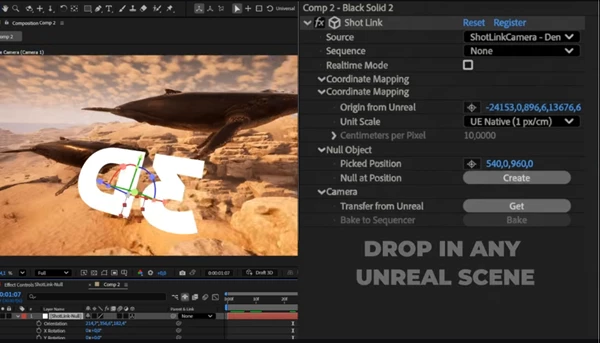
Camera Transfer Between Unreal and After Effects
Camera information can move in both directions.
When you find an angle in the Unreal viewport, Transfer from Unreal can copy that Unreal camera onto the After Effects camera. The workflow also supports capturing the Unreal viewpoint with Get and placing it on the AE camera as a keyframe.
Movement can then originate from After Effects as well. The After Effects timeline drives the linked setup, and when the AE camera is animated, the Unreal camera follows it.
For final Unreal workflows, Bake to Sequencer sends the After Effects camera back to Unreal as keyframes. ShotLink can write it as a CineCameraActor, allowing the camera animation created in After Effects to be used for a Movie Render Queue pass.
The camera workflow can therefore move in both directions:
Find or transfer an Unreal camera → Work and animate in After Effects → Bake the AE camera back to Unreal
Drive Unreal Animation from the After Effects Timeline
The timeline connection is not limited to camera movement.
ShotLink lets you select a Level Sequence and synchronize its animation with the After Effects timeline. As the AE timeline advances, the Unreal animation follows it frame by frame.
This keeps the Unreal scene and After Effects composition on the same timing reference while compositing. You can scrub the AE timeline and work with the corresponding Unreal animation without separately managing exported image sequences for every scene change.
The Sequence control determines the range Unreal will render.
Image Quality Considerations
ShotLink delivers frames as Unreal renders them rather than introducing its own rendering system. As a result, image characteristics depend on the Unreal scene and its rendering settings.
Some Unreal features are designed around real-time playback rather than isolated frames. The product documentation specifically identifies auto exposure, screen-space reflections, and temporal accumulation as settings that may require manual adjustment.
If the incoming render shows flickering or smeared reflections, these Unreal settings may need to be configured for the project.
ShotLink Controls at a Glance
| Control | Function |
|---|---|
| Source | Selects the Unreal camera being rendered |
| Sequence | Defines the range Unreal will render |
| Realtime Mode | Keeps the Unreal view continuously updating |
| Origin | Defines where Unreal's world zero sits in the composition |
| Unit Scale | Sets pixels per centimetre |
| Origin from Unreal | Sets the origin to the Unreal camera position |
| Picked Position | Defines the selected point in the rendered image |
| Null at Position | Creates a 3D null at that surface point |
| Transfer from Unreal | Copies the Unreal camera to the AE camera |
| Bake to Sequencer | Sends the AE camera to Unreal as keyframes |

Files Password : gfxplugin.com OR 123456