Downloadable Files
You can download ERA RENEW for free from the bottom of this page.
ERA RENEW
Old photographs often lose clarity, color, and visible detail over time, while scanned prints may also contain damage that makes the original image harder to appreciate. ERA RENEW is designed to restore these photographs with local AI processing, combining automatic restoration with controls for refining the final image.
The software can restore image clarity, enhance faces, recover details, process black-and-white photographs, and upscale images. It is intended for old family photos, scanned prints, faded portraits, historic photographs, and other images that need restoration while preserving their original character.
Local AI Photo Restoration
One of the central features of ERA RENEW is its local AI-powered restoration process. Selected photographs are processed directly on the user's PC rather than being uploaded for photo restoration.
According to the product information, photos are not uploaded for advertising, profiling, or AI training either. This local approach is particularly relevant when working with personal material such as family photographs or scanned archives that users may prefer to keep on their own computer.
Some AI model files may need to be downloaded the first time they are required. Once the necessary resources are available, the software can use its AI features as part of the local restoration workflow.
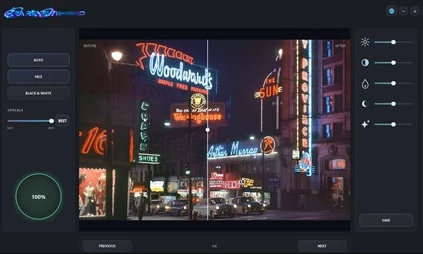
Restore Faces, Details, and Image Clarity
ERA RENEW provides several restoration capabilities that target common problems found in older photographs.
AI photo restoration: Improves old, faded, or damaged photographs.
Face enhancement: Restores and improves faces that have lost visible detail.
Detail enhancement: Recovers details and improves overall image clarity.
Image upscaling: Increases the size of photographs while using AI processing to improve the result.
Black-and-white processing: Supports restoration and enhancement of historic monochrome photographs.
These tools can be used on different types of source material. A faded family portrait may benefit from face and detail enhancement, while a historic black-and-white image can be processed without requiring it to be treated as a modern color photograph.
ERA RENEW can also enhance color, detail, and clarity in vintage photography, including older night photographs where visual information may be difficult to distinguish.
Manual Controls for Refining the Restoration
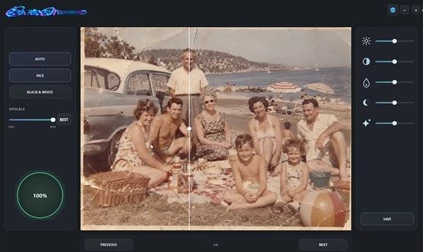
AI restoration is not the only way to control the result. ERA RENEW also includes manual image adjustments, giving users additional control after selecting the restoration options they need.
Available adjustments include:
Brightness
Contrast
Saturation
Shadows
Highlights
These controls provide a way to refine the appearance of the restored photograph rather than relying entirely on automatic processing. This is useful when the goal is to improve an old image while keeping its existing visual character instead of making every photograph look the same.
A Simple Photo Restoration Workflow
The workflow in ERA RENEW is built around a short sequence:
Select a photo → Choose restoration options → Process the image → Save the finished result
After selecting an old or damaged photograph, users choose the restoration features appropriate for that image. ERA RENEW then processes the photograph using the selected options, with manual adjustments available for further control.
Once the restoration is complete, the finished image can be saved directly to the Downloads folder.
This straightforward process keeps the software focused on photo restoration rather than requiring users to work through a complicated image-editing environment.
What Types of Photos Can ERA RENEW Handle?
ERA RENEW is specifically designed around older and degraded photographic material. Its restoration and enhancement tools can be applied to:
Old family photographs
Faded portraits
Scanned photo prints
Damaged photographs
Historic black-and-white images
Vintage night photography
Images that need improved clarity or additional detail
Photos that need upscaling
The combination of face restoration, detail recovery, black-and-white processing, upscaling, and basic tonal adjustments means the restoration process can be adapted to the condition of the source image.
For family archives in particular, local processing also means the selected photographs remain on the PC during restoration rather than being uploaded as part of the image-processing workflow.
ERA RENEW for Preserving Old Photographs
ERA RENEW focuses on a specific task: giving old, faded, and damaged photographs a clearer and more usable appearance through local AI processing. It combines automatic restoration features such as face enhancement, detail recovery, and upscaling with manual controls for brightness, contrast, saturation, shadows, and highlights.
Its simple select-process-save workflow makes it suitable for restoring personal photo collections, scanned prints, portraits, and historic images without requiring a complex editing process.

Files Password : gfxplugin.com OR 123456