Downloadable Files
You can download Text Styles AE for free from the bottom of this page.
Text Styles AE by Aescripts
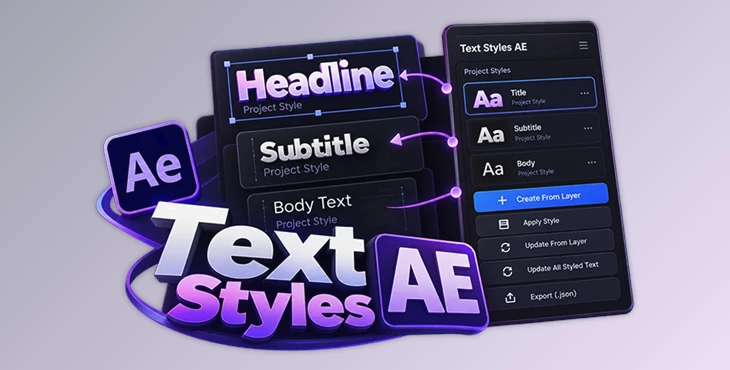
Managing typography across a large After Effects project becomes more complicated when the same text design appears on many different layers. A change to a font, spacing value, alignment, or visual style can otherwise mean revisiting text layers individually. Text Styles AE addresses this by letting you create project-wide typography style libraries and apply complete text designs from a dedicated panel.
Rather than storing only a few basic font properties, a Project Style can contain Character settings, Paragraph formatting, and supported Layer Styles. Once a style has been created, it can be applied to other text layers in one click, updated as the design evolves, and reused in other projects.
Build Project-Wide Typography Styles
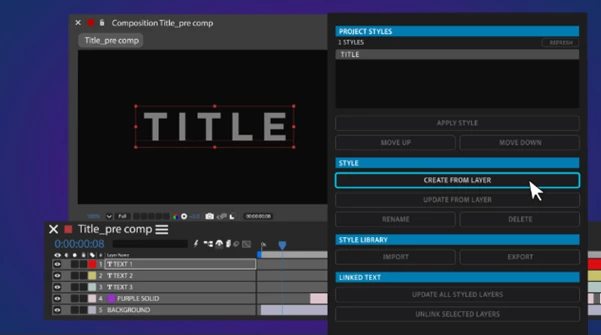
Text Styles AE turns an existing text layer into a reusable Project Style. Select a text layer in your After Effects composition and click Create From Layer in the panel. After naming the style, it automatically appears in the Project Styles window.
You can repeat the process with additional text layers to build a library containing as many typography styles as your project requires.
Each style can preserve a broad range of formatting information, including:
Font
Font size
Color
Leading
Tracking
Alignment
Indents
Spacing
Hyphenation
Character settings
Paragraph formatting
Supported Layer Styles such as Drop Shadow and Outer Glow
Because these properties are stored together, a style represents the complete text design rather than requiring individual formatting values to be recreated separately.
Apply Complete Styles in One Click
Once a Project Style has been created, applying it to another text layer is straightforward.
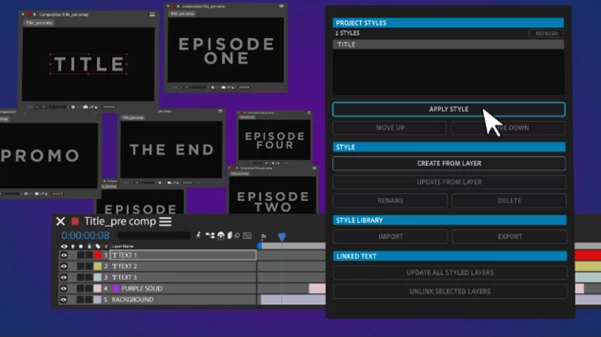
Select an unformatted text layer, choose the required style from the Project Styles window, and click Apply Style. Text Styles AE then formats that layer using the properties stored in the selected style.
The basic workflow is:
Select styled text → Create From Layer → Name the Style → Select another text layer → Apply Style
This approach is particularly relevant when multiple text elements need to follow the same typography system. Instead of configuring font properties, paragraph settings, spacing, and supported Layer Styles separately, the saved design can be reapplied as a single style.
Update Typography Across an Entire After Effects Project
Project Styles are not limited to the formatting originally captured when they were created. They can also be updated when the design changes.
Start with any text layer that already uses the saved style and make the required design changes. It does not need to be the original layer from which the style was created. Once the revised formatting is ready, click Update From Layer to overwrite the saved Project Style with the new design.
After confirming the updated style, Update All Styled Text applies those changes to every text layer using that style across the After Effects project.
The update process can therefore be summarized as:
Edit a styled layer → Update From Layer → Review the new style → Update All Styled Text
This provides a centralized way to revise an established typography system. A change to a saved style can be propagated across all associated text rather than requiring each matching layer to be reformatted individually.
One detail is important: updating a style overwrites its previous design. If you want to preserve the original style as well as the revised version, create a new style from the updated layer before using Update All Styled Text.
Export Styles for Other Projects and Designers
Typography libraries created with Text Styles AE are not restricted to the After Effects project in which they were built.
The panel includes an Export option that saves your Styles as a .json file. That file can then be imported into another project using Text Styles AE.
This gives the style library two practical roles. It can act as a reusable typography system across multiple After Effects projects, and it can also be shared with other designers who need access to the same saved styles.
Instead of rebuilding the same text formatting for every new project, established Character settings, Paragraph formatting, and supported Layer Styles can travel with the exported style library.
A More Centralized Typography Workflow in After Effects
Text Styles AE is designed around a simple cycle of creating, applying, updating, and exporting typography styles:
Create → Apply → Update → Export → Reuse
Its main advantage is the ability to treat typography as a reusable project-wide system rather than a collection of separately formatted text layers. Complete text designs can be captured from existing layers, applied to other text, revised from any layer using the style, and pushed across the project when formatting requirements change.
For After Effects projects that depend on consistent typography across many text elements, Text Styles AE provides a direct way to keep those designs organized while also making them portable between projects and designers.

Files Password : gfxplugin.com OR 123456