Downloadable Files
You can download Gausser for free from the bottom of this page.
Gausser by Aescripts
Gausser brings 3D Gaussian Splatting into Cinema 4D, allowing artists to import captured splat data and work with it using familiar C4D tools. Instead of treating a Gaussian splat as a static capture, the plugin makes it possible to animate, deform, clone, relight, and render it as part of a Cinema 4D scene.
The plugin supports PLY, SPLAT, and SPZ files and works directly in the Cinema 4D viewport. From there, captures can interact with Fields, MoGraph effectors, deformers, forces, Cloner, transform controls, and native Cinema 4D particles.
Import and Prepare Gaussian Splat Captures
Gausser starts by importing Gaussian splat data from three supported formats:
PLY
SPLAT
SPZ
After loading a capture, you can adjust its size, orientation, and color or crop the splat before continuing with the scene. The capture remains available directly in the Cinema 4D viewport, so the setup can be handled within the normal C4D environment.
This creates a direct workflow from captured Gaussian splat data to an editable Cinema 4D scene.
Import → Adjust → Animate → Render
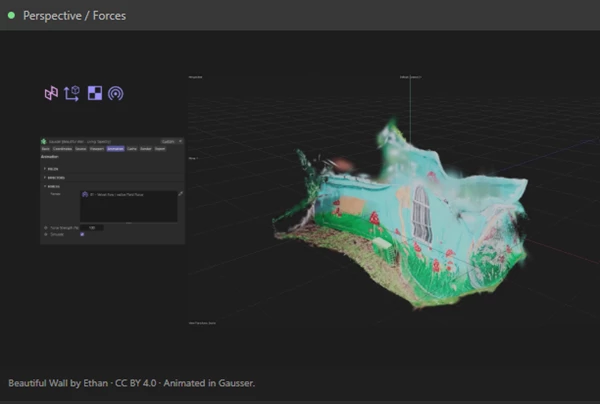
Control Splats with Cinema 4D Fields
Fields provide a way to control which parts of a Gaussian splat are visible and how they appear over time. Gausser supports using Cinema 4D Fields to reveal, fade, or isolate selected areas of a capture.
Multiple Field layers can also be combined, and their influence can be animated. This is particularly useful when the goal is to create a controlled reveal rather than displaying the entire capture at once.
Fields are also connected to other parts of the Gausser workflow because they can control the influence of MoGraph effectors.
Animate Captures with Effectors, Deformers, and Forces
One of the main differences between a simple Gaussian splat viewer and Gausser is the range of Cinema 4D animation systems that can interact with the imported data.
MoGraph Effectors
Gausser works with MoGraph effectors, allowing effectors to animate the splats. Fields can then define where and how strongly those effectors influence the capture.
This connects Gaussian splatting with Cinema 4D's existing MoGraph workflow instead of requiring a separate animation system.
Cinema 4D Deformers
Imported captures can also respond to deformers. Splats can be bent, twisted, and reshaped, making it possible to change the form of captured data after it has been brought into the scene.
Forces
Gausser supports Cinema 4D forces such as Gravity, Wind, and Field Force. Their strength and influence can be adjusted and animated to create motion within a splat capture.
Evaluated frames can also be baked into the RAM cache. This provides a way to store the evaluated motion after working with force-driven effects.
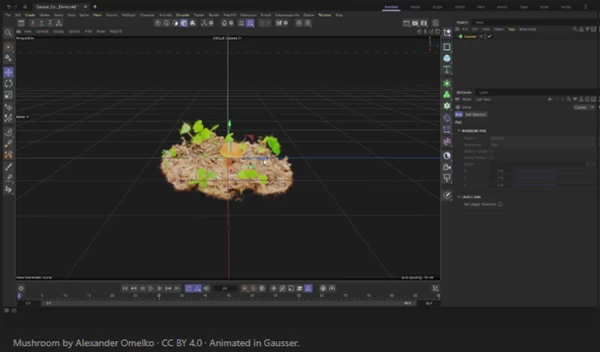
Native Cinema 4D Integration
Gausser is designed to work with existing Cinema 4D tools rather than operating as an isolated Gaussian splatting environment.
Standard transform controls can be used to move and transform a capture. Gausser also works with the Cloner, allowing multiple splat captures to be arranged through a MoGraph setup.
Another integration option is the ability to emit native Cinema 4D particles from splats. This connects Gaussian splat data with Cinema 4D's particle system and expands the ways captured data can participate in motion-based scenes.
Separate Viewport and Render Controls
Gausser provides independent controls for how splats are displayed during scene work and how they appear in the final render.
Render density, splat size, and opacity can be set separately from the viewport. This separation means the working representation does not have to use the same settings as the rendered result.
For rendering, Gausser prepares the required geometry and materials for:
Standard
Redshift
Octane
Arnold
The plugin can also blend Cinema 4D scene lighting with the original color information stored in the capture. As a result, imported splats can respond to the lighting setup of the surrounding scene while retaining their captured color information.
A Gaussian Splatting Workflow Inside C4D
Gausser focuses on making Gaussian splat captures part of a regular Cinema 4D workflow. A PLY, SPLAT, or SPZ capture can be imported and adjusted in the viewport, then controlled through Fields or animated with effectors, deformers, and forces.
Cloner and transform tools provide further scene integration, while native particle emission adds another way to use splat data for animation. For final output, separate render controls and support for Standard, Redshift, Octane, and Arnold allow the capture to move from viewport work into a rendering workflow without leaving Cinema 4D.

Files Password : gfxplugin.com OR 123456