Downloadable Files
You can download ToneLab Chroma for free from the end of this page.
ToneLab Chroma
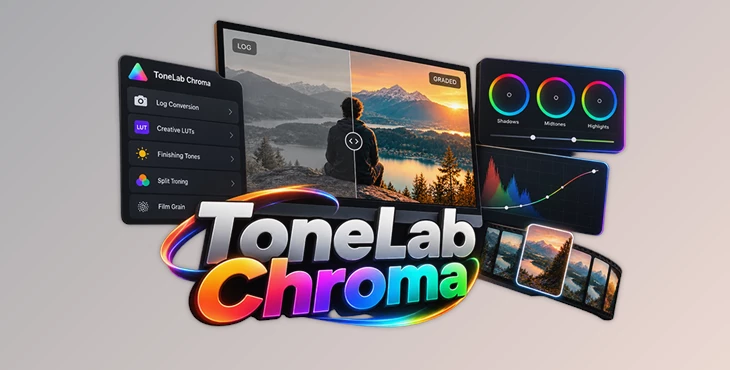
Color grading often involves moving between different tools for Log conversion, creative looks, and final adjustments. ToneLab Chroma brings these parts of the grading process together in a single panel for DaVinci Resolve, Adobe Premiere Pro, and Adobe After Effects.
Designed as a one-click color grading suite, it combines Log footage conversion, a collection of 65 Creative LUTs, and finishing controls such as Finishing Tones, Split Toning, and Film Grain. The result is a more centralized workflow where the main grading tools are accessible from one place.
Color Grading in One Panel
The central idea behind ToneLab Chroma is to keep different stages of color grading inside one interface. Rather than focusing only on applying LUTs, the suite covers both footage conversion and creative finishing.
Its workflow includes:
Log footage conversion
65 Creative LUTs
Finishing Tones
Split Toning
Film Grain
Additional grading controls within the same panel
This combination makes ToneLab Chroma suitable for moving from Log footage toward a finished look without treating conversion, creative LUTs, and finishing as completely separate parts of the workflow.
65 Creative LUTs
ToneLab Chroma includes 65 Creative LUTs for applying different color looks to footage.
These LUTs are integrated directly into the grading suite rather than being presented as a separate LUT package. After converting Log footage, users can apply a creative LUT and continue refining the image with the other available grading controls.
The workflow can therefore be summarized as:
Log Footage → Convert → Apply Creative LUT → Fine-Tune → Finish
Because all of these stages are handled through ToneLab Chroma, creative LUTs can function as part of a broader grading process rather than being the final adjustment by themselves.
Finishing the Grade
After conversion and creative color adjustments, ToneLab Chroma provides additional tools for refining the final appearance.
Finishing Tones provide another stage of tonal adjustment, while Split Toning gives users an additional way to shape the color treatment of the image. Film Grain can also be introduced as part of the finishing process.
Having these controls alongside Log conversion and Creative LUTs creates a grading workflow that extends from preparing the original footage through to final stylistic adjustments.
Supported Editing and Grading Software
ToneLab Chroma is designed for three desktop applications:
| Software | ToneLab Chroma Support |
|---|---|
| DaVinci Resolve | Yes |
| Adobe Premiere Pro | Yes |
| Adobe After Effects | Yes |
This makes the same ToneLab Chroma grading suite available across dedicated color grading, video editing, and motion graphics workflows.
ToneLab Chroma vs. ToneLab Mobile
ToneLab also offers ToneLab Mobile, but it serves a different workflow.
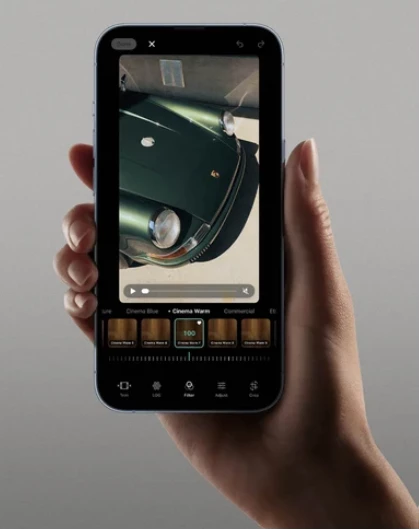
ToneLab Chroma is the desktop color grading suite for DaVinci Resolve, Premiere Pro, and After Effects. ToneLab Mobile is an iPhone application designed to handle shooting and grading directly on the phone.
ToneLab Mobile can:
Shoot true Log footage
Convert Log footage
Apply the same collection of 65 Creative LUTs
Provide professional camera controls
Access a full grading suite directly on iPhone
Unlike the desktop workflow, ToneLab Mobile does not require a desktop computer for shooting, converting, and grading footage.
For editors working inside DaVinci Resolve, Premiere Pro, or After Effects, ToneLab Chroma is the relevant desktop option. For an iPhone-based capture and grading workflow, ToneLab Mobile is the dedicated alternative.

Files Password : gfxplugin.com OR 123456