Downloadable Files
You can download HSX NanoVisuality for free from the end of this page.
HSX NanoVisuality
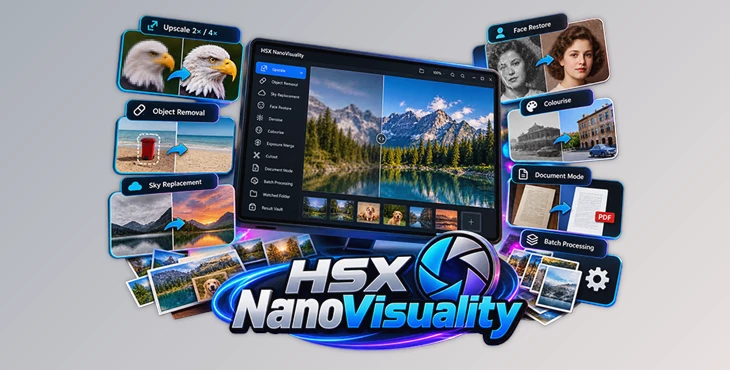
HSX NanoVisuality is a Windows photo-finishing application that brings 17 tools into a single local workspace. Rather than focusing only on one task such as image upscaling, it is designed to handle multiple stages of finishing a photograph, including upscaling, object removal, sky replacement, face restoration, colorization, exposure merging, document processing, and batch operations.
A central part of its design is local processing. Photographs are processed on the user's own CPU or GPU instead of being uploaded to an external server. The application requires no account, includes no telemetry, and can continue working without an internet connection.
17 Tools for Photo Finishing
HSX NanoVisuality combines different photo and imaging operations within one application. Its available capabilities include:
2× and 4× Upscaling: Enlarges photographs while rebuilding detail rather than simply stretching the existing pixels.
Object Removal: Removes unwanted elements such as signs, bins, or people and fills the resulting area.
Sky Replacement: Replaces the existing sky using one of six included skies and warms the rest of the image to help it match.
Face Restoration: Provides restoration functionality for faces in old or damaged photographs.
Denoising: Helps process photographs affected by unwanted noise.
Cutout: Provides subject or image cutout functionality within the finishing workflow.
Colorization: Adds color to photographs, including older images that need restoration work.
Exposure Merge: Combines exposure-related image processing as part of the available finishing toolkit.
Document Mode: Straightens a photographed document or page and outputs it as a PDF.
The application also keeps a vault that remembers previous results, providing a place for processed outputs within the workflow.

Batch Processing and Automated Workflows
HSX NanoVisuality is not limited to processing photographs individually. It includes a queue, watched folder, and batch actions, making it suitable for working through an entire folder or shoot.
Batch actions can chain multiple tools together across a collection of photographs. This is particularly relevant when the same sequence of finishing operations needs to be applied to multiple files rather than repeating each operation manually for every image.
The workflow can therefore extend from individual image correction to larger sets of photographs:
Add photos → Choose finishing tools → Queue or batch actions → Process locally → Access results in the vault
A watched folder provides another way to incorporate processing into workflows involving folders of incoming images.
Local Processing and Privacy
One of the defining characteristics of HSX NanoVisuality is that its processing architecture is local-first by design.
Photos opened in the application remain on the user's machine rather than being sent to a processing server. CPU or GPU resources on the computer perform the work, and the application remains functional when the network is switched off.
There is also:
No registration
No sign-in
No required online identity
No telemetry
No usage analytics sent from the device
No photo uploads
No subscription
An internet connection is only used by the Microsoft Store for installation and licence checks. Once installed, the application's photo-processing functionality itself does not depend on an online service.
Where HSX NanoVisuality Fits
The combination of restoration, enhancement, removal, replacement, document processing, and batch tools makes HSX NanoVisuality suitable for several types of photo-finishing work.
Photographers can use its processing tools across folders of photographs, while sellers working with multiple product or listing images can use its queue and batch capabilities. Face restoration, denoising, and colorization provide tools for old or damaged photographs, while object removal and sky replacement address more direct image-editing tasks.
Document Mode serves a different workflow: a photographed page can be straightened and written to PDF without requiring a separate document-processing application for that operation.
The application is therefore positioned as a finishing deck rather than a single-purpose upscaler, bringing several otherwise separate image-processing tasks into the same Windows application.

Files Password : gfxplugin.com OR 123456