Downloadable Files
You can download Edge Controller for free from the end of this page.
Edge Controller
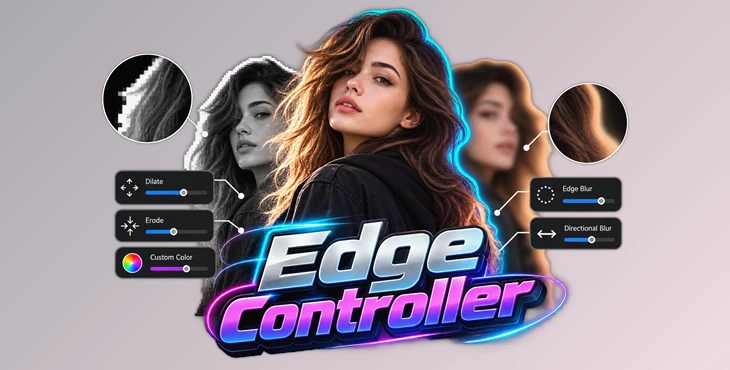
Clean edges are critical when working with keyed footage, masks, roto work, and other alpha-based cutouts in After Effects. Edge Controller is a Windows-only compositing plugin designed specifically for refining these boundaries without requiring a stack of separate effects.
It brings several edge tools into one effect, so you can expand or shrink the edges, add blur, fill them with color, or make them softer.
The effect works with alpha channels, masks, and keyed subjects, giving you more control over the shape of the edges and any outlines you want to create.
All-in-One Edge Engineering
The main purpose of Edge Controller is to bring several boundary-processing operations into one unified effect. Instead of treating edge expansion, blur, and color as separate processes, the plugin provides controls for handling them together.
Its core capabilities include:
Outer and inner edge dilation
Selective edge blur
Horizontal, vertical, or combined directional blur
Custom color outlines
Inner edge blur
Color Shift
Pixel-accurate boundary adjustment
This combination is designed for correcting harsh cutouts, building UI halos, generating colored outline strokes, and integrating isolated subjects more naturally with a new background.
Precise Inner and Outer Dilate Control
Edge Controller provides separate Outer Dilate and Inner Dilate controls.
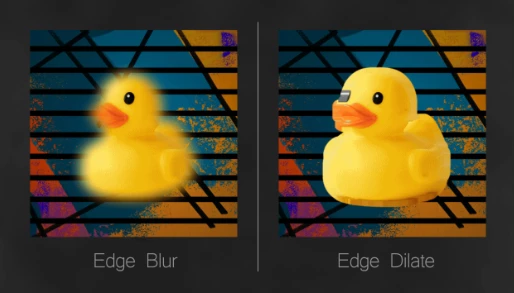
Outer Dilate grows the boundary outward, while Inner Dilate grows it inward. This two-directional approach provides direct control over which side of the silhouette is being modified.
The edge can therefore be expanded or contracted at the pixel level depending on the requirements of the composite. The relevant settings are organized within a dedicated Dilate group.
Edge Blur Without Blurring the Main Subject
A common problem with softening a cutout is that conventional blur can affect details throughout the subject. Edge Controller's Edge Blur applies diffusion specifically to the boundaries rather than blurring the entire layer.
Directional Blur can operate in three ways:
Horizontal → Vertical → Both
This selective approach preserves the core subject detail while softening harsh borders, creating a smoother transition between a cutout and its background.
Inner Edge Blur provides additional control by softening the inner side of the edge band.
Custom Color Outlines and Color Shift
Custom Color can function as a complete outline or stroke around the silhouette. The stroke can be positioned in three ways:
Inner
Outer
Centered across the silhouette edge
This means the color controls can be used for both compositing adjustments and deliberate graphic treatments such as colored outlines or halos around alpha-based subjects.
The Color Shift control can sample the spread edge color from deeper inside the subject, providing another way to control the appearance of the processed boundary.
Works with Alpha Channels, Masks, and Roto Brush Cutouts
Edge Controller works directly with several common types of isolated boundaries in After Effects:
Layer alpha channels
Masks
Keying cutouts
Roto Brush masks
Because the plugin operates on these boundaries, it can be applied after a subject has been isolated to refine the resulting edge rather than replacing the isolation process itself.
A basic workflow can be represented as:
Isolate Subject → Apply Edge Controller → Adjust Inner/Outer Dilate → Refine Edge Blur → Adjust Edge Color
The controls used will depend on whether the goal is boundary cleanup, background blending, dilation, or a visible outline.
Performance for High-Resolution Compositing
Edge Controller is built as a native, multi-threaded C++ plugin and is optimized for high-resolution compositing, including 4K timelines.
Its bounding-box render engine improves processing efficiency, particularly in large compositions where a masked or roto subject occupies only a portion of the frame.
Dedicated GPU acceleration is not currently included. GPU support is being considered for future development.
How It Differs from Native After Effects Edge Effects
Edge Controller is designed differently from relying on individual built-in effects such as Matte Choker or Simple Choker.
Rather than stacking multiple effects for different boundary operations, it combines:
Edge Blur + Directional Blur + Dilate Controls + Custom Color
within one C++ plugin.
According to the developer, this approach preserves sub-pixel accuracy and renders significantly faster than stacking multiple native effects.
The distinction is therefore broader than simply growing or shrinking a matte. Edge Controller centralizes several related operations and provides dedicated controls for manipulating both sides of a silhouette.
Compatibility and Limitations
Edge Controller is currently available only for Windows.
A macOS release is under consideration, but Mac compatibility is not currently available.
The plugin uses a multi-threaded C++ implementation for processing. Dedicated GPU acceleration is also not currently supported and is only being considered for future development.
Edge Controller is focused specifically on controlling and refining alpha-based boundaries in After Effects. Its combination of independent inner and outer dilation, selective edge blur, directional controls, Color Shift, and customizable strokes provides a single workspace for both technical edge cleanup and more visible outline treatments.

Files Password : gfxplugin.com OR 123456