Downloadable Files
You can download Hue/Shift™ DCTL Plug-In for free at the end of this page.
Hue/Shift™ DCTL Plug-In – Pro Version
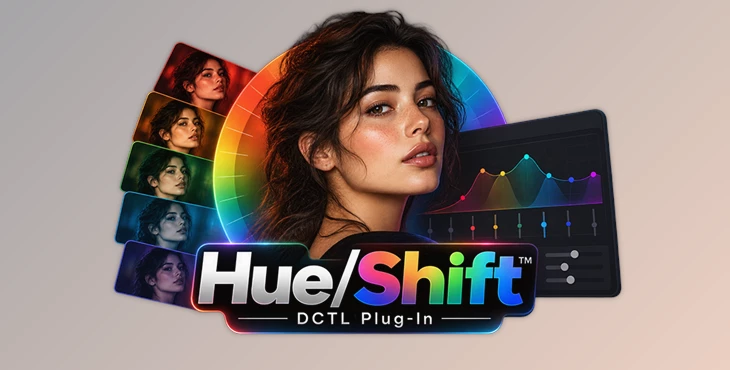
Hue/Shift™ DCTL Plug-In – Pro Version is a color manipulation tool for DaVinci Resolve built around precise control of hue, saturation, and density. Its approach combines subtractive and additive saturation controls with per-hue adjustments, allowing colorists to build deep, film-like palettes while maintaining image integrity and protecting important areas such as skin tones.
The plug-in is made for creating and adjusting looks for films, TV shows, commercials, and streaming projects. It works with DaVinci Resolve 19 and newer versions.
Precise Hue, Saturation, and Density Control
Hue/Shift manipulates color relationships without relying on secondary keys. Individual hue controls provide targeted adjustments, giving the user direct control over different parts of the image's color palette.
One of its central features is combining Subtractive + Additive saturation control per hue. This lets you push specific colors while retaining a natural, filmic character. A stated use case is creating deep film reds while protecting skin tones from unwanted changes.
Density can also be controlled per hue. These controls reduce luminance while increasing saturation, providing another way to create richer, more vibrant cinematic palettes.
The core adjustment system therefore brings together:
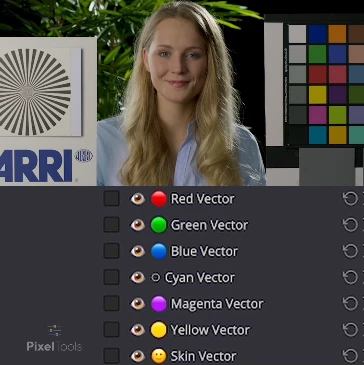
Individual hue control
Additive saturation per hue
Subtractive saturation per hue
Density control per hue
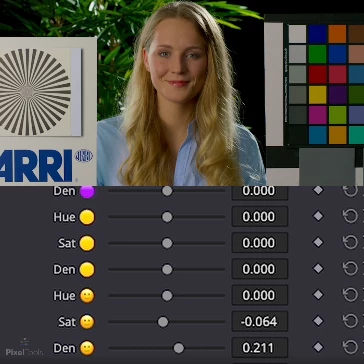
Dedicated skin controls
Rather than treating saturation as a single global adjustment, Hue/Shift lets you control the relationships between individual colors.
Protecting Neutrals, Skin, and Tonal Ranges
Strong color manipulation can affect parts of an image you didn't intend to change. Hue/Shift includes several dedicated controls designed to address this problem.
Clean Neutrals
The exclusive Clean Neutrals feature minimizes unwanted adjustments in low-saturation areas. It controls how the look interacts with neutral or near-neutral parts of the image while preserving the intended color treatment elsewhere.
Dedicated Skin Controls
Hue/Shift also provides dedicated Skin controls, making skin adjustments a distinct part of the color workflow. This is particularly relevant when building stronger color palettes while trying to keep skin tones intact.
Saturation Highlight Bypass
The Saturation Highlight Bypass slider adds tonal control to saturation processing. It targets darker tonal ranges while preserving highlights and mid-tones, giving the colorist another way to determine where saturation changes should affect the image.
Visual Guidance for Hue Adjustments
Hue/Shift includes a Visual Curve UI with intuitive hue overlays. These overlays act as a visual guide while creating a look, helping identify which hue controls correspond to specific colors such as skin tones.
This removes the need to guess which hue range to adjust and connects the plug-in's hue controls directly to a visual representation of the affected colors.
The combination of visual hue guidance and individual hue controls is particularly suited to look development where specific color relationships need to remain consistent across different shots and cameras.
Designed for Color-Managed Workflows
Hue/Shift is designed around DaVinci Wide Gamut (DWG), which is the recommended color-management environment for the plug-in. It also supports ACES and other professional color-managed workflows.
Resolve Color Management (RCM) or Color Space Transforms (CST) provide broad camera support. According to the product information, supported camera sources include:
ARRI
RED (IPP2)
Sony
Canon
Panasonic
Blackmagic
Apple Log
DJI
Any input supported through RCM or CST
This approach lets you use Hue/Shift when developing looks that need to translate across footage from different cameras, rather than tying its operation to a single camera format.
What Is Included in the Pro Version?
The Pro edition provides twelve custom DCTLe plug-in files and twelve PowerGrade DRX files, divided between Icon and NoIcon versions.
| Pro Version Content | Included |
|---|---|
| Custom DCTLe plug-in files | 12 |
| DCTLe Icon versions | 6 |
| DCTLe NoIcon versions | 6 |
| PowerGrade DRX files | 12 |
| PowerGrade Icon versions | 6 |
| PowerGrade NoIcon versions | 6 |
For comparison, the Basic version contains two custom DCTLe files—one Icon and one NoIcon version—along with two corresponding PowerGrade DRX files and a User Guide PDF.
The Pro package therefore expands the supplied DCTLe and PowerGrade options substantially beyond the Basic edition.
Compatibility and Licensing
Hue/Shift™ DCTL Plug-In – Pro Version requires DaVinci Resolve 19 or later. DaVinci Wide Gamut is recommended, while ACES and other professional color-managed workflows are also supported.
The product is sold as a one-time purchase with no subscription and includes free lifetime updates.
The listed Individual license applies to productions with budgets of up to $5 million USD. Studios and productions above that level require the separate Studio licensing option.
Hue/Shift was created for colorists, DPs, and editors who need detailed control over hue relationships, density, and saturation during professional look development. Its defining workflow centers on manipulating individual colors while providing dedicated mechanisms for protecting skin, low-saturation areas, highlights, and mid-tones—making it particularly focused on controlled, film-like color shaping inside DaVinci Resolve.

Files Password : gfxplugin.com OR 123456