Downloadable Files
You can download Instant Depth Map for free from the end of this product page.
Instant Depth Map
Instant Depth Map is an AI-powered plugin for Adobe After Effects and Premiere Pro that generates depth maps directly from still images and video footage. Powered by the Depth Anything V2 model, it analyzes a single visual source and produces a grayscale representation of scene depth in seconds, without requiring LiDAR data, stereo-camera footage, or manual masking.
The generated map can become a practical spatial pass for 2.5D parallax, camera projection, depth-based compositing, relighting, fog, displacement, depth of field, and other effects where different areas of an image need to be controlled according to their distance.
AI Depth Maps from a Single Image or Video
The central function of Instant Depth Map is its one-click depth map generator. Apply the effect to a layer and the plugin creates a grayscale depth output based on the spatial information it detects in the source.
This means the workflow can begin with ordinary footage or a still image rather than depth information captured separately during production.
The basic process is straightforward:
Apply → Process → Composite
Apply: Add Instant Depth Map to the chosen layer.
Process: Generate the spatial pass and adjust its response.
Composite: Use the resulting depth information for blur, atmosphere, grading, separation, parallax, or stylized VFX.
The plugin processes the depth map inside the Adobe workflow, keeping the generated spatial information available for further effects and compositing.
Grayscale Output and 15 Thermal Depth Presets
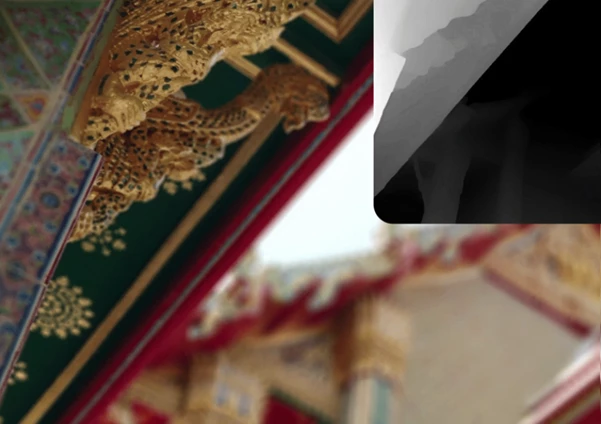
The standard output is a clean grayscale depth map, but Instant Depth Map also includes 15 thermal presets. These alternative color modes can make different depth regions easier to inspect and can also serve as stylized visual outputs.
The included thermal presets are:
Radiant Spectrum
Ember Heat
Chromatic Flux
Neon Plasma
Cryo Flame
Subsurface Glow
X-Ray Amber
Abyssal Blue
Volcanic Glass
Aurora Field
Cyber Heat
Ultraviolet
Sunset Chrome
Acid Lime
Hologram
You can therefore move from the regular grayscale representation to a color-coded view when a thermal visualization is more appropriate for checking the depth structure or creating a particular look.
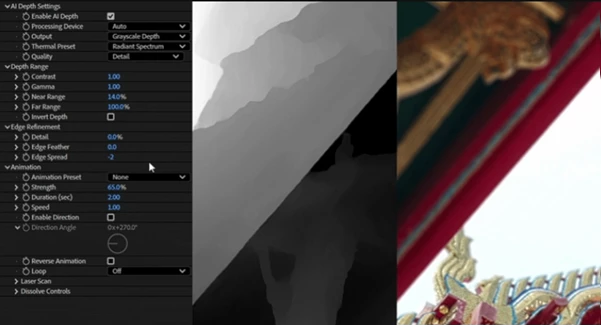
Edge Refinement for Cleaner Depth Separation
AI-generated depth information often needs attention around boundaries where foreground and background elements meet. Instant Depth Map includes edge refinement tools for cleaning these areas directly within the workflow.
The refinement controls are intended to smooth and improve problematic edges after the initial map has been generated, giving you more control over the spatial separation before the depth pass is used for subsequent effects.
This is particularly relevant when the depth map itself becomes the basis for visible separation, blur, or other depth-driven processing.
Six Built-In Motion Presets
Instant Depth Map goes beyond producing a static depth pass by including six ready-made animation presets:
| Preset | Motion |
|---|---|
| 01 | Reveal |
| 02 | Wave |
| 03 | Near → Far |
| 04 | Far → Near |
| 05 | Scan |
| 06 | Dissolve |
After selecting a preset, its timing can be fine-tuned to fit the shot.
The Reveal Direction control adds another level of adjustment by changing the direction in which the reveal travels across the frame. It can be used to coordinate the animation with camera movement, scene flow, or the visual rhythm of the footage without rebuilding the effect.
Creating Depth-Driven Effects
Once generated, the depth map can drive multiple types of visual processing. One of the plugin's demonstrated uses is depth of field on footage. Instead of applying the same amount of blur across an entire frame, the depth information provides spatial separation that can be used to create a more depth-aware focus effect.
The same underlying depth pass supports several other workflows listed for Instant Depth Map, including:
2.5D parallax
Camera projection
Depth-based compositing
Relighting
Fog and atmospheric effects
Displacement
Grading
Foreground/background separation
Stylized VFX
These uses all rely on the same generated spatial information, so the depth map is not limited to one predefined effect. It acts as a reusable pass that can feed different compositing and visual-effects processes.
Still Images and Video Footage
Instant Depth Map works with both stills and video, which makes the same depth-generation workflow available across static and moving sources.
For still-image work, the generated depth data can support processes such as camera projection and 2.5D parallax. With footage, it can be used for effects including cinematic focus separation, atmosphere, depth-based compositing, and other VFX operations.
The plugin also includes motion presets and fast in-comp processing as part of its supported workflow.
Compatibility and Technical Support
Instant Depth Map is built for Adobe After Effects and Adobe Premiere Pro and supports both Windows and macOS.
Its listed technical support includes:
| Specification | Support |
|---|---|
| Adobe After Effects | Yes |
| Adobe Premiere Pro | Yes |
| Windows | Yes |
| macOS | Yes |
| GPU Acceleration | Yes |
| Multi-Frame Rendering | Ready |
| Color Depth | 8 / 16 / 32 BPC |
GPU acceleration is available for processing, while Multi-Frame Rendering support integrates the plugin with compatible After Effects rendering workflows.
The plugin supports 8, 16, and 32 bits per channel, so its depth-generation workflow can be used across projects operating at different color-depth settings.
Instant Depth Map is ultimately centered on one task: extracting usable spatial information from ordinary images and footage directly inside After Effects or Premiere Pro. Its combination of Depth Anything V2 generation, grayscale and thermal visualization, edge refinement, motion presets, and depth-driven processing turns that generated map into a practical component for compositing and VFX rather than simply a standalone depth image.

Files Password : gfxplugin.com OR 123456