Downloadable Files
You can download BaseLUTs for Sony A6300 for free from the end of this page.
BaseLUTs for Sony A6300
Sony A6300 footage recorded with Cine4 can retain highlight information beyond the traditional 100 IRE point, reaching a white clipping point of 109 IRE. This creates an important consideration during color conversion: a LUT needs to account for that additional highlight information rather than simply treating 100 IRE as the end of the usable range.
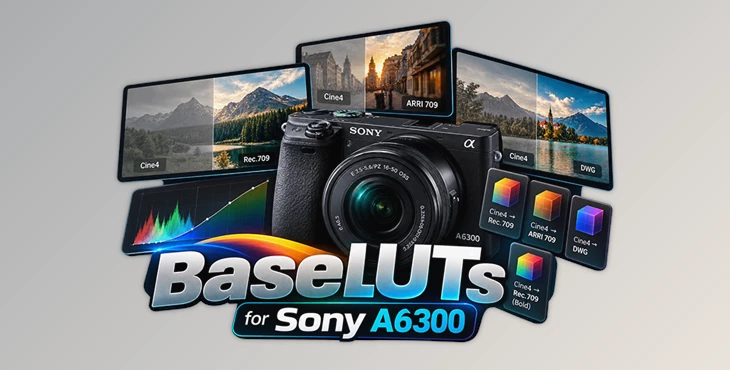
BaseLUTs for Sony A6300 are designed around this Cine4 behavior. It provides conversion options for taking Cine4 footage into Rec.709, ARRI 709, or DaVinci Wide Gamut while accounting for the camera profile's exposure characteristics.
Built Around the Sony A6300 Cine4 Profile
The BaseLUT configuration for the Sony A6300 is based on a specific recording setup rather than being presented as a universal LUT for every picture profile on the camera.
The recommended source configuration is:
| Setting | Value |
|---|---|
| Profile | Cine4 |
| Color Space | Cinema |
| Native ISO | 100 |
| Black Clipping | 0 IRE |
| Middle Gray | 42 IRE |
| White Clipping | 109 IRE |
Gamut also lists the corresponding 10-bit code values as 0 for black clipping, 430 for middle gray, and 1115 for white clipping. These specifications are useful because they define the source footage the conversion was designed around.
In other words, this isn't simply a creative color preset meant to place a style over arbitrary footage. Its primary role is color conversion, with the Cine4/Cinema configuration acting as the starting point.
Four Conversion Options
The original BaseLUT package for this camera family provides four Cine4 conversion choices. Each serves a different destination or grading approach.
Cine4 to Rec.709
The standard Rec.709 BaseLUT converts Cine4 footage to Rec.709, providing a conventional display-oriented conversion. Gamut describes its Rec.709 workflow as a precise conversion intended for clean and accurate color on standard displays.
Cine4 to ARRI 709
A separate conversion targets ARRI 709. Gamut describes this option as a sensor-matched emulation of the ARRI Classic709 look with a refined tonal response. It gives editors another conversion path rather than limiting the footage to standard Rec.709.
Cine4 to Rec.709 — Bold Version
The package also includes a Bold Version of the Cine4-to-Rec.709 conversion. It is provided separately from the standard Rec.709 BaseLUT, allowing the editor to choose between the regular and Bold variants.
Cine4 to DaVinci Wide Gamut
For a color-managed grading workflow, Cine4 to DWG conversion is available. This maps the source into DaVinci Wide Gamut rather than directly targeting Rec.709. Gamut positions DWG as its scene-referred conversion option for workflows that require greater grading flexibility.
The available paths can therefore be summarized as:
Sony A6300 Cine4 → Rec.709 / ARRI 709 / Rec.709 Bold / DaVinci Wide Gamut
Retaining Cine4 Highlight Information
Highlight handling is one of the more specific aspects of this BaseLUT.
Cine4 records information above 100 IRE and reaches its listed white clipping point at 109 IRE. According to Gamut, the Cine4 BaseLUT is built to compensate for this additional information and bring it back within the converted range. The intended result is better highlight roll-off and fewer clipped highlights during conversion.
This matters particularly in shots containing bright portions of the image where Cine4 has recorded information above the conventional 100 IRE level. Rather than ignoring that part of the signal, the conversion accounts for it.
This highlight behavior also explains why the source profile and exposure specifications are relevant. The LUT is tied to the tonal characteristics of Cine4 rather than functioning as a generic look LUT.
Base Conversion Before a Creative Look
BaseLUTs and Creative LUTs perform different jobs in Gamut's workflow.
The BaseLUT handles the initial conversion of the camera profile. You can then apply a Creative LUT afterward if you want a stylized look. Gamut specifically notes that when filming Cine4 on 8-bit cameras, its BaseLUT can first convert the profile to its intended color response before a Creative LUT is placed on top.
The basic workflow is therefore straightforward:
Cine4 footage → BaseLUT conversion → Additional grading or Creative LUT
For a DWG workflow, the destination changes:
Cine4 footage → Cine4-to-DWG BaseLUT → DaVinci Wide Gamut grading workflow
This separation keeps technical conversion and creative styling as distinct stages, rather than asking one LUT to do both.
Important Source Settings
The main limitation to keep in mind is that the Sony A6300 conversion is documented for Cine4 with the Cinema color space at native ISO 100. It should not be described as a conversion designed for every Sony A6300 picture profile because the official specifications identify Cine4 as the supported profile for this BaseLUT set.
For footage shot with this setup, BaseLUTs for Sony A6300 give you several ways to convert the image while handling the profile’s 109 IRE highlight limit. You can choose between Rec.709, ARRI 709, Bold Rec.709, or DaVinci Wide Gamut depending on how you want to grade your footage. Dear user, you must first login to your account to write your comment.
Please click here to Log in

Files Password : gfxplugin.com OR 123456