Downloadable Files
You can download Truss Generator for free from the end of this page.
Truss Generator
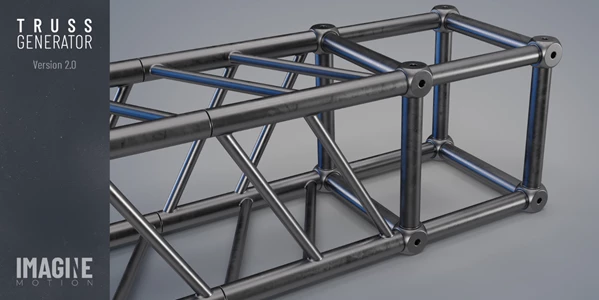
You can download Truss Generator for free from the end of this page. This Geometry Nodes-based tool is designed for building truss structures procedurally, with a workflow centered on editing points rather than manually assembling every section of a truss system.
Created specifically to improve the process of building stages with truss systems, Truss Generator combines procedural construction, snapping, length information, and basic appearance controls. Version 2.0 further develops the tool based on user feedback, comments, and reviews.
Build Truss Structures with Geometry Nodes
The core of Truss Generator is its fully procedural approach. Rather than treating a truss structure as a collection of manually positioned elements, the tool uses Geometry Nodes to generate the system from the shape you create.
Its modeling workflow is based around a single vertex. In Edit Mode, you can grab existing points or extrude new ones to define the shape of the structure. You can also use standard Blender tools to subdivide edges and fill vertices.
This provides a straightforward way to create different truss layouts while remaining inside a familiar Edit Mode workflow.
A typical process can be summarized as:
Start with a vertex → Grab or extrude points → Subdivide or fill where needed → Generate the truss structure
Because the structure remains procedural, you can develop its shape through the underlying points rather than arranging each truss element individually.
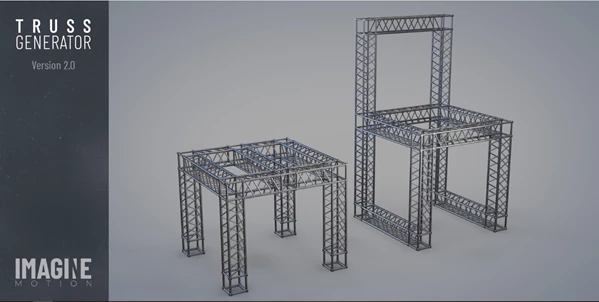
Instance-Based Truss Generation
Truss Generator uses instances when generating structures. This is important for larger truss systems because instances reduce memory usage and optimize rendering performance.
For stage designs containing repeated truss elements, this approach avoids unnecessarily treating every repeated component as an entirely independent piece of geometry.
The result is a procedural system designed not only for faster construction but also for more efficient memory use during the project.
Snap Function for Connected Elements
Version 2.0 introduces a Snap function designed to prevent gaps between truss elements.
Small gaps can become a problem when assembling modular structures, particularly where multiple sections are expected to connect cleanly. The Snap system addresses this directly by helping elements meet without unwanted gaps.
This feature complements the procedural workflow: you can focus on shaping the overall truss layout while the snapping behavior helps maintain proper connections between its elements.
Check the Total Truss Length
Another practical feature is the built-in total truss length information.
As you build the structure, an information text displays its total length. Both metric and imperial measurements are supported, making the feature usable with different measurement systems.
The length display is intended as working information rather than part of the finished visual output. It can be disabled when it is not needed, and the information text does not appear in the final render.
This gives you access to the measurement while designing the structure without requiring that text to become part of the rendered scene.
Customize Color and Roughness
The generated truss does not have to remain visually fixed. Truss Generator includes controls for adjusting two appearance properties:
Color
Roughness
These controls let you modify the truss look to match the scene or stage design without changing the procedural construction workflow.
Where Truss Generator Fits into a Blender Workflow
Truss Generator was originally created to improve the workflow of building stages with truss systems, which defines its main use case clearly.
Its combination of procedural generation and point-based editing makes it suitable for layouts where the truss needs to follow a custom structure rather than remain limited to a single predefined arrangement. Vertices and edges define the layout, while the Geometry Nodes setup handles the generated truss system.
The main workflow-related features can be viewed together like this:
| Feature | Role in the Workflow |
|---|---|
| Geometry Nodes system | Generates the truss procedurally |
| Single-vertex workflow | Provides the starting method for creating structures |
| Grab / Extrude | Shapes and extends the truss layout |
| Subdivide / Fill | Uses standard Edit Mode tools to develop the structure |
| Instances | Reduces memory usage and optimizes rendering performance |
| Snap | Prevents gaps between elements |
| Total Length | Displays truss length in metric or imperial units |
| Color & Roughness | Controls the visual style of the truss |
Together, these functions keep construction, measurement, connection, and basic styling within the same procedural system.
What Changed in the Last Version?
Truss Generator is an upgraded version developed in response to feedback, comments, and reviews from users.
One of the specifically highlighted additions is the new Snap function, addressing gaps between elements. The current version also provides the procedural workflow, instance-based generation, metric and imperial total-length information, and controls for color and roughness.
For Blender users creating stage truss systems, Truss Generator provides a Geometry Nodes-based alternative to manually building and positioning repeated truss sections. Its main distinction is the combination of a simple point-editing workflow with procedural generation, snapping, measurement information, and instance-based construction in a single tool.

Files Password : gfxplugin.com OR 123456