Downloadable Files
You can download LightWrap for free from the end of this page.
LightWrap
Creating a convincing composite often depends on what happens around the edges of the foreground. When light and color from the background have no influence on those edges, the foreground can feel visually separated from the scene. LightWrap is an After Effects plugin designed specifically for this part of the compositing process: it wraps the light and color of a selected background layer around the edges of your foreground.
The main difference is that LightWrap works directly on your layers. You don’t need to precompose them first. Just choose a background layer and apply the effect to your foreground. You can then move, resize, or animate the layer, and the effect will follow it automatically.
Light Wrapping Without Precomposing
LightWrap uses a chosen background layer as the wrap source and blends its light and color into the foreground edges, driven by the foreground alpha. It works with footage, text, and shape layers, so you can use the same approach for both compositing and motion graphics.
The foreground remains live throughout the process. Changes to its position, scale, or animation do not require rebuilding the effect through another precomp.
LightWrap also honors track mattes, Time Remap, and motion blur, including shutter-accurate motion blur. This helps the effect stay connected to layers that are already part of a more involved After Effects setup.
Shaping the Edge Wrap
The plugin provides several controls for defining how the background enters the foreground edges.
Radius controls the wrap's reach.
Width helps define the area affected around the edge.
BG Blur controls the softness of the background contribution.
Intensity ranges from 0% to 200%.
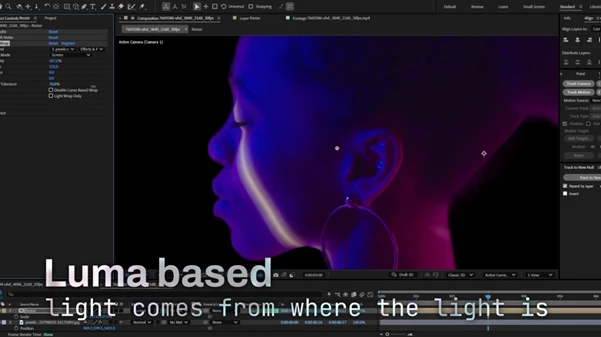
Luma weighting can drive the wrap based on background brightness, with adjustable tolerance, or you can disable it.
Seven blend modes are also available: Normal, Screen, Add, Lighten, Soft Light, Overlay, and Multiply.
For closer inspection or more customized compositing, Light Wrap Only outputs only the generated wrap rather than the complete foreground result.
Directional Wrapping for Specific Light Sources
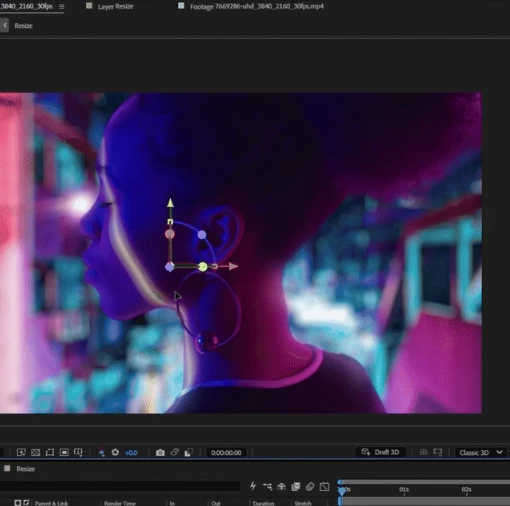
A background does not always illuminate a subject evenly from every direction. LightWrap includes a directional gate that can restrict the effect to a specific arc instead of wrapping the entire edge uniformly.
The Direction controls include Center, Angle, Spread, and Falloff. Together, they determine where the wrap appears, how wide the affected area is, and how gradually it fades.
This is particularly relevant when a scene contains a strong light source behind or beside the foreground. The wrap can be limited to the corresponding side rather than affecting edges that should not receive the same light.
Light Glow and Background Color Correction
LightWrap includes a separate Light Glow for creating a background-tinted halo around the foreground. The glow has its own Intensity and Size controls, along with Normal, Add, and Screen blend modes.
You can adjust its Inside and Outside falloff independently, giving separate control over how the halo behaves on either side of the foreground edge.
You can also correct the background before using its color for wrapping. Built-in Color Correct controls provide:
Saturation
Exposure
Tint
Tint Amount
This means the layer supplying the wrap doesn't have to contribute its original color unchanged. You can grade its appearance specifically for the edge effect while keeping the selected background source.
Where LightWrap Fits Into a Project
The plugin is primarily designed for integrating foreground elements into background plates, but its support for different layer types expands its role beyond footage compositing.
It can apply environmental edge light to a foreground subject, create rim or bounce-light effects based on the background, wrap color around live text and shape layers, or produce more stylized glowing edge treatments.
Because text and shapes remain live, LightWrap also works in motion graphics setups where those elements continue to change or animate after the effect is applied.
Performance and After Effects Compatibility
LightWrap is resolution-independent and supports 8-bit, 16-bit, and 32-bit workflows as well as Smart Render.
It is compatible with After Effects 2024 and later on both Windows and macOS. GPU acceleration is provided through CUDA on Windows and Metal on macOS, with a CPU fallback available for Software Only rendering.
Important Note for 3D Compositions
There is one specific requirement to keep in mind when using LightWrap in compositions containing 3D layers.
A real Camera layer should be added to the composition. You can also create one through View → Create Camera from 3D View.
After Effects' default camera is not fully exposed to effects, so using LightWrap in a 3D composition without an actual Camera layer can cause the result to appear offset. This requirement does not affect 2D compositions.

Files Password : gfxplugin.com OR 123456