Downloadable Files
You can download Fix Expressions for free from the end of this page.
When Expressions Suddenly Stop Working
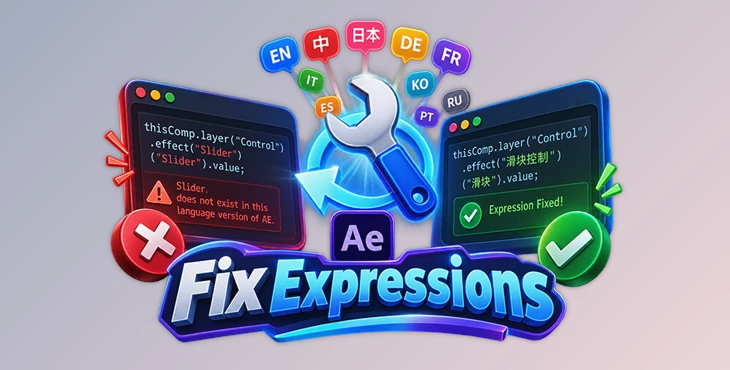
Have you ever opened an After Effects project from another designer and suddenly found dozens—or even hundreds—of expression errors?
The project may have worked perfectly on the original computer, but expressions can break when the project is opened in a different language version of After Effects. For example, a project created in English AE may contain expressions that reference property or effect names that are different in Chinese, Japanese, German, or another localized version.
Fixing these errors manually can quickly become frustrating, especially in complex projects with many compositions and expressions.
Fix Expressions is designed specifically for this situation. It scans expressions affected by language mismatches, translates the localized terms, and rewrites them so they can work again—all without requiring you to change the interface language of After Effects.
Why Different AE Languages Can Break Expressions
After Effects is available in many languages, and some property and effect names are localized based on the language in use.
This becomes a problem when an expression directly references one of these localized names. An expression written for one language may search for a property name that simply does not exist under the same name in another language.
Imagine downloading an After Effects template originally created using English AE and opening it in a Chinese version. If the expressions reference localized names such as "Slider," AE may fail to find the expected property and return an error.
When this happens once, manually correcting the expression may be manageable. When the project contains hundreds of affected expressions, however, fixing each reference individually can become time-consuming.
Meet Fix Expressions
Fix Expressions is an After Effects extension that repairs cross-language expression errors with a simpler workflow.
Instead of changing the entire After Effects interface language, restarting the application, or manually searching through expressions, the extension converts them directly.
Its basic workflow consists of three steps:
Scan → Translate → Rewrite
First, it scans the selected range for expressions that fail because of language mismatches. Next, it checks the missing localized terms against its language dictionaries. Finally, it rewrites the affected expressions using the appropriate property or effect names.
This lets After Effects stay in your preferred interface language while correcting the expressions themselves.
Features
One-Click Expression Repair
The main purpose of Fix Expressions is to speed up repairing language-related expression errors.
Instead of manually locating every broken expression, you can run the repair process from the extension and let it identify and process affected expressions across your chosen range.
This can be especially useful when working with large templates or projects containing many expression-driven elements.
Support for 10 Languages
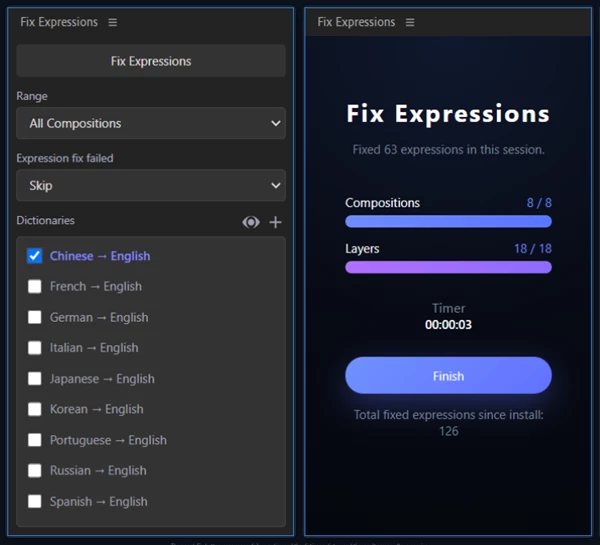
Fix Expressions includes dictionaries for ten languages:
English
Chinese
Japanese
German
French
Italian
Korean
Spanish
Portuguese
Russian
The dictionaries adapt to the language version of After Effects you are currently using, allowing expressions to be repaired between supported language pairs.
No Need to Change the After Effects Language
One of the most convenient parts of the workflow is that After Effects can stay in your preferred language.
You don't need to switch the interface to another language or restart AE just to make localized expressions work. Fix Expressions focuses on correcting the expression references instead.
This can make working with templates created by international designers much more comfortable.
Editable Dictionaries
The included dictionaries are not completely fixed or closed.
Dictionary entries can be queried, added, deleted, and modified. If a term you need is missing, you can add the appropriate entry instead of being limited to the default terms.
This also gives the extension more flexibility across different projects and naming situations.
Batch Conversion
Cross-language problems can affect many expressions at once. Fix Expressions processes these issues in batches rather than forcing you to repair each expression individually.
For example, if a downloaded motion graphics template contains numerous expressions referencing localized effect properties, you can scan the selected range and process the affected expressions together.
Focused Language-Mismatch Repair
Fix Expressions specifically targets missing-property and missing-effect errors caused by localized naming.
This focused approach is useful when the expression is logically correct but fails because After Effects is running in another language.
A Simple Workflow for Fixing Expressions
Using the extension follows a straightforward process.
Start by opening the project containing the broken expressions. Before changing expressions manually, check whether the errors seem related to localized property or effect names.
Open Fix Expressions and select the range you want to scan. The extension searches that range for expressions affected by language mismatches.
When Fix Expressions identifies a missing localized term, it looks for the corresponding name in its dictionaries and rewrites the expression accordingly.
After the repair is complete, review the results and check the affected animations to confirm that they behave as expected.
This approach can be much faster than searching through every composition and editing individual expressions by hand.
Where Fix Expressions Can Be Useful
The extension can be particularly helpful when working with projects created by people using different language versions of After Effects.
For example, you might receive an English After Effects template while working in Japanese AE. The project could contain many expression-controlled sliders, effects, or properties. Even though the project structure is correct, localized names may cause those expressions to fail.
The same situation can happen when collaborating with an international team or opening older projects created on systems configured with another AE language.
Instead of changing your normal After Effects environment to match every project, Fix Expressions lets you address these localized expression references directly.
Tips for a Smoother Repair Process
Before running a large repair, it is useful to identify whether the errors are actually caused by language differences. Fix Expressions targets missing-property and missing-effect problems related to localized naming, so not every expression error is necessarily repairable with it.
After processing expressions, preview important compositions and check expression-driven animations. This is especially helpful in larger projects where expressions control multiple connected properties.
If the extension cannot find a required translation, inspect the dictionaries. Since you can add and modify entries, you may be able to include the missing localized term yourself.
It is also a good idea to keep your dictionaries organized when adding custom entries. Clear, accurate translations make them more useful for future projects.
Less Time Searching Through Broken Expressions
Expression errors can be particularly annoying when nothing is fundamentally wrong with the animation—the project was simply created in another language version of After Effects.
Fix Expressions makes it easier to fix expression errors caused by different After Effects languages. It finds the affected expressions, translates the terms using its built-in dictionaries, and fixes them without requiring you to change After Effects' language.
It supports ten languages, lets you edit the dictionaries, and can fix multiple expressions at once. This is especially useful when working with templates, shared projects, or After Effects files created in another language.
If you regularly work with After Effects files from different creators or language environments, Fix Expressions can be a useful tool to keep on hand when localized expression names start causing errors.

Files Password : gfxplugin.com OR 123456