Downloadable Files
You can download DOF PRO for free from the end of this page.
Give Your Scenes Real Camera Depth
A beautifully rendered scene can still feel strangely flat when everything is perfectly sharp. In real photography and filmmaking, a camera lens naturally creates areas that fall in and out of focus. That separation helps guide the viewer’s eye, gives the image a stronger sense of depth, and can make even a simple composition feel more cinematic.
Creating convincing depth of field after a shot or render has already been produced, however, is more complicated than adding a basic blur. Real lenses create different bokeh shapes, optical imperfections, highlight behavior, vignetting, and varying amounts of defocus depending on the distance from the camera.
This is exactly the type of work DOF PRO is designed for. It is an Adobe After Effects plugin for generating complex, photorealistic depth-of-field effects as a post-process.
What Makes Depth of Field So Important?
Depth of field describes the distance between the nearest and farthest objects in a scene that appear acceptably sharp. In a real camera, this changes according to factors such as lens focal length, aperture, and the distance between the camera and subject.
Imagine a portrait where the person's face is sharp while the lights behind them turn into soft glowing bokeh. Or think of a 3D product render where the front edge is crisp but objects farther away gradually blur.
These effects do more than make an image attractive. They create visual hierarchy. Instead of asking the viewer to look at everything at once, you can use focus to direct attention toward the most important part of the frame.
For 3D artists, depth of field can also be expensive to calculate directly during rendering. Physically accurate DOF generated through complex ray tracing can significantly increase rendering time, which is one reason depth of field is sometimes added later during post-production.
Meet DOF PRO
DOF PRO, or Depth of Field Generator PRO, brings advanced depth-of-field processing directly into Adobe After Effects. It reproduces sophisticated lens behavior while letting artists create the effect after the original image or 3D scene has been rendered.
One of its most useful workflows uses a depth map. This is a grayscale image in which different gray values represent different distances from the camera. DOF PRO can use this information to determine which areas should remain in focus and which should become progressively blurred.
Most 3D applications can generate a depth map alongside the main render. For photographic images, you can also create depth maps manually, including linear or radial gradients when appropriate.
This makes the plugin useful for CGI, motion graphics, photography, compositing, retouching, and other projects where realistic control over focus is needed.
Features That Go Beyond Simple Blur
DOF PRO goes far beyond increasing or decreasing blur. Its tools reproduce a variety of optical characteristics that contribute to the appearance of real lenses.
Customizable Aperture and Bokeh
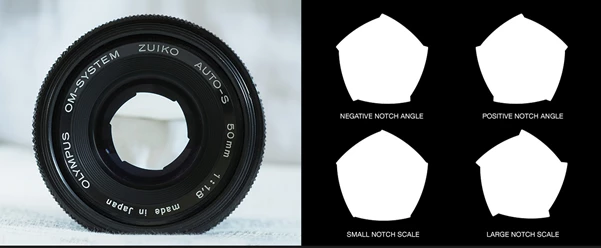
The shape of a lens aperture directly affects out-of-focus highlights. DOF PRO includes circular and polygonal aperture shapes with 3 to 16 blades, along with controls for blade notching, aperture characteristics, aspect ratio, optical vignetting, and other optical properties.
Custom aperture maps take this further. You can load your own aperture designs and use them to change the appearance of bokeh, opening the door to more creative shapes and stylized results.
Realistic Lens Aberrations
Perfect digital blur can sometimes look too clean. Real lenses introduce small imperfections, and those imperfections often help an image feel photographic.
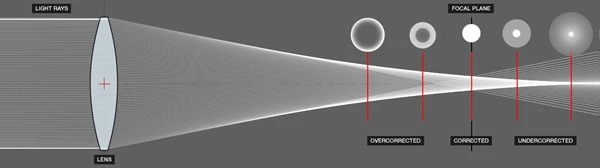
DOF PRO supports spherical aberration and can reproduce different behavior in front of and behind the focal plane.
It also supports longitudinal and lateral chromatic aberration, letting you control color fringing independently or combine them.
Achromatic aberration is supported as well, providing additional control over magenta and green fringing characteristics.
Used carefully, these details can make generated depth of field feel less like a software effect and more like something produced through an actual lens.
Cat’s Eye Bokeh and Optical Vignetting
Bokeh near the edges of a real image does not always stay perfectly circular. Optical vignetting can gradually narrow these highlights into the familiar Cat’s Eye shape.
DOF PRO recreates this behavior and lets you control vignetting intensity and scale. It can also work with polygonal aperture shapes rather than limiting the effect to circular bokeh.
This can make a noticeable difference in night scenes, portraits, product shots, and compositions containing many bright out-of-focus lights.
Tilt-Shift Effects
DOF PRO can also create tilt-style focus using linear gradient depth maps. By controlling the focus plane's orientation, you can create selective-focus effects similar to those associated with tilt-shift photography.
For example, a wide city shot can have a narrow band of sharp focus while the foreground and background blur, creating the familiar miniature-style appearance.
Field Curvature and Astigmatism
Real lenses do not always maintain a perfectly flat focus field.
DOF PRO can reproduce field curvature using radial gradient depth maps, including inverted configurations that defocus the center while keeping details sharper toward the corners.
The plugin also supports tangential and sagittal astigmatism with adjustable intensity. Tangential astigmatism can create defocus resembling rotational blur, while sagittal astigmatism produces behavior closer to a zoom blur.
Catadioptric Lens Effects
For something visually different, DOF PRO can reproduce the behavior of catadioptric, or mirror, lenses.
These lenses are known for their distinctive donut-shaped bokeh. DOF PRO lets you adjust the secondary mirror size and combines the effect with optical vignetting to reproduce how this type of bokeh changes toward the corners of an image.
Better Highlights
Bright out-of-focus lights are one area where ordinary blur effects can quickly look artificial.
DOF PRO includes highlight enhancement controls designed to produce brighter and more vivid bokeh. A threshold determines which bright image areas are affected, while additional controls let you adjust brightness, tint, and saturation.
This is especially useful for scenes containing streetlights, decorative lights, reflections, or other strong highlights.
Aperture Textures
Not every real camera lens is perfectly clean. Small amounts of dirt and dust on lens elements can become visible inside bright bokeh.
DOF PRO can use an After Effects layer as an aperture texture, allowing textures to appear within the generated bokeh. You can also adjust its intensity and positional offset to better imitate real optical behavior.
Matte Box Simulation
Even equipment mounted in front of a lens can influence bokeh.
The plugin includes matte box controls that simulate the way physical matte-box flags can progressively crop bokeh near the edges of a frame. You can adjust the top, bottom, left, and right controls independently.
This can be especially useful when matching the optical look of existing footage.
Noise Recovery for More Natural Results
Heavy defocus can remove natural grain or pixel noise, making blurred areas look unnaturally smooth.
DOF PRO includes a noise rendering system that reintroduces this texture. Noise can be animated or static, monochromatic or colored, and distributed in different ways according to the image, focus map, or amount of blur.
The result can help blurred areas blend more naturally with the rest of the footage.
Practical Ways to Use DOF PRO
These controls can make a noticeable difference in several situations.
For a 3D render, you can export a depth map and use it to add DOF during compositing instead of committing to an expensive depth-of-field calculation during the original render.
For portrait work, you can separate the subject from a distracting background and create smoother bokeh while maintaining control over highlights and optical characteristics.
For motion graphics, you can use focus changes to direct attention between foreground and background elements.
For product visualization, subtle focus falloff can help give a clean CGI render more photographic depth.
For stylized scenes, custom aperture maps, tilt effects, unusual bokeh, aberrations, and mirror-lens characteristics can turn depth of field into a creative element rather than simply simulating a conventional camera.
Tips for More Convincing Depth of Field
The strongest depth-of-field effects aren't always the most intense. Start with a clear focal point and decide what the viewer should notice first. Then allow the blur to increase naturally as elements move farther from that focus plane.
When working with a depth map, pay particular attention to object edges. Clean separation between depth values can help avoid obvious post-processing artifacts around foreground objects.
It is also worth being restrained with optical imperfections. Chromatic aberration, spherical aberration, Cat’s Eye bokeh, and aperture textures can improve realism, but combining all of them aggressively may make the result feel intentionally processed rather than photographic.
Pay special attention to bright highlights. Bokeh is often easiest to notice around small light sources, so these areas are useful when fine-tuning aperture shape, aberration, vignetting, and highlight behavior.
Finally, do not forget image texture. If the original shot or render contains visible grain or digital noise, perfectly smooth defocused regions may stand out. DOF PRO's noise tools can help restore texture to these areas and produce a more consistent result.
A More Flexible Way to Create Camera Depth
DOF PRO is useful because it treats depth of field as an optical effect rather than simply another type of blur. From custom aperture shapes and depth maps to aberrations, Cat’s Eye bokeh, tilt effects, highlight enhancement, aperture textures, and noise recovery, its controls give artists room to build depth of field around the needs of each individual scene.
The plugin is also GPU-accelerated, supports multi-threading and Multi-Frame Rendering, and works with 8-, 16-, and 32-bit-per-channel color workflows.
For photographers, compositors, motion designers, and 3D artists, that combination can be especially useful when the original material lacks enough depth of field or when rendering the effect directly is inconvenient. Instead of treating focus as something permanently decided when the image was captured or rendered, DOF PRO lets you shape it later and make it part of the creative process.

Files Password : gfxplugin.com OR 123456