Downloadable Files
You can download Chisel for free from the end of this page.
Real-Time SDF Modeling for Blender
Traditional Boolean modeling can become frustrating when a design grows more complex. Intersections may create problematic geometry, surfaces can require cleanup, and a shape that initially looked simple can quickly turn into extra work.
Chisel gives you a different way to model in Blender. Made for Blender 4.5+ and 5.x, it lets you combine, cut, slice, emboss, and engrave shapes in real time while keeping the surfaces smooth.
Instead of constantly thinking about the underlying mesh, you can concentrate more directly on the form you are trying to create.
What Is SDF Modeling?
SDF stands for Signed Distance Field. In practical terms, Chisel represents shapes mathematically rather than relying only on conventional polygon geometry during the modeling process.
This makes Boolean-style operations especially interesting. Shapes can interact more fluidly, and transitions between forms can appear smooth rather than looking like separate pieces simply pushed through one another.
For example, you might start with a simple primitive, combine another shape with it, subtract a section to create a cavity, and then use another operation to engrave details into its surface.
Because Chisel performs its Boolean operations directly on distance fields, the resulting form remains a single watertight surface. This helps avoid common issues such as broken Boolean geometry, problematic normals, or the need to repair the mesh after experimenting with intersections.
See the Shape While You Build It
One of the most useful aspects of Chisel is its ray-marched viewport.
Rather than building a complex structure and waiting until later to properly evaluate the surface, you can see the resulting form while sculpting and composing your shapes. This makes experimentation much more immediate.
If an intersection does not look right, you can adjust it. If a cut needs to be deeper, you can change the shape or operation. If two forms need a smoother visual relationship, you can continue refining the composition while viewing the result.
This real-time feedback can be particularly useful when designing objects with curved surfaces, carved sections, layered forms, or complex Boolean relationships.
Six Operations in One Stack
Chisel provides six operations for manipulating and combining forms:
Union – combine shapes into a single form.
Difference – subtract one shape from another.
Intersect – preserve the shared region between shapes.
Slice – divide or cut forms.
Emboss – create raised surface details.
Engrave – carve details into a surface.
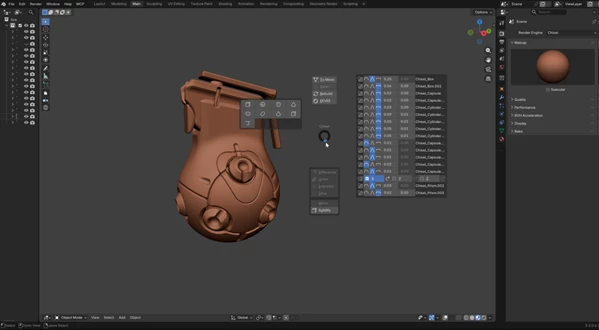
Having these operations available within one stack makes it possible to build more elaborate objects from relatively simple components.
For instance, you could combine primitives to establish the main silhouette of an object, subtract additional forms to create openings, and then use engraving or embossing to introduce smaller surface details.
Smooth Mathematical Surfaces
Chisel is built around mathematical shapes, allowing Boolean combinations to blend smoothly.
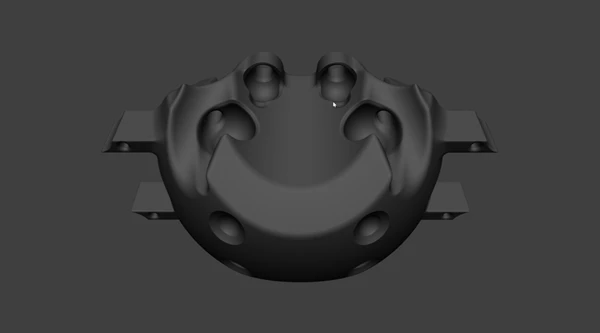
This can be particularly valuable for designs where harsh polygon intersections would distract from the intended appearance. Rounded mechanical forms, abstract objects, smooth hard-surface concepts, and organically blended shapes can all benefit from this approach.
The smooth transitions also encourage experimentation because shapes can be pushed into one another without immediately creating the cleanup problems commonly associated with complex mesh Boolean workflows.
Watertight Boolean Results
Boolean operations can become troublesome when they leave behind geometry that needs additional repair.
Chisel avoids this problem by performing Boolean calculations directly on distance fields. The result remains a single watertight surface, without bad normals or Boolean structures that visually break apart when viewed closely.
This lets you spend more time designing the object and less time repairing the consequences of each modeling operation.
Flexible Building Blocks
Chisel includes 10 primitives, 3 curves, and support for any mesh, giving you several starting points for constructing forms.
Simple primitives can establish the overall volume, curves can help create more specialized shapes, and existing meshes can become part of the SDF-based composition.
This combination means the workflow does not have to remain limited to basic geometric objects. You can progressively introduce more detailed elements as the design develops.
GPU Compute Renderer
Chisel includes a GPU compute renderer for its real-time workflow.
Because the viewport is ray-marched, you can evaluate the mathematical surface as you work instead of relying entirely on a traditional polygon viewport representation.
The result is a modeling environment centered around immediate visual feedback.
Faster Access With the Pie Menu
Chisel also provides a pie menu that can be opened with Q.
When you are repeatedly switching between operations during modeling, quick access matters. Keeping commonly used controls within easy reach helps the process feel more like continuous shape exploration and less like navigating through menus.
Where Can Chisel Be Useful?
The SDF approach can work particularly well for projects involving complex combinations of simple forms.
You could use it to explore futuristic props constructed from overlapping volumes, create abstract sculptures with flowing intersections, develop smooth hard-surface concepts, or add engraved and embossed details to an existing design.
It can also be useful during early concept development. Instead of worrying about final topology immediately, you can experiment with proportions, intersections, cuts, and silhouettes to determine whether an idea visually works.
The combination of primitives, curves, meshes, and six Boolean operations provides plenty of room for this kind of iterative modeling.
Tips for Better Results With Chisel
Start with the largest forms of your model before introducing smaller details. Establishing the overall silhouette first makes it easier to judge whether later cuts, intersections, and surface elements actually improve the design.
Try to use Boolean operations deliberately as well. A Difference operation can create much more than a simple hole; carefully positioned subtraction shapes can define panels, channels, cavities, and larger structural details.
For surface decoration, reserve Emboss and Engrave operations for details that support the main form rather than overwhelming it. Subtle raised or recessed elements often feel more integrated when their scale matches the surrounding geometry.
It is also worth taking advantage of the real-time viewport while experimenting. Move shapes around, adjust their relationships, and evaluate the object from different angles before committing to a particular arrangement.
Since Chisel is designed around smooth mathematical surfaces, exploring how forms blend and intersect is an important part of getting the most from its workflow.
A Different Way to Approach Boolean Modeling
Chisel gives Blender artists another way to build 3D models without relying so much on traditional Boolean tools. You can combine and edit shapes in real time, create smooth connections between them, and get clean, closed models that are ready for further work.
With six operations, 10 primitives, 3 curves, support for meshes, a ray-marched viewport, and GPU compute rendering, it provides a flexible environment for carving and combining shapes directly inside Blender.
For artists who frequently create objects through intersections, subtraction, slicing, engraving, or smooth combinations of multiple forms, Chisel provides an interesting way to explore those ideas while keeping the modeling process focused on the shape itself.

Files Password : gfxplugin.com OR 123456