Downloadable Files
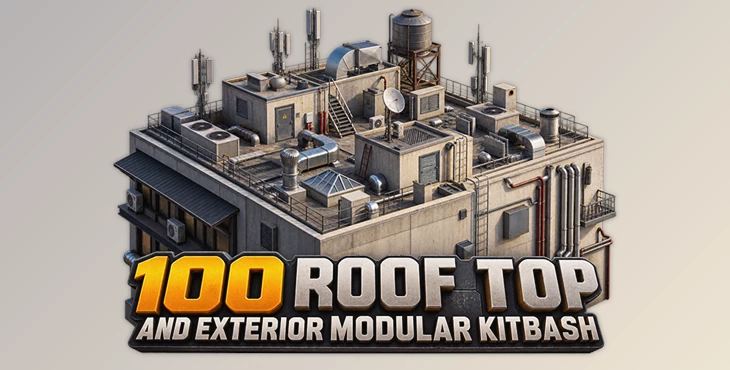
You can download 100 Roof Top and Exterior Modular Kitbash for free from the end of this page.
100 Roof Top and Exterior Modular Kitbash
Creating a believable exterior environment is often about the small details. A building may already have the right overall shape, but without rooftop equipment, vents, pipes, structural elements, and other exterior objects, it can still feel empty or unfinished.
Building all of these secondary assets individually can take a considerable amount of time, especially when working on large architectural scenes or environments. 100 Roof Top and Exterior Modular Kitbash provides a collection of ready-made 3D objects designed to help you add these details more quickly while maintaining flexibility in your scene.
Bring More Detail to Rooftops and Exteriors
Kitbash assets are pre-built 3D components that can be combined, rearranged, scaled, and reused to construct more complex environments. Instead of modeling every exterior detail from scratch, you can select the pieces you need and integrate them directly into your project.
This approach can be particularly useful when creating rooftops, industrial structures, urban environments, architectural scenes, and background buildings.
For example, a simple rooftop can quickly feel more complete when several different mechanical or structural objects are placed around it. The same assets can also be reused across multiple buildings with different scales, rotations, positions, and materials to create variation throughout a larger scene.
The goal is not simply to add more objects. Carefully placed exterior details can help establish scale, break up large empty surfaces, and make an environment visually richer.
What Is 100 Roof Top and Exterior Modular Kitbash?
100 Roof Top and Exterior Modular Kitbash is a collection created by Amethesh Lgp that contains more than 100 unique 3D objects for rooftop and exterior environment design.
The models are provided in several common 3D formats, including FBX, OBJ, STL, and native Blender files, giving artists flexibility when bringing the assets into their preferred 3D workflow.
The collection focuses on detailed yet low-poly objects, making the models suitable for situations where you want additional environmental detail without unnecessarily building every component yourself.
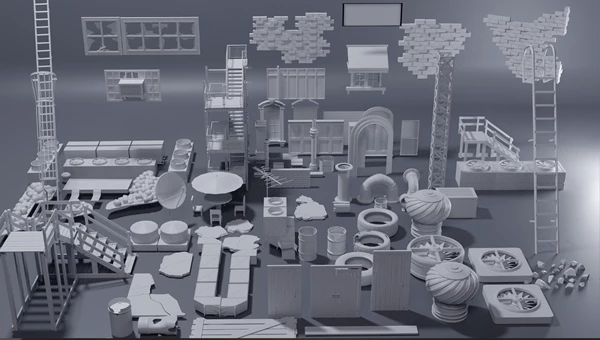
Over 100 Unique Objects
The collection includes more than 100 individual objects. Having a large selection of pieces makes it easier to introduce variation when constructing rooftops and exterior environments.
Rather than repeatedly using the same few assets, you can combine different objects to give individual buildings their own visual identity.
Modular Environment Building
The assets are designed around a kitbash workflow. You can combine individual models to create more detailed rooftop arrangements or exterior structures.
This modular approach also makes experimentation easier. Objects can be moved, rotated, duplicated, or scaled until the arrangement works naturally with the architecture of your scene.
Detailed Models
Although the assets are intended to remain practical for environment creation, the models contain enough detail to contribute to close and medium-distance views.
This can help turn otherwise plain exterior areas into more convincing parts of the overall environment.
Low-Poly Design
The models use a low-poly approach, which can be useful when a scene requires many repeated exterior elements.
This is particularly valuable for larger environments where dozens of buildings or rooftop areas may need additional detail.
Easy to Texture
The objects are designed to be easy to texture. This gives you room to adapt their appearance to the visual direction of your project rather than being locked into one specific style.
You could create clean architectural surfaces, aged industrial materials, painted metal, weathered finishes, or other variations depending on the environment.
Multiple File Formats
100 Roof Top and Exterior Modular Kitbash is available in:
FBX
OBJ
STL
Native Blender files
Having multiple formats makes the collection easier to incorporate into different 3D pipelines and projects.
Where Can You Use These Assets?
One practical use for this kit is adding detail to urban environments. When several buildings appear together, completely empty rooftops can make the scene feel overly simple. Adding different combinations of exterior objects can help distinguish one structure from another.
The kit can also be useful for architectural visualization. Exterior details can provide additional scale references and make large surfaces feel less empty.
For industrial or game environments, you can combine multiple pieces to quickly establish more complex rooftop arrangements without spending time creating every secondary model individually.
The same collection can therefore be reused across different projects simply by changing the arrangement, scale, materials, and placement of its components.
Tips for Building Better Exterior Scenes
Avoid placing every available object into a single area. A more controlled selection usually produces a cleaner and more believable result. Start with a few larger elements and then use smaller objects to support the overall composition.
Variation is also important when reusing kitbash assets. If the same model appears several times, change its rotation, scale, position, or material whenever appropriate. Small differences can make repeated assets much less noticeable.
Pay attention to scale as well. Exterior objects contribute strongly to how viewers understand the size of a building, so keeping their proportions believable can improve the entire scene.
Materials can provide another level of variation. Since the models are easy to texture, consider adapting their surfaces to their surroundings. A clean modern building might need relatively uniform materials, while an older industrial environment could benefit from rougher or more weathered surfaces.
Finally, think about viewing distance. Objects that will only appear far from the camera do not necessarily need the same amount of attention as assets positioned prominently in the foreground.
Build Detailed Environments More Efficiently
100 Roof Top and Exterior Modular Kitbash provides more than 100 unique, detailed, and low-poly objects that can be used to expand rooftops and exterior environments without modeling every secondary asset from the beginning.
Support for FBX, OBJ, STL, and native Blender files also makes the collection flexible enough to fit into different workflows, while its easy-to-texture models allow you to adapt the assets to the visual style of each project.
These modular pieces can help fill empty areas and add more detail to your scenes. They’re a simple way to make buildings and environments look more interesting without spending too much time creating everything from scratch.

Files Password : gfxplugin.com OR 123456