Downloadable Files
You can download MotionBaker for free from the end of this page.
MotionBaker
Exporting animations from After Effects for use in websites, apps, messaging platforms, and other digital experiences can involve several repetitive steps. When a project contains multiple compositions, handling each animation separately can make the export process even more time-consuming.
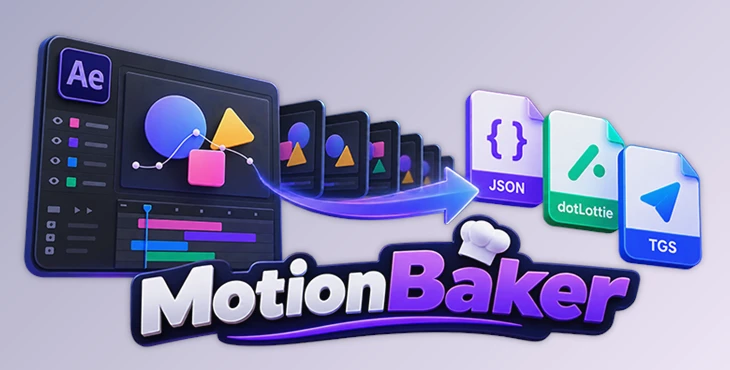
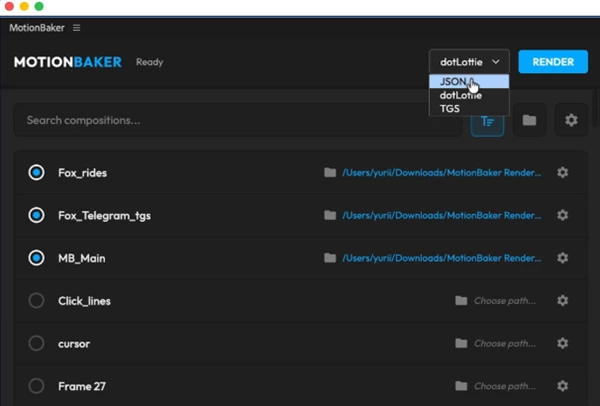
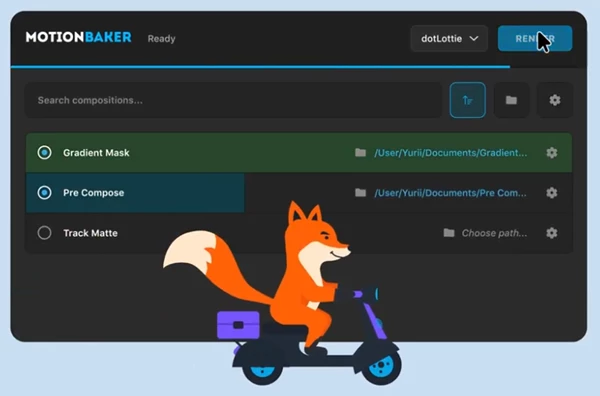
MotionBaker makes it easier to export animations from After Effects. From one panel, you can export your compositions as JSON, dotLottie, or TGS files, choose where to save them, change image settings, and export several animations at once.
It also includes handy options for compressing images, converting text to shapes, and creating HTML previews. This makes it easier to check your animations and get them ready for use outside After Effects.
A Simpler Way to Export After Effects Animations
MotionBaker focuses on turning After Effects compositions into animation formats that can be used outside the application. Instead of manually processing compositions one by one, you can select multiple compositions and manage their exports from the same panel.
The tool supports three export formats: JSON, dotLottie, and TGS.
This makes it useful when creating animations intended for different environments or players. For example, you may have several animated elements in an After Effects project that need to be exported individually. MotionBaker allows you to select those compositions, determine where each file should be saved, choose the appropriate export format, and process them together.
The batch workflow becomes especially useful when a project contains many related animations. Rather than repeating the same export steps for every composition, you can prepare several exports at once.
Meet MotionBaker
MotionBaker is built around a straightforward idea: keep animation export organized and accessible directly inside After Effects.
From one panel, you can manage compositions, output locations, export formats, image settings, and previews. This can reduce repetitive work while giving you more control over how exported assets are prepared.
Features
JSON, dotLottie, and TGS Export
MotionBaker can export After Effects animations to JSON, dotLottie, and TGS formats. You can select the format that fits the intended destination of your animation.
Batch Exporting
Multiple compositions can be selected and exported together. This is particularly helpful for projects containing collections of icons, interface animations, motion graphics, or other separate animated elements.
Flexible Output Paths
You can assign individual output paths to different compositions or select one shared output folder. This makes it easier to keep exported assets organized according to the structure of your project.
Raster Image Compression and Resizing
MotionBaker includes controls for compressing and resizing raster image assets. These options can help you manage the image resources included with an exported animation.
Glyphs Option
Supported text can be converted to shapes using the Glyphs option. This provides another way to prepare text elements when exporting compatible animations.
HTML Preview Generation
The tool can generate HTML previews so exported animations can be reviewed in a browser. This gives you a convenient way to inspect the result after export before moving it into its intended app or player.
Where MotionBaker Can Be Useful
Imagine an After Effects project containing several animated graphics that need to become separate animation files. Exporting every composition individually means repeatedly choosing settings, destinations, and formats.
With MotionBaker, those compositions can be selected together and prepared as a batch. You can choose a shared destination when the files belong together or give individual compositions their own output paths when they need to remain separated.
Another practical scenario involves animations containing raster images. Instead of leaving those assets untouched, you can use MotionBaker's compression and resizing controls to adjust them as part of the export workflow.
After the export is complete, generating an HTML preview provides a convenient way to check the animation in a browser.
Tips for Better MotionBaker Exports
A smooth export workflow starts with preparing your After Effects compositions carefully. Before processing a large batch, check that each composition contains the correct animation, dimensions, assets, and timing.
It is also useful to test a smaller export before processing an entire collection. Export one representative composition and review it in the intended player or application. If everything behaves as expected, you can then apply the workflow to the remaining compositions.
When working with raster assets, use compression and resizing thoughtfully. The goal should be to find a suitable balance between image quality and the requirements of your final animation.
For larger projects, organize your output folders before exporting. A shared folder can be convenient for related animations, while individual output paths can make more complex projects easier to manage.
The HTML preview feature can also become part of your regular checking process. Reviewing exported animations before delivery can help reveal differences between the original After Effects composition and the final exported result.
Keep Export Compatibility in Mind
An important part of working with MotionBaker is understanding that export compatibility depends on both the After Effects features used in the composition and the target animation player.
Not every After Effects feature is supported by Lottie or TGS. An animation that looks correct inside After Effects may therefore behave differently after export if it contains unsupported elements or effects.
For this reason, always check the exported animation in the actual app, platform, or player where it will eventually be used.
HTML previews are useful for reviewing results in a browser, although they may require an internet connection to load the animation player.
Compatibility
MotionBaker is compatible with:
Adobe After Effects 2026
Adobe After Effects 2025
Version 1.0.0 was released on September 14, 2026.
A More Organized Animation Export Workflow
MotionBaker brings several useful export tasks together inside After Effects. JSON, dotLottie, and TGS support covers multiple animation delivery formats, while batch exporting can reduce repetitive work when handling several compositions.
Features such as custom output paths, raster image compression and resizing, Glyphs conversion, and HTML previews add useful control around the export process rather than limiting the tool to a simple export button.
For motion designers who regularly need to move animations from After Effects into compatible external players or platforms, MotionBaker provides a more centralized way to prepare, export, organize, and review those files.
The most important step is still testing the final result in its intended environment. With that practice in place, MotionBaker can help make multi-composition animation exports more manageable and organized.

Files Password : gfxplugin.com OR 123456