Downloadable Files
You can download DocManager Pro for free from the end of this page.
DocManager Pro
Working with many open documents in Adobe Photoshop can quickly become difficult to manage. Moving through tab after tab, finding the correct PSD, checking document properties, and copying layers between files can interrupt your concentration and add unnecessary steps to even a simple workflow.
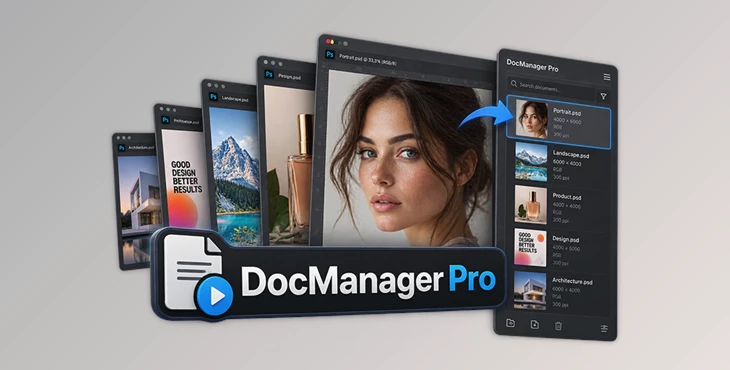
DocManager Pro is a Photoshop plugin designed to make this process much more organized. It gives you a visual overview of your open documents, makes switching between them faster, and provides practical tools for copying, filtering, saving, closing, and managing multiple files directly from one panel.
For photographers, retouchers, designers, and other Photoshop users who regularly work with several documents at the same time, it can turn a crowded workspace into a much easier environment to navigate.
A Better Way to Manage Multiple Photoshop Documents
Photoshop tabs work well when only a few files are open. The situation changes when a project involves ten, twenty, or even more images. File names begin to look similar, finding a specific document takes longer, and repeatedly moving between tabs can become frustrating.
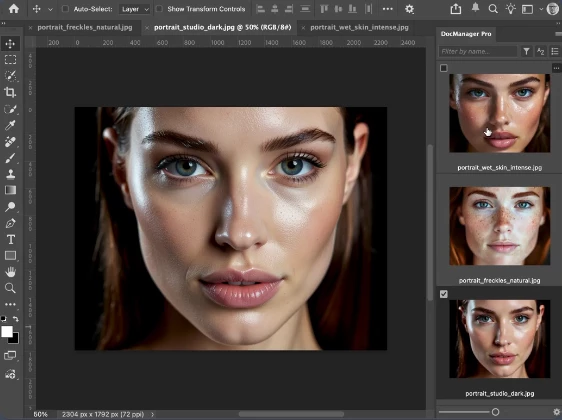
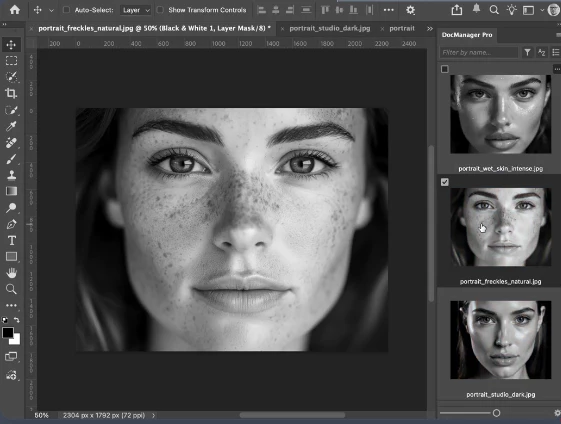
DocManager Pro approaches this problem visually. Instead of relying only on document names, you can see your open files as thumbnails and immediately recognize the image or design you need.
This can be especially useful during complex photo retouching projects, large image batches, compositing work, or any workflow where multiple PSD files need to remain open simultaneously.
The result is not a change to the artwork itself, but a more efficient way of working with it. By spending less time searching for files and performing repetitive document-management tasks, you can keep more attention on the actual creative process.
Meet DocManager Pro
DocManager Pro is a plugin for Adobe Photoshop 2024 and newer versions on Windows and Mac. It provides a dedicated panel for managing open documents and adds several workflow tools that go beyond basic document navigation.
One of its main advantages is that many common operations can be performed directly from the panel. You can visually locate documents, switch between them, copy content, inspect important file information, filter large groups of open documents, and access frequently used actions without constantly moving through Photoshop tabs.
This makes the plugin particularly practical for workflows involving large numbers of related files.
Visual Thumbnail Navigation
DocManager Pro displays your currently open documents using thumbnail previews. Instead of identifying an image only by its filename, you can visually recognize it and switch to it with a click.
Thumbnail sizes can also be adjusted, allowing you to choose between larger previews and a more compact overview depending on the number of documents in your workspace.
A list view is available as another way to organize and navigate open files.
Drag-and-Drop Document and Layer Copying
Copying content between Photoshop documents is a common part of compositing, retouching, and design work.
DocManager Pro simplifies this process with drag-and-drop functionality for copying documents and layers. This can reduce the number of manual steps required when moving the same elements between different files.
For example, a retoucher working on several related images could move adjustment or retouching layers between documents more efficiently rather than repeatedly navigating through individual tabs.
Powerful Right-Click Options
The plugin provides quick access to important operations through its right-click menu.
You can perform actions such as saving, closing, or exporting files without handling every document separately. Photoshop Actions can also be applied to multiple files, which can be particularly helpful when working with batches.
This gives you a convenient central location for many repetitive document-management operations.
Detailed Document Information
DocManager Pro can display useful information about your open files directly inside the panel.
Available information includes document name, dimensions, profile, resolution, color mode, bit depth, color profile, creation date, camera, lens, focal length, aperture, exposure time, and ISO.
These details are customizable, so you can display the information that is most relevant to your particular workflow.
For photographers and retouchers, having camera and image information immediately visible can make it easier to compare files without repeatedly opening additional dialogs.
Advanced Document Filtering
When many files are open, even thumbnail navigation can become crowded. DocManager Pro includes search and filtering tools to help narrow down the document list.
You can search by filename and filter documents according to properties such as orientation, dimensions, resolution, color mode, color profile, and bit depth.
For example, you could isolate portrait-oriented RGB documents at a particular resolution or quickly locate a specific PSD inside a large group of files.
Save and Reopen Sessions
The plugin also supports sessions, allowing groups of documents to be saved and reopened later.
This is useful for projects that cannot be completed in a single Photoshop session. Instead of manually locating and reopening every required document the next time you work, saved sessions can help you return to the relevant collection of files more conveniently.
Where DocManager Pro Can Make a Difference
The benefits become most noticeable when a Photoshop project grows beyond a handful of documents.
A professional retoucher may have multiple photographs, reference images, PSD files, and alternate versions open at once. Thumbnail navigation makes these files easier to identify, while drag-and-drop layer copying can simplify transferring adjustments or elements between related images.
Designers working on multiple variations of the same artwork can similarly move between versions more quickly. Batch-oriented users can take advantage of filtering and multi-document actions to organize files according to their technical properties before processing them.
Even in smaller projects, the visual document overview can simply provide a cleaner alternative to repeatedly searching through Photoshop's standard tabs.
Tips for a Faster Workflow
When using DocManager Pro, adjust the thumbnail size according to the type of project you are handling. Larger thumbnails are useful when visual identification is important, while smaller thumbnails can provide a better overview when dozens of documents are open.
Take advantage of document filters instead of manually scanning a large collection. If you already know that the file you need has a particular orientation, resolution, color mode, or profile, filtering can significantly reduce the number of visible documents.
For repetitive projects, sessions are also worth incorporating into your workflow. Saving a group of related documents can make it easier to stop working and return later without rebuilding the entire workspace.
When transferring content between files, drag-and-drop copying is particularly useful for layers that need to appear across multiple documents. Keeping logically related files together and using clear document names can make this visual workflow even easier to manage.
Finally, customize the document information shown in the panel. Displaying every available property may create unnecessary visual clutter, so keeping only the details you regularly need can provide a cleaner and more focused workspace.
Lite vs. Pro
DocManager is available in both Lite and Pro versions.
The free DocManager Lite version focuses on the essential navigation experience, including thumbnail previews, adjustable thumbnail sizes, document navigation, and list view.
DocManager Pro expands the workflow with more advanced management features, including drag-and-drop copying of documents and layers, right-click operations, additional document information, and the ability to save and reopen sessions.
For users who mainly want a visual way to navigate open Photoshop files, the Lite edition covers the core functionality. Users managing larger or more complex projects can take advantage of the additional workflow tools available in the Pro version.
Final Thoughts
DocManager Pro makes it easier to work with multiple documents open in Photoshop at the same time.
Instead of searching through a long row of tabs, you can see thumbnails of your open files and quickly find the one you need. You can also drag and drop to copy layers or documents, filter your files, check document details, save sessions, and access common actions more quickly.
This can be especially useful for photographers, retouchers, and designers who often have many Photoshop files open at once. It keeps the workspace easier to manage and cuts down on time spent switching between documents.
If your Photoshop tabs often get crowded, DocManager Pro gives you a simpler way to find, organize, and work with your open files.

Files Password : gfxplugin.com OR 123456