Downloadable Files
You can download Photo Organizer AI Premium for free from the end of this page.
Photo Organizer AI Premium
Managing a large photo collection can quickly become difficult when thousands of images are scattered across different folders. Duplicate shots, blurry photos, poorly focused images, and pictures from completely different events can all end up mixed together, making manual organization a time-consuming process.
Photo Organizer AI Premium is a Windows desktop application designed to simplify this process with local AI-powered photo analysis. It can scan a photo library, evaluate image quality, detect duplicates, identify faces and scenes, and organize photos into event-based albums.
The app does most of its work directly on your computer instead of sending your photos to the cloud. This is useful if you want to organize your photos faster while keeping your files stored locally on your own device.
Turn a Messy Photo Library into an Organized Collection
The main idea behind Photo Organizer AI Premium is simple: let AI handle the repetitive parts of reviewing and organizing photos.
Imagine returning from several trips, events, or photography sessions with thousands of images stored in one large directory. Some shots may be duplicates, others may be blurry, and photos from multiple events may have become mixed together.
Manually reviewing every image can take hours. Photo Organizer AI analyzes the library and assigns useful information to individual photos so that problematic or important images are easier to find.
The application can evaluate factors such as sharpness, focus, exposure, composition, and face quality. It can also detect scenes and subjects and identify identical or visually similar images.
This means you can spend more time making final decisions instead of manually searching through every file.
AI-Powered Photo Culling
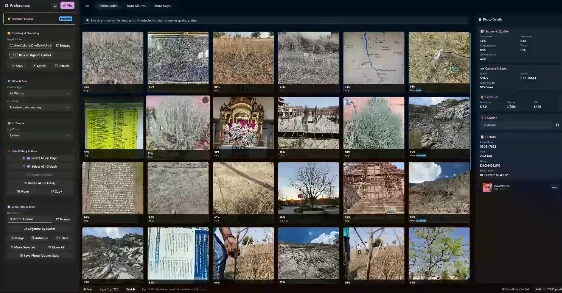
One of the most important parts of Photo Organizer AI Premium is its Culler workspace.
Photos are displayed in a visual grid and can receive an overall AI quality score from 0 to 100%. Individual analysis can include:
Sharpness
Focus quality
Exposure
Composition
Face quality
Eye-open detection
Smile detection
Based on this analysis, photos can also receive useful statuses such as Keep, Review, Blurry, Poor Focus, Closed Eyes, Duplicate, or Similar.
For example, after shooting hundreds of photos at an event, you can filter the collection to reveal blurry or poorly focused images first. You can then review those images before deciding whether they should be removed.
The user can also manually mark important photos as Keep, allowing personal judgment to remain part of the culling process.
Intelligent Subject and Scene Classification
Photo Organizer AI Premium uses local classifiers to identify subjects and recognize different types of scenes.
Photos can be categorized with labels related to content such as mountains, water, rain, documents, weddings, graduations, birthdays, beach trips, and mountain outings.
These classifications make large libraries easier to search. Instead of remembering a filename, you can search or filter according to what appears in the photograph.
Blur, Focus, and Quality Detection
Not every photograph in a large shoot deserves the same amount of attention.
The application can detect problems such as blur, poor focus, excessive grain, red-eye, and other quality issues. Its scoring system helps bring weaker images to your attention without requiring you to inspect every photograph at full resolution.
You can also adjust the quality threshold according to your own standards.
Duplicate and Similar Photo Detection
Burst photography and repeated imports can create large numbers of nearly identical files.
Photo Organizer AI Premium can identify both identical and near-duplicate photos. Identical files can be recognized through image checksums, while visually similar photographs can be grouped using similarity analysis.
This is particularly useful when several versions of essentially the same frame exist, and you only want to retain the strongest shot.
Virtual Event Albums
Organization goes beyond simply finding bad photographs.
The Albums workspace can group photos into virtual event albums according to chronological information and location similarity. These albums can then be renamed, merged, split, reorganized, and reviewed before they are saved into physical destination folders.
For example, photos captured during one trip or event can be grouped together even when the original files are scattered throughout a larger directory.
Face Detection and People Organization
The Faces workspace adds another way to navigate large collections.
When face detection is enabled, the application can detect faces and cluster similar ones into identities. You can review these clusters, correct incorrect matches, merge identities, choose representative images, and assign names to people.
Once identities are organized, it becomes much easier to locate photographs containing a particular person.
Interactive Photo Maps
Photos containing GPS information can be explored geographically through the Maps workspace.
Geotagged photographs appear as markers on an interactive map. Nearby images can be clustered together, while individual markers provide access to thumbnails and basic information.
This provides a visual way to revisit travel photography and other location-based collections.
Powerful Photo Search
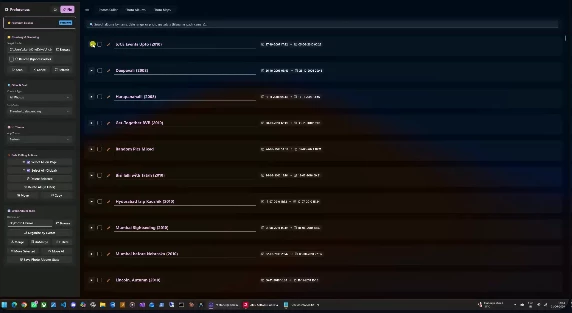
The Culler search system allows you to locate images using much more than filenames.
Searchable information includes camera make and model, detected subjects, scene labels, photo status, resolution, file size, aperture, shutter speed, ISO, focal length, GPS location, and capture date.
For example, searching for a camera manufacturer can reveal photographs captured with that camera, while searching for "Blurry" can quickly surface images that need additional review.
DirectML GPU Acceleration
Photo Organizer AI Premium supports DirectML GPU acceleration for its local AI processing.
When compatible graphics hardware is available, the application can use the GPU to accelerate deep-learning analysis. Users can also control parallel processing and image decoding settings to balance scanning speed against CPU and memory usage.
This becomes particularly valuable when processing photo libraries containing thousands of files.
Local Processing and Privacy
A major characteristic of Photo Organizer AI is its local workflow.
Photo scanning, AI analysis, duplicate detection, and file management are performed on the computer rather than requiring the photo library to be uploaded to a cloud-based AI service.
For photographers working with private client images, personal collections, or large local archives, this approach can make photo management more practical while keeping the original files under local control.
A Practical Workflow for Large Photo Libraries
A good starting point is to select the root folder containing your photographs and configure the analysis options you actually need.
If duplicate detection is important, enable it before scanning. Face detection can also be enabled when you want to organize images by people. GPU acceleration can help improve processing performance on compatible hardware.
After scanning, start with the Culler rather than immediately reorganizing everything.
Filter duplicates first and inspect the suggested groups. Next, review blurry and poorly focused images. Sorting photographs by quality score from lowest to highest can also make problematic images easier to find.
Once the initial cleanup is complete, move to the Albums workspace and allow the application to group images by events. Review these virtual albums, rename them where necessary, move incorrectly grouped photographs, and merge related events.
Only after checking the results should you save the organized albums to their final folders.
Tips for Better and Safer Photo Organization
AI scoring works best as an assistant rather than a replacement for your own visual judgment.
A photograph with technical imperfections may still be important because of its subject, timing, or emotional value. Before bulk-deleting images based on a quality threshold, review the selected files and manually protect important photographs.
Duplicate groups deserve similar attention. Two images can look almost identical while containing small differences in expression, focus, or composition. Compare important frames before choosing which one to keep.
For face organization, review suggested identities before merging large groups. Correcting false matches early can help maintain a cleaner people library.
It is also a good idea to organize photos virtually before writing the final album structure to disk. Rename albums, merge related events, and move misplaced photos first.
Most importantly, maintain a separate backup before using permanent deletion or bulk file-management operations. This is particularly important when working with large professional or personal archives.
Who Can Benefit from Photo Organizer AI Premium?
The application can be particularly useful for photographers who regularly return from shoots with hundreds or thousands of images. Wedding, event, travel, portrait, and family photographers can use its culling and event-organization features to reduce repetitive library management.
It can also be helpful for users with years of personal photographs stored across poorly organized directories. Duplicate detection, face clustering, maps, scene classification, and virtual albums provide several different ways to rediscover and restructure those collections.
The goal is not simply to automatically delete unwanted photographs. It is to provide enough information and organization tools to make large collections easier to review and manage.
A Smarter Way to Manage Growing Photo Collections
As a photo library grows, organization can become almost as demanding as editing the photographs themselves. Photo Organizer AI Premium combines AI-assisted culling, quality analysis, duplicate detection, event albums, face clustering, geographical browsing, metadata search, and local processing within one Windows application.
Its strongest advantage is the ability to handle several stages of photo management in the same workflow. You can identify technical problems, compare similar photographs, find duplicates, organize events, browse people, and explore locations without manually sorting every file from scratch.
With a good backup and a quick check of the results, Photo Organizer AI Premium can make a messy photo collection much easier to organize, search, and manage.

Files Password : gfxplugin.com OR 123456