Downloadable Files
You can download Three/Strip for free from the end of this page.
Bring the Character of Classic Technicolor Into Modern Color Grading
There is something instantly recognizable about the color of classic films from the 1920s through the 1950s. Rich reds, distinctive greens, bold color separation, and carefully controlled skin tones gave Technicolor productions a visual identity that still feels unique today.
Getting that look isn’t as simple as pushing the saturation or dropping a vintage LUT on your footage. A big part of the Technicolor look came from the way colors were separated and combined during the original film process.
That’s what Three/Strip tries to recreate inside DaVinci Resolve. Its OFX and DCTL tools are based on classic two-strip and three-strip techniques, giving you a practical way to bring some of that old Technicolor character into your grade without locking you into a preset look.
What Is Two-Strip and Three-Strip Color?
Early Technicolor processes approached color differently from modern digital cameras. Instead of recording a conventional RGB image and simply adjusting its colors afterward, these processes relied on separating color information and combining it in specific ways.
The early two-strip approach produced a much more limited red-green response. This creates a distinctive vintage palette that can immediately suggest early color cinema or period filmmaking.
Three-strip processes expanded the available color information and produced the bold separation, density, and recognizable color relationships associated with many classic Technicolor films.
Trying to imitate these characteristics with ordinary saturation, curves, or a simple preset can produce colorful footage, but it does not necessarily recreate the way those colors interact. Three/Strip approaches the look through controlled channel crosstalk, color separation, and palette shaping instead.
Meet Three/Strip
Three/Strip is an OFX and DCTL plug-in collection for DaVinci Resolve focused on creative look development rather than basic shot matching.
Instead of locking you into a single vintage preset, the toolkit gives you controls for shaping the palette yourself. This makes it useful when you want the influence of classic Technicolor while still adapting the result to the footage, subject, and visual direction of your project.
Use the OFX version for a compact workflow with the full process in a single node, or integrate the DCTL version into an existing DCTL-based grading pipeline.
The package also includes five PowerGrade looks that provide additional starting points for exploring different Technicolor-inspired aesthetics.
OFX and DCTL Workflows
One of the biggest advantages of Three/Strip is the ability to choose how the effect fits into your node tree.
The OFX plug-in places the three-strip separation and Crosstalk behavior inside a single GPU-rendered node. This is particularly useful when you want to keep your node tree short and quickly establish the overall palette.
The DCTL version offers the same core Crosstalk control in a format that fits naturally into DCTL-focused grading workflows.
Three-Strip Color Separation
The three-strip mode uses controlled channel crosstalk inspired by classic dye-transfer color processes.
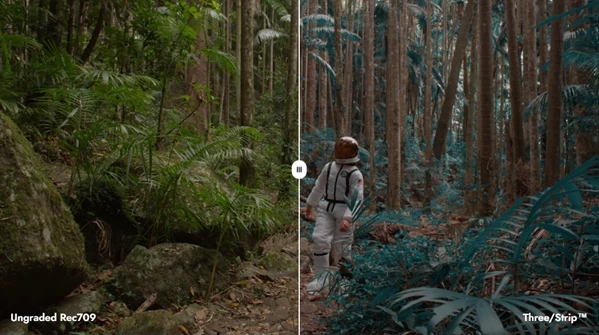
Rather than simply making colors stronger, it changes their relationships and separation. This can create richer color contrast and a more distinctive cinematic palette while giving you room to decide how strongly the effect should influence the image.
For example, footage with colorful costumes, production design, landscapes, or strong primary colors can gain a much more stylized relationship between reds, greens, and other hues.
Two-Strip Palette Mode
For an even older aesthetic, the OFX plug-in includes a two-strip mode.
Its limited red-green response can work especially well for period-inspired sequences, experimental films, title sequences, music videos, or any project where modern digital color feels too clean and contemporary.
Instead of merely making footage look "old," the restricted palette gives the image a more specific visual identity.
Controlled Crosstalk
Crosstalk is an important part of the Three/Strip approach. It allows color layers to interact in a way inspired by classic three-strip film reproduction.
Small adjustments can subtly change the personality of a grade, while stronger settings can produce a much more stylized palette. This gives you considerably more flexibility than applying a fixed Technicolor-style preset.
Automatic Skin Protection
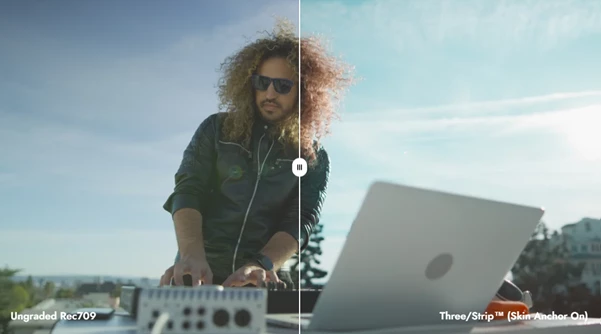
Bold palette transformations can easily create unnatural faces. Three/Strip addresses this with automatic skin protection designed to preserve natural-looking skin tones while the surrounding color volume is compressed and reshaped.
This is particularly valuable for narrative scenes, commercials, fashion footage, and music videos where you may want an expressive palette without sacrificing believable skin.
Five PowerGrade Looks
The collection includes five PowerGrade DRX files that explore different Technicolor-inspired palettes.
These are separate creative starting points rather than replacements for the main OFX or DCTL controls. They can help you quickly explore different directions before refining the grade around your footage.
Built for Look Development
Three/Strip is primarily a look-development tool.
That distinction is important. Its purpose is not simply to correct individual shots but to help establish a recognizable palette that can become part of the visual language of an entire project.
You might build your core Three/Strip look on a representative hero shot, refine its color relationships, and then carry that visual direction across the rest of the sequence.
Professional Color Management
The tool is designed around DaVinci Wide Gamut and also supports ACES and other professional color-managed workflows.
This makes it easier to integrate Three/Strip into established grading pipelines without abandoning the color-management structure you already use.
Camera compatibility is also broad through Resolve Color Management or Color Space Transforms, including footage from ARRI, RED, Sony, Canon, Panasonic, Blackmagic, Apple Log, DJI, and other supported sources.
Blackmagic Control Surface Support
For colorists working with dedicated hardware, Three/Strip integrates with Blackmagic Mini and Advanced Control Surfaces.
This allows important adjustments to remain accessible within a hands-on grading workflow instead of constantly interrupting the process to interact with software controls.
What Is Included?
The Three/Strip collection includes one OFX plug-in for macOS, Windows, and Linux, one custom DCTL plug-in file, five PowerGrade DRX files, and a PDF user guide.
The OFX version works with both DaVinci Resolve Studio and the free edition of DaVinci Resolve 19.1 or newer.
The DCTL version requires DaVinci Resolve Studio 19.1+, as DCTL plug-ins do not run in the free edition.
This distinction is useful to remember: users of the free edition can still use the included OFX version, while Studio users can choose between both OFX and DCTL workflows.
Where Can Three/Strip Work Best?
The effect can be useful anywhere a project needs color to become an intentional part of its visual identity.
A historical short film could use the two-strip palette to suggest an early color-film aesthetic. A fashion project could use three-strip separation to create stronger relationships between wardrobe, skin, and set colors. A music video might push Crosstalk further for a deliberately exaggerated retro palette.
For narrative work, the effect can also be considerably more subtle. Instead of attempting to reproduce an obvious vintage look, you can introduce only enough color separation and density character to make modern digital footage feel less neutral.
That flexibility is one of the main strengths of a controllable look-development tool compared with a one-click preset.
Tips for Better Results
Start gently. Strong color-processing tools often produce their most convincing results when the effect supports the footage rather than completely overpowering it. Begin with restrained Crosstalk and color adjustments, then gradually increase them while watching important colors and skin tones.
It is also worth choosing a representative hero shot before building the look for an entire project. Pick an image containing important elements such as skin, wardrobe, highlights, shadows, and key production colors. Once the palette works there, test it across several different shots before committing to it.
Pay particular attention to skin. The built-in skin protection helps preserve natural tones, but every shot and lighting environment is different. Check faces carefully whenever you make stronger palette adjustments.
If you are experimenting with a period look, try the two-strip mode rather than simply reducing saturation. Its restricted color response can create a more intentional early-cinema character than generic vintage processing.
For three-strip-inspired grades, consider the relationship between production design and color processing. Footage containing deliberate reds, greens, costumes, props, and colorful environments gives the color-separation tools more visual information to work with.
Finally, avoid treating Three/Strip as the entire grade. Use it as part of a broader node structure where exposure, balancing, contrast, film-emulation elements, and final output adjustments can each be controlled independently.
A Flexible Approach to Vintage Color
Three/Strip offers a more hands-on way to explore the visual character of classic two-strip and three-strip color inside DaVinci Resolve.
Instead of reducing the Technicolor aesthetic to a fixed preset, it provides OFX and DCTL workflows, controlled Crosstalk, three-strip separation, a two-strip palette mode, skin protection, PowerGrades, and support for professional color-managed pipelines.
That makes it useful not only for obvious retro effects, but also for modern projects that simply need richer color relationships and a more distinctive palette.
Whether you are grading a narrative film, commercial, fashion piece, music video, or period-inspired project, Three/Strip gives you room to experiment with classic color ideas while keeping the final look under your control.

Files Password : gfxplugin.com OR 123456