Downloadable Files
You can download Cloth NeXt for free from the end of this page.
Bring Faster Cloth Simulation to Blender
Creating believable cloth can be one of the more demanding parts of a 3D workflow. Fabric needs to move naturally, respond properly to collisions, and remain stable enough for artists to experiment without constantly fighting the simulation.
Cloth NeXt aims to provide a faster and more pleasing way of using GPU cloth simulation within Blender. Cloth NeXt enables next-generation GPU cloth simulation in Blender, giving artists a stable, creative, and fast workflow.
Whether you are experimenting with a simple piece of fabric or building a more complex production-ready simulation, Cloth NeXt aims to make cloth physics feel much more intuitive.
What Is Cloth NeXt?
Cloth NeXt is a GPU-powered cloth simulation solution created specifically for Blender. Instead of treating cloth simulation as a slow and complicated technical process, it provides artists with a faster way to create and experiment with physically simulated fabric.
GPU acceleration is particularly valuable when working with cloth because simulation often requires many calculations to determine how fabric moves, folds, and interacts with other geometry.
By delivering GPU cloth simulation directly inside Blender, Cloth NeXt helps create a workflow where artists can spend more time adjusting the visual result and less time waiting for simulations.
This can be useful for many different types of 3D scenes. You might be creating flowing fabric, experimenting with cloth interacting with objects, or developing more complex simulations intended for production. In each case, faster feedback makes it easier to test ideas and refine the final result.
Why Faster Cloth Simulation Matters
Cloth is highly dependent on iteration. Small changes can significantly affect how fabric behaves, so artists often need to run a simulation, inspect the result, make adjustments, and simulate again.
A faster workflow makes this experimentation much more practical.
Instead of avoiding changes because another simulation could take too long, you can explore different setups and concentrate on finding the movement and behavior that work best for your scene.
Stability is equally important. Complex cloth setups become much easier to work with when the simulation system provides predictable results and allows artists to focus on creative decisions rather than constantly troubleshooting the physics.
Next-Generation GPU Cloth Simulation
At the heart of Cloth NeXt is GPU-powered cloth simulation. The system is designed to take advantage of GPU processing to provide a faster cloth workflow directly inside Blender.
This is particularly helpful when working on scenes where repeated simulation and adjustment are necessary.
Fast and Responsive Workflow
Cloth NeXt focuses heavily on speed. Faster simulation means faster experimentation, allowing artists to evaluate changes without unnecessarily interrupting their creative process.
This can make a noticeable difference when refining folds, movement, collisions, and the overall behavior of fabric.
Stable Cloth Physics
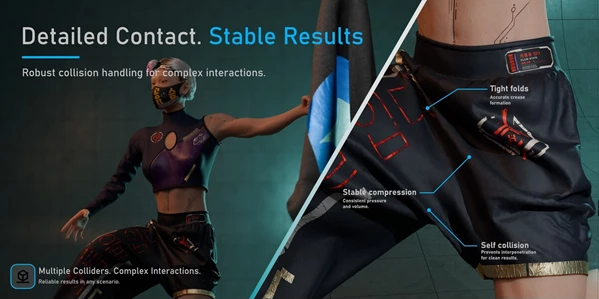
Speed alone is not enough for serious cloth work. Cloth NeXt is also designed around simulation stability, helping artists create more dependable cloth setups while working on increasingly complex scenes.
A stable simulation gives you a stronger foundation for refining your results.
Cloth Collision Support
Realistic fabric needs to interact convincingly with surrounding geometry. Cloth collision functionality allows simulated fabric to respond to other objects in the scene instead of simply passing through them.
This is essential for many practical cloth setups and helps produce more believable results.
From Simple Tests to Production Work
Cloth NeXt is intended to scale from straightforward fabric experiments to more complex, production-ready simulations.
You can use the same workflow while exploring basic cloth behavior and then move toward more detailed scenes as your project develops.
Integrated Directly into Blender
One of the biggest advantages is that the workflow remains inside Blender. Artists can create their scene, work with their geometry, configure cloth behavior, and continue developing the project without moving the simulation process into a separate application.
This makes Cloth NeXt especially useful for Blender artists who want more powerful cloth capabilities while keeping their existing workflow intact.
Where Can You Use Cloth NeXt?
There are many situations where GPU-accelerated cloth simulation can improve a Blender project.
For example, you could use it to experiment with fabric draped over objects, create cloth elements that react to surrounding geometry, or develop more elaborate animated fabric simulations.
It can also be valuable during look development. Because cloth is highly sensitive to physical changes, being able to iterate quickly allows you to compare different behaviors and choose the version that looks most convincing.
For larger projects, the combination of speed and stability can help make repeated cloth simulation a more manageable part of the production process.
Tips for Better Cloth Simulations
Even with a fast GPU solver, good cloth results depend on thoughtful setup. Start with relatively simple simulations whenever possible and make sure the basic behavior works before adding unnecessary complexity.
Pay particular attention to collisions. Cloth interacting incorrectly with surrounding objects can immediately make an otherwise good simulation feel unrealistic. Testing these interactions early can save significant refinement later.
It is also worth making changes gradually. Instead of modifying several parts of a simulation at once, adjust one element, run the simulation, and observe how the cloth responds. This makes it easier to understand what is actually influencing the final result.
Finally, take advantage of the faster workflow to experiment. Try different setups and observe how small adjustments change the folds, movement, and interaction of the fabric. Faster feedback is most useful when it gives you the freedom to explore rather than simply rushing toward the final simulation.
Make Cloth a More Creative Part of Blender
Cloth NeXt brings next-generation GPU cloth simulation directly into Blender with an emphasis on speed, stability, and creative freedom.
Its biggest advantage is not simply making cloth simulation faster. A more responsive simulation workflow makes experimentation easier, allowing artists to spend more time refining how their fabric looks and behaves.
From simple cloth setups to more complex production-ready simulations, Cloth NeXt provides Blender artists with a dedicated approach to GPU cloth physics that can make the entire process feel more intuitive and enjoyable.
For artists who regularly work with fabric, collisions, cloth physics, or simulation-heavy Blender scenes, Cloth NeXt offers a practical way to turn cloth simulation into a faster and more flexible part of the creative workflow.

Files Password : gfxplugin.com OR 123456