Downloadable Files
You can download Exposure/Tool™ DCTL for free from the end of this page.
Take Precise Control of Exposure in DaVinci Resolve
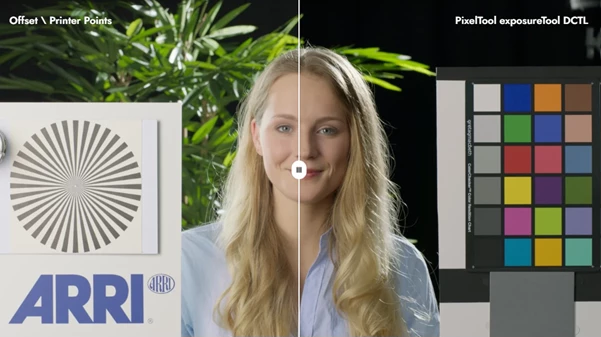
Exposure is one of the most fundamental parts of color grading, but making exposure adjustments is not always as straightforward as it seems. Traditional controls such as Offset, Printer Points, or Lift/Gamma/Gain can affect more than just overall brightness. In particular, some adjustments can raise black levels and leave shadows looking slightly washed out or milky.
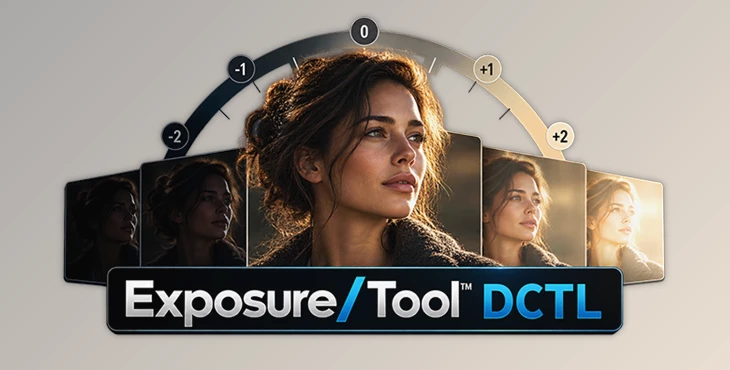
Exposure/Tool™ DCTL gives you a simpler way to handle exposure. It lets you adjust your image using real exposure stops, similar to changing exposure in a camera or working with RAW footage.
Instead of guessing how far to move a conventional grading control, you can make predictable exposure changes while preserving clean black levels and maintaining the overall character of the image.
Why Exposure in Stops Makes Grading Easier
Photographers and cinematographers already think about exposure in stops. Increasing exposure by one stop has a clear meaning, which makes this approach easier to understand and repeat across different shots.
Exposure/Tool™ DCTL brings that familiar concept directly into the grading process. This can be especially useful when balancing multiple clips from the same scene or correcting footage that was captured slightly too bright or too dark.
For example, imagine an interior shot where the subject is underexposed, but the overall contrast already looks good. A conventional brightness adjustment may lift the deepest blacks along with the subject. With a more exposure-focused tool, you can brighten the image while keeping the black levels cleaner.
The result is greater control with less trial and error.
Photometric Exposure Adjustments
The main exposure control works in real photographic stops. This makes adjustments intuitive and predictable, particularly for users accustomed to working with cameras and RAW footage.
You can quickly increase or decrease exposure without relying on arbitrary control values.
Clean Black Level Preservation
One of the most important characteristics of Exposure/Tool™ DCTL is its ability to maintain clean black levels.
Native adjustments such as Offset can sometimes raise the black floor as exposure increases, potentially giving dark areas a slightly milky appearance. Exposure/Tool™ is designed to avoid this behavior, helping shadows retain their depth while you adjust overall exposure.
This is particularly useful when working on cinematic footage where deep, controlled shadows are an important part of the image.
Fill Exposure for Shadow Detail
The dedicated Fill Exposure control provides another useful way to shape the image.
Instead of simply increasing the brightness of the entire frame, Fill Exposure introduces soft, targeted light below middle gray. This allows you to reveal additional shadow detail without unnecessarily flattening the entire image.
For example, if a person's face contains important information in the darker tonal range, Fill Exposure can gently open those areas while helping brighter portions of the image remain controlled.
Visual Fill Roll-Off Curve
Exposure/Tool™ also provides a visual roll-off curve for Fill Exposure.
The overlay helps you see where the fill adjustment begins and how gradually it fades through the tonal range. This makes it easier to shape the transition naturally rather than relying entirely on visual guesswork.
It can be especially helpful when you want to lift darker areas without creating an obvious processed look.
Fast Node-Based Workflow
The tool is designed to fit naturally into professional DaVinci Resolve grading workflows.
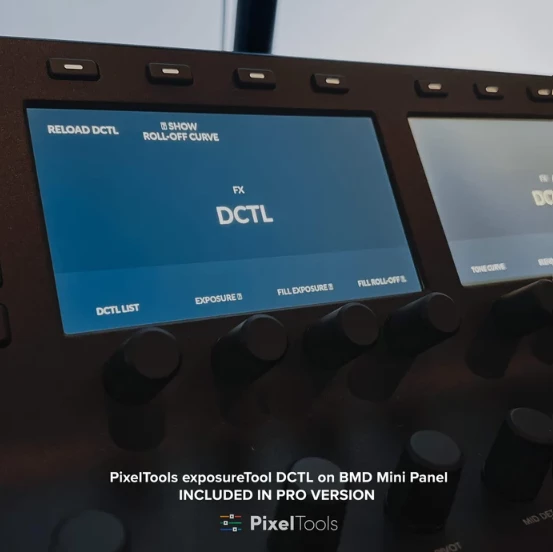
Simply apply it to a node and access it through FX. It is also compatible with Blackmagic Design control panels, making it practical for users working with established fixed node trees.
Because the exposure operation can remain on its own dedicated node, you can keep exposure adjustments separated from contrast, color balance, saturation, and creative look development.
Wide Log Format Support
Exposure/Tool™ DCTL supports major professional camera and log workflows, including:
ARRI LogC3 and LogC4
RED IPP2
Sony S-Log2 and S-Log3
Canon Log
DJI D-Log
Panasonic V-Log
Other common professional log workflows
This makes the tool suitable for projects involving footage from different camera systems.
Color-Managed Workflow Support
Exposure/Tool™ is designed for scene-referred color grading and works with DaVinci Wide Gamut, ACES, and Resolve Color Management workflows.
This is particularly valuable when building a consistent grading pipeline where exposure corrections need to behave predictably before the final display transform.
Base Setup PowerGrade Included
A Base Setup PowerGrade is included to help you integrate the tool into your grading workflow quickly.
Rather than building the initial setup from scratch, you can use the provided PowerGrade as a practical starting point and adapt it to your own node structure.
Where Exposure/Tool™ DCTL Can Be Useful
The tool can fit into many everyday color-grading situations. You might use it to correct an underexposed Log clip, balance exposure differences between cameras, compensate for small exposure inconsistencies between shots, or gently reveal detail in dark areas.
It can also be useful when creating a fixed node tree. A dedicated exposure node near the beginning of the grade gives you a consistent place to perform primary exposure corrections before moving on to contrast, color separation, secondary corrections, and creative look development.
For projects containing many clips, this structured approach can make grading faster and easier to manage.
Tips for More Natural Exposure Adjustments
For the most natural results, start with relatively small exposure changes and evaluate the image as a whole. Just because the tool allows precise adjustments in stops does not mean every shot needs a dramatic correction.
When shadows need additional detail, try using Fill Exposure instead of pushing the overall exposure too far. Adjust the Fill Roll-Off so the effect blends smoothly into the surrounding tonal range.
It is also useful to separate technical correction from creative grading. Use Exposure/Tool™ for exposure management first, then handle contrast, color balance, saturation, and the final look on separate nodes. This keeps your grade organized and makes individual adjustments easier to revisit.
In color-managed workflows, place the tool appropriately within your scene-referred node structure so that exposure adjustments remain predictable.
Designed for DaVinci Resolve Studio
An important compatibility detail is that Exposure/Tool™ DCTL requires DaVinci Resolve Studio. DCTL plug-ins are not supported in the free version of DaVinci Resolve.
The tool works with DaVinci Wide Gamut, ACES, and other Resolve Color Management workflows, making it particularly suitable for users who already work with professional scene-referred grading pipelines.
Installation is handled through the PixelTools installer, which places the required files in the appropriate Resolve location.
A Cleaner Way to Manage Exposure
Exposure correction should ideally be predictable, fast, and easy to repeat from shot to shot. Exposure/Tool™ DCTL approaches this task with controls that closely match the way photographers, cinematographers, and colorists already think about exposure.
Exposure/Tool™ DCTL keeps this process simple by using controls that feel familiar to anyone who has worked with cameras or color grading. You can adjust exposure in stops, control Fill Exposure separately, and see how the highlights roll off as you make changes. It also works with a wide range of Log formats and color-managed workflows in DaVinci Resolve Studio.
If you often need to fix exposure without lifting the blacks or losing depth in the shadows, Exposure/Tool™ DCTL gives you a more direct way to do it than relying only on Resolve’s standard grading controls.

Files Password : gfxplugin.com OR 123456