Downloadable Files
You can download Filmic/Contrast™ DCTL for free from the end of this page.
Filmic/Contrast™ DCTL
Creating cinematic contrast is about much more than making shadows darker and highlights brighter. A good contrast curve can shape the entire character of an image, giving it depth, softness, separation, and a more natural sense of dimension.
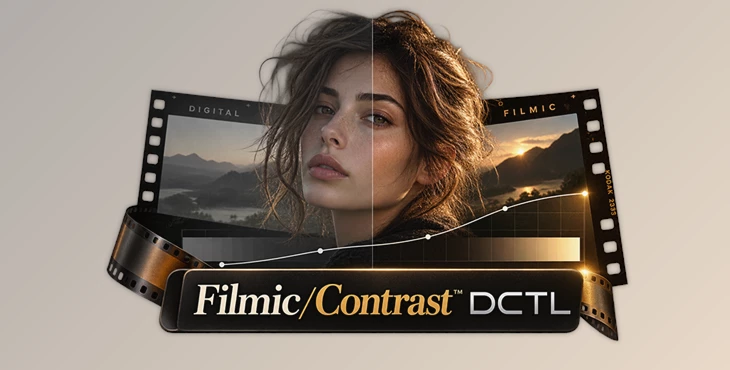
Filmic/Contrast™ DCTL is a professional contrast-shaping tool for DaVinci Resolve Studio designed to bring an analog-inspired feel into modern digital color grading. Instead of manually building complicated curves, it gives colorists an intuitive way to create smooth highlights, gently lifted shadows, and carefully controlled tonal separation.
Ideal for grading music videos, commercials, short films, online content,, or simply creating your own cinematic aesthetic, Filmic/Contrast™ DCTL provides a flexible way to craft contrast that results in images that aren't over-processed or harsh.
Why Filmic Contrast Makes a Difference
Digital contrast can easily become aggressive. Deepening the shadows too much may crush important detail, while pushing highlights can make bright areas look hard or unnatural.
Film-inspired contrast takes a more controlled approach.
Rather than simply stretching the tonal range, the goal is to shape how different areas of the image transition from shadows through midtones and into highlights. Smooth highlight roll-off can help bright areas feel more natural, while slightly lifted blacks can introduce the softer shadow character often associated with analog film.
Imagine grading an interior scene with bright windows and darker areas inside the room. A carefully designed filmic curve can maintain a sense of depth in the shadows while allowing the brighter areas to transition more smoothly.
The same principle works beautifully for portraits, landscapes, commercial footage, and narrative scenes where you want contrast without sacrificing subtle tonal information.
Meet Filmic/Contrast™ DCTL
Filmic/Contrast™ DCTL is built specifically for creating and refining these kinds of contrast curves inside DaVinci Resolve Studio.
Its scene-referred Modern Curves engine provides a reliable starting point for developing custom looks or LUTs. Instead of fighting Resolve's traditional curve tools, you can shape the image through controls designed around practical color-grading workflows.
The tool was developed by working professional colorists and is intended for real-world film, television, commercial, and streaming workflows.
Its purpose is simple: give you precise control over contrast while making the process faster, clearer, and more intuitive.
Features
Modern Curves Engine
At the heart of Filmic/Contrast™ DCTL is its scene-referred Modern Curves engine.
This gives you a solid foundation for shaping contrast while working with modern color-managed footage. It is particularly useful when developing a consistent look or creating LUTs because you can establish the tonal character of the image before moving into more creative adjustments.
Instead of treating contrast as a simple global adjustment, the curve can become an intentional part of your overall look.
Lifted Blacks Control
One of the easiest ways to introduce a softer film-inspired character is through the Lifted Blacks control.
It allows you to gently raise the darkest areas of the image, producing softer matte-like shadows without manually manipulating multiple curve points.
This can be especially useful for nostalgic grades, subtle film emulation, fashion footage, music videos, or any project where completely crushed blacks would feel too digital or aggressive.
The key is moderation. A small amount can soften the image while preserving depth; too much can make the grade look washed out.
Five Curated PowerGrade Curves
Filmic/Contrast™ DCTL includes five curated PowerGrade curves that provide practical starting points for different styles:
Modern
Soft Film
ENR Bleach
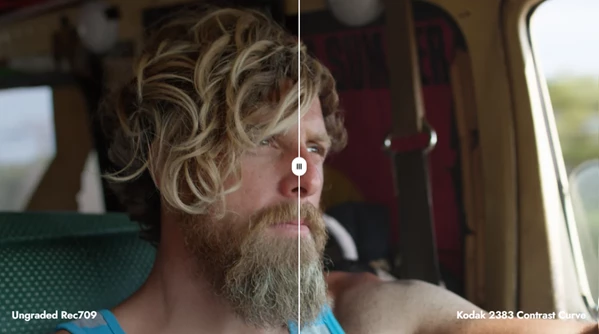
Kodak 2383
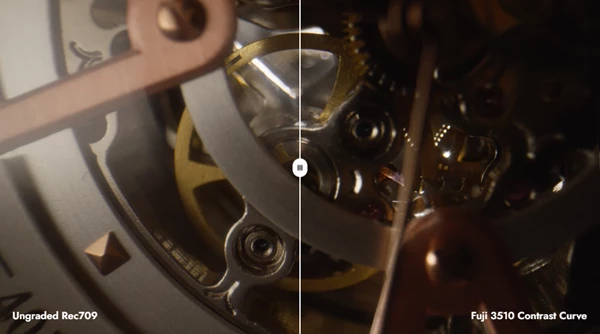
Fuji 3510
These presets are useful when you want to quickly explore different tonal directions without building every curve from scratch.
For example, you might begin with Soft Film for a gentler cinematic image, while the Kodak 2383 or Fuji 3510-inspired options can provide different starting points when developing a more traditional film-oriented look.
Because they serve as starting points, you can continue adjusting the grade to suit the specific lighting, exposure, camera, and creative direction of your footage.
Visual Curve UI
Understanding what a contrast adjustment is actually doing becomes much easier when you can see its effect clearly.
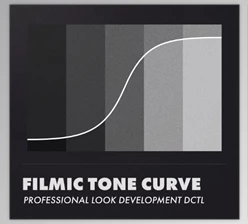
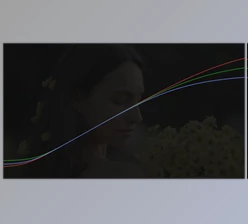
Filmic/Contrast™ DCTL provides a visual greyscale ramp and on-screen curve overlays that help you understand how your adjustments affect the tonal range.
This visual feedback is particularly helpful when making subtle changes. Instead of relying entirely on trial and error, you can see how the tonal response is being shaped while evaluating the actual image.
Built for Color-Managed Workflows
The tool is designed around DaVinci Wide Gamut (DWG) and works with professional color-management workflows including ACES.
This makes Filmic/Contrast™ DCTL suitable for projects where maintaining a controlled color pipeline is important.
It can fit into workflows involving Resolve Color Management and Color Space Transforms, allowing the contrast treatment to become part of a larger structured grading pipeline rather than an isolated effect.
Broad Camera Support
Because Filmic/Contrast™ DCTL works within professional color-managed workflows, it can be used with footage from a wide range of camera systems.
This includes footage from:
ARRI, RED with IPP2, Sony, Canon, Panasonic, Blackmagic, Apple Log, and DJI, as well as other input formats supported through Resolve Color Management or Color Space Transforms.
This flexibility is particularly useful for editors and colorists who regularly receive footage from several different cameras within the same project.
A Strong Foundation for Custom Looks and LUTs
One of the most useful aspects of Filmic/Contrast™ DCTL is that it does not have to be treated as a final "look."
It can instead become the tonal foundation of a larger grade.
For example, you could first use Filmic/Contrast™ DCTL to establish your preferred shadow depth, midtone separation, and highlight behavior. After that, you can continue developing color separation, saturation, film characteristics, or other creative adjustments in additional nodes.
This approach can also be helpful when designing your own LUTs because the contrast behavior becomes a deliberate part of the look rather than something added randomly at the end.
Tips for Better Results
Start with subtle adjustments. Film-inspired contrast usually works best when the viewer notices the overall character of the image rather than an obvious contrast effect.
Pay particular attention to skin tones and important midtones. Deep blacks may look impressive at first glance, but maintaining useful detail in faces and other important areas often produces a more sophisticated result.
When using Lifted Blacks, avoid raising the shadows simply because a matte look is fashionable. Consider whether the treatment actually supports the mood of the scene.
It is also worth testing the included PowerGrade curves as starting points before creating a curve entirely from scratch. They can help you quickly identify the general tonal direction that works best for your footage.
For color-managed projects, make sure your footage is correctly transformed into the intended working color space before making creative decisions. A consistent color-management pipeline makes it much easier to judge contrast accurately across footage from different cameras.
Finally, evaluate the image at normal viewing size as well as through scopes. Technical information is valuable, but the final goal is still an image that feels natural and visually intentional.
Bringing an Analog Touch to Digital Grading
Filmic/Contrast™ DCTL offers a practical way to approach one of the most important parts of color grading: contrast.
With its visual curve interface, Lifted Blacks adjustment, curated PowerGrade curves, Modern Curves engine, and support for professional color-managed workflows, Filmic/Contrast™ DCTL can be used for quickly creating a cinematic starting point, as well as for carefully crafting custom looks.
The tool promotes more controlled manipulation of shadows, midtones, and highlights rather than extreme edits. This can result in softer, deeper, and more purposeful digital content whilst still benefiting from the advantages of a modern grading workflow.
For colorists who frequently work in DaVinci Resolve Studio and want an easier way to experiment with film-inspired tonal characteristics, Filmic/Contrast™ DCTL provides an interesting balance between speed, visual control, and creative flexibility.

Files Password : gfxplugin.com OR 123456