Downloadable Files
You can download FilmFade DCTL for free from the end of this page.
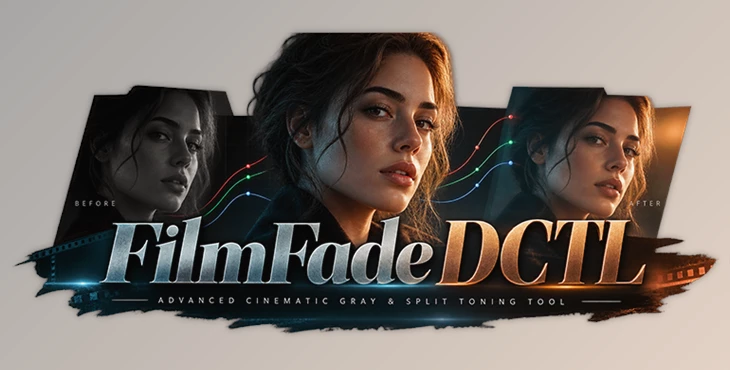
Give Digital Footage a More Filmic Tonal Character
Creating a convincing cinematic look is not always about adding stronger colors or applying a dramatic LUT. Sometimes, an image's character comes from small tonal adjustments—lifting the blacks slightly, softening the highlights, or introducing subtle color differences between shadows and brighter areas.
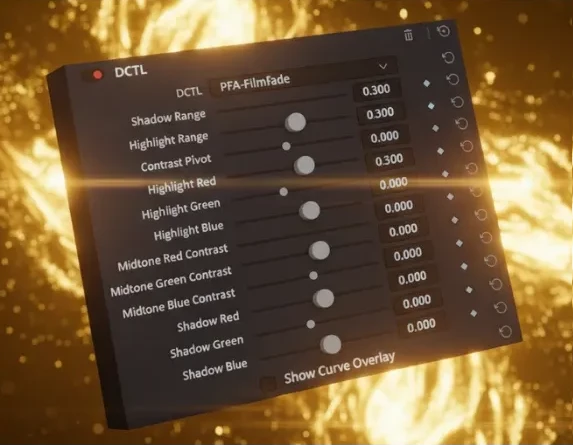
FilmFade DCTL can be helpful here. This cinematic gray and split-tone tool includes a number of sliders that let you manipulate RGB values across various tonal ranges. Rather than manually creating complex curves, you can use controls that directly affect your image's overall tone.
This provides a more efficient, accessible way to achieve cinematic faded shadows, controlled highlights, and cinematic split tone.
Create the Filmic Gray Shadow Look
One of the most recognizable characteristics of many film-inspired grades is the way deep blacks are handled. Rather than dropping directly into pure black, shadows can be gently lifted toward gray, producing a softer and more atmospheric image.
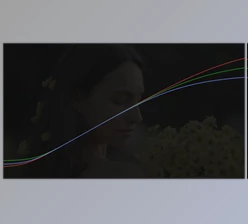
To do this manually requires some careful manipulation of RGB curves. Because small changes can have a large impact on the image,, it can take time to find a balance across the channels while maintaining the desired contrast.
FilmFade DCTL simplifies this process by translating these tonal adjustments into dedicated sliders. You can mathematically manipulate RGB values and shape the tonal range without constantly working directly with curves.
For example, raising the shadow RGB values together can create a subtle gray-black fade. Adjusting them independently allows you to introduce color into the darker areas and build more stylized cinematic looks.
Why Split Toning Matters
Split toning allows different parts of an image's tonal range to carry different color characteristics.
Instead of applying one color treatment across the entire frame, you can separate shadows and highlights. A scene might have slightly cooler shadows while retaining warmer highlights, or the dark areas could carry a subtle color cast while brighter portions remain more neutral.
These differences can add depth and atmosphere.
For narrative footage, this can support a darker and moodier visual style. Music videos can benefit from more pronounced color separation, while commercials and creative projects can use subtle split toning to give otherwise clean digital footage more character.
The important part is control. The effect should complement the footage rather than overpower it.
FilmFade DCTL Features
Slider-Driven Tonal Control
FilmFade DCTL turns advanced tonal adjustments into a slider-based workflow. This makes it easier to experiment with the look of an image without constantly manipulating traditional RGB curves.
Cinematic Gray Shadows
The tool is particularly useful for creating lifted gray shadows. By raising the shadow values, you can soften the black point and produce the faded appearance commonly associated with film-inspired grades.
RGB Shadow Control
RGB values in the shadow region can be manipulated to shape both brightness and color.
Matching the RGB shadow sliders can produce a neutral gray fade, while varying them independently provides greater creative control over shadow coloration.
Highlight Rolloff Control
FilmFade DCTL also lets you control the brighter areas of the image. Adjusting highlight behavior can help prevent the grade from feeling overly harsh and allows you to balance the brighter parts of the frame against lifted shadows.
Split Toning
Separate RGB manipulation makes it possible to introduce different tonal characteristics throughout the image. This can be used for subtle color separation or more noticeable creative grades.
Mathematical Color Processing
Rather than relying on a fixed LUT, DCTL processing uses mathematical operations to manipulate color values. This gives the tool precise control over the image and keeps adjustments flexible during grading.
GPU-Accelerated Processing
DCTLs use GPU processing for real-time color grading. This enables immediate visual feedback while adjusting the look and helps maintain an efficient grading workflow.
High Color Precision
Because DCTLs use mathematical algorithms rather than fixed lookup tables, they provide precise color transformations without being limited to a predefined LUT look.
Where FilmFade DCTL Can Be Useful
FilmFade DCTL can fit into many types of color-grading workflows.
For cinematic and narrative projects, you can use it to lift shadows and add subtle color separation that supports a scene's atmosphere.
For music videos, stronger split-toning choices can help establish a distinctive visual identity.
For commercial and branded content, smaller adjustments can soften digital blacks and create a more polished tonal response without making the footage appear heavily processed.
It can also help when building a film-emulation-inspired grade, especially when you want more direct control over the black point and tonal color relationships instead of relying entirely on a preset look.
A Faster Alternative to Complex RGB Curves
RGB curves are extremely powerful, but they can also be intimidating when you only need a specific tonal result.
A small curve adjustment can affect a large portion of the image, and balancing multiple channels may require repeated tweaks.
FilmFade DCTL approaches the same type of manipulation through dedicated controls. The slider-based workflow can make concepts such as shadow lifting and split toning easier to understand visually.
This is especially useful when you already know the result you want—for example, slightly faded blacks with a subtle color bias—but don't want to spend unnecessary time building the effect manually.
Tips for Better Results
Start with small adjustments. A cinematic fade does not necessarily require heavily lifted blacks. Slightly raising the shadow values can often create enough separation from pure black while preserving contrast and depth.
For a neutral gray fade, start by keeping the RGB shadow adjustments relatively balanced. Once the basic tonal structure feels right, experiment with individual channels to introduce subtle color variation.
Pay attention to the relationship between shadows and highlights as well. If the shadows are heavily lifted while highlights remain extremely aggressive, the image can feel disconnected. Use the highlight controls to create a more cohesive tonal transition.
Split toning also tends to work best when it supports the existing colors of the scene. Instead of immediately pushing extreme values, gradually introduce color and watch how skin tones, neutral objects, and important visual elements respond.
Build the Look Before the Final Creative Touch
FilmFade DCTL can also work as part of a larger grading workflow.
You can use it to establish the tonal character of the image first—adjusting the shadow fade, highlight response, and tonal color separation—and then continue refining the grade with other tools.
This can be especially helpful before applying a final creative LUT. By establishing the tonal foundation beforehand, you have more control over how the final look interacts with the footage.
The goal is not necessarily to make FilmFade responsible for the entire grade. Instead, it can handle a specific part of the process efficiently, leaving you more time to refine the overall image.
Final Thoughts
FilmFade DCTL offers a targeted solution for cinematic gray shadows, controlled highlight rolloff, and split-tone experimentation through a simple slider interface.
One of the major benefits of this plugin is that it provides both control and accessibility. Changes that would typically involve manipulating RGB curves can instead be accomplished using specific sliders. This can provide greater clarity while grading by showing exactly what changes are being made to the image.
Whether you're creating a subtle film-inspired fade, developing a moody narrative look, or adding tonal separation to digital footage, FilmFade DCTL gives you precise control over some of the elements that have the greatest influence on the character of a grade.
Used with restraint, those relatively small adjustments to shadows, highlights, and RGB balance can make a significant difference in how cinematic and cohesive the final image feels.

Files Password : gfxplugin.com OR 123456