Downloadable Files
You can download Color Slider DCTL for free from the end of this page.
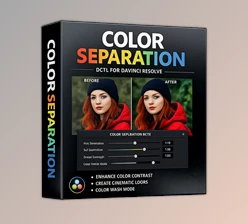
Fast and Precise Color Separation for DaVinci Resolve
Color grading often becomes more complicated than it needs to be. You may want to adjust one specific color in a shot, but traditional qualifiers, masks, and multiple nodes can quickly turn a simple correction into a time-consuming workflow. On less powerful systems, complex grading setups can also affect timeline performance.
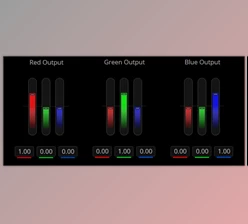
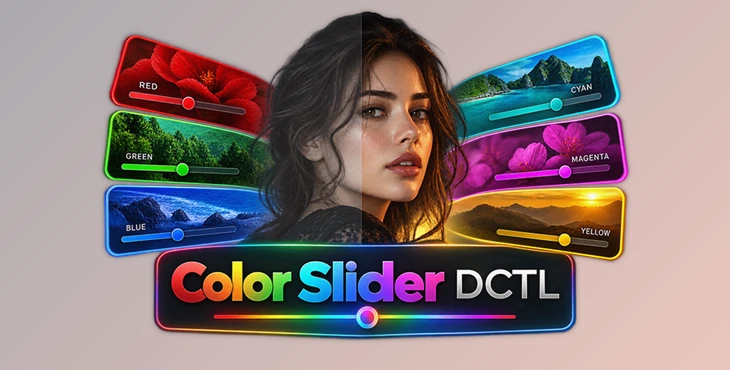
Color Slider DCTL allows fast, non-destructive correction of six primary color components: Red, Green, Blue, Cyan, Magenta, and Yellow.
Unlike traditional pixel-based selection methods, Color Slider DCTL uses mathematical color separation to deliver fast, consistent results in DaVinci Resolve Studio. This provides a more efficient way to separate colors, grade, and maintain strong timeline performance.
A Faster Approach to Color Separation
Traditional color qualifiers can be extremely useful, but they are not always the fastest solution. Complex qualifiers and power windows may require extra processing, and inaccurate selections can make it hard to isolate the exact color you intended.
For example, cyan areas may be interpreted as blue, while yellowish skin tones can sometimes overlap with red selections. Fixing these situations often requires additional adjustments or nodes.
Color Slider DCTL approaches the problem differently. It separates colors mathematically rather than depending on conventional pixel selection.
This gives you dedicated control over the six foundational color channels directly from a single DCTL. You can adjust a blue sky, refine green vegetation, modify warm skin tones, or shift cyan and magenta accents without building an unnecessarily complicated node structure.
Six-Channel Color Control
At the center of Color Slider DCTL is a six-vector color system covering:
Red – Useful for skin tones, warm objects, and red accents.
Green – Ideal for vegetation, environmental elements, and unwanted green casts.
Blue – Useful for skies, water, shadows, and other cool areas.
Cyan – Provides more precise control over teal and turquoise colors.
Magenta – Helps refine pink, purple, and magenta elements.
Yellow – Useful for warm highlights, golden-hour scenes, and yellow tones.
Having all six channels available within one node can significantly simplify the grading process. Instead of creating several qualifiers for different colors, you can perform multiple targeted adjustments from the same tool.
Mathematical Color Separation
One of the most important characteristics of Color Slider DCTL is its approach to color isolation.
Rather than relying on traditional pixel selection, the DCTL uses mathematical color separation. This approach provides more predictable control while avoiding the performance overhead of complex qualifiers and power windows.
For editors and colorists working with demanding timelines—or simply using lower-performance computers—this can make the grading experience noticeably more responsive.
Non-Destructive and Stackable Workflow
Color Slider DCTL is designed for non-destructive grading and can be stacked multiple times when a project requires deeper or more layered adjustments.
For example, one instance could handle skin and warm colors, while another could handle skies, vegetation, or stylized cyan and magenta tones.
This allows you to create more sophisticated looks while keeping individual adjustments organized.
Built-In Mask Tool
When making targeted color adjustments, knowing exactly which areas of the image are being affected is extremely important.
The built-in Mask Tool helps you see where your adjustments land. Instead of guessing whether a particular slider is affecting unwanted parts of the frame, you can inspect the affected areas directly.
This can be especially helpful when similar colors appear in different parts of a scene.
Precision Range Slider
The Range Slider gives you more control over the boundaries of a color adjustment.
You can expand the range for a broader adjustment or tighten it for more selective color separation.
For example, if you are adjusting blue tones but want to minimize changes to nearby cyan areas, refining the range can help produce a cleaner and more controlled result.
What’s New in Color Slider 2.0?
Color Slider 2.0 expands the original color-separation workflow with additional finishing controls.
These tools allow you to move beyond individual color adjustments and make broader aesthetic changes without leaving the DCTL interface.
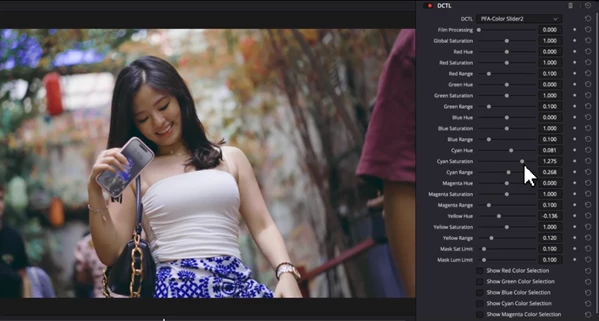
Film Processing Slider
The Film Processing Slider is designed to introduce characteristics inspired by analog film processing.
It subtly affects tonal and density characteristics to give digital footage additional depth and texture. Rather than functioning simply as another saturation control, it is intended as a finishing tool for creating a richer, more film-like appearance.
This can be useful after your primary color corrections are complete and you want to add a subtle cinematic character to the image.
Global Saturation Slider
Color Slider 2.0 also includes a Global Saturation Slider for controlling the overall intensity of color across the project.
Individual channel adjustments can remain intact while the overall saturation level is refined separately.
This is particularly useful near the end of a grade. After balancing the six individual channels, you can quickly decide whether the complete image needs slightly more or less color intensity.
Practical Uses in Real Grading Projects
The six-channel approach can be useful across many different types of footage.
In a landscape shot, you could refine the green vegetation while independently controlling the cyan and blue tones in the sky or water.
For portrait footage, red and yellow controls can help refine warm areas and skin-related colors while leaving cooler background elements relatively independent.
In commercial or product footage, you can refine individual brand colors or colorful objects more precisely without building a large collection of qualifiers.
You can also use the same controls creatively. Cyan, magenta, and yellow adjustments can help establish stylized palettes, while the Film Processing control can add a final film-inspired character to the finished grade.

Tips for Better Results
Start with subtle adjustments. Even though Color Slider DCTL provides precise control, strong channel changes can quickly create an unnatural image. Small movements usually provide a better foundation for professional-looking grades.
Use the Mask Tool whenever you are unsure about what part of the image is being affected. Visualizing the adjustment area can prevent accidental changes to colors elsewhere in the frame.
The Range Slider is also worth refining before pushing an adjustment too far. Tightening or expanding the affected color range can often produce a cleaner result than simply increasing the strength of the color change.
For more complicated grades, consider stacking multiple instances instead of forcing every correction into a single stage. Keeping adjustments logically separated makes the grade easier to understand and modify later.
Finally, treat the Film Processing and Global Saturation controls as finishing tools. Complete your important color corrections first, then use these global controls to refine the overall character and intensity of the image.
A Cleaner Way to Control Color
Color Slider DCTL provides a practical alternative to building complicated qualifier-heavy workflows for every targeted color adjustment.
With dedicated controls for Red, Green, Blue, Cyan, Magenta, and Yellow, mathematical color separation, a built-in Mask Tool, adjustable range control, and non-destructive stackability, it brings several useful grading functions together in one place.
Version 2.0 extends that workflow further with Film Processing and Global Saturation controls, making it possible to handle both targeted color adjustments and broader finishing decisions from the same DCTL.
Colorists and editors who frequently require color separation while still maintaining a healthy DaVinci Resolve timeline and manageable node structure will benefit from the fast and flexible color grading provided by Color Slider DCTL.

Files Password : gfxplugin.com OR 123456