Downloadable Files
You can download AI Image Watermark Remover Pro for free from the end of this page.
AI Image Watermark Remover Pro
Removing unwanted watermarks, logos, text, date stamps, or small distracting elements from a photo can be surprisingly difficult. Simply painting over an unwanted area often leaves visible smudges, repeated textures, or unnatural patches that make the edit obvious.
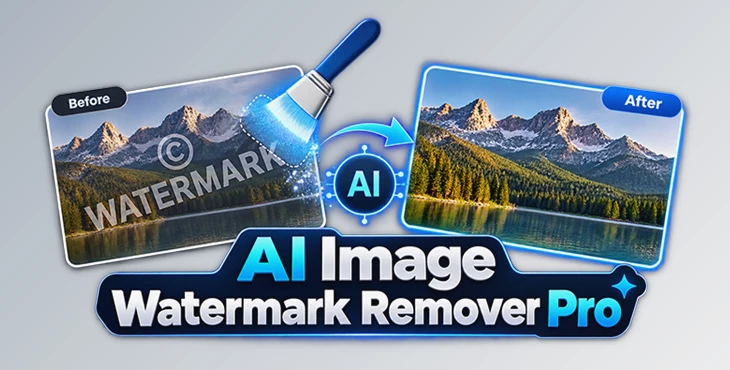
AI Image Watermark Remover Pro uses AI inpainting and a very accurate masking technique to remove unwanted objects from images and fill in the gaps with content. The software is a desktop application for Windows, and all processing occurs locally on your computer, which is ideal for users who need an offline editor or who are concerned about data privacy.
Clean Up Images with AI Inpainting
The key technology behind AI Image Watermark Remover Pro is AI inpainting. Instead of simply blurring or covering an unwanted element, the software analyzes the pixels surrounding the selected area and generates new image content to fill the gap.
For example, if a small text overlay appears over a wall, sky, fabric, or another textured surface, the software can analyze nearby colors, patterns, and details before reconstructing the selected area.
This can produce a much more natural result than traditional cloning or smudging methods, especially when the unwanted object is relatively small and does not heavily cover the main subject.
The same technology also makes the software useful beyond watermark removal. Scratches on scanned photographs, dust spots, minor blemishes, date stamps, and small background distractions can also be targeted with the masking tools.
Meet AI Image Watermark Remover Pro
AI Image Watermark Remover Pro is a specialized Windows application created to simplify image cleanup and object removal. Rather than requiring complicated manual retouching, the workflow revolves around selecting the unwanted area and allowing the AI to reconstruct it.
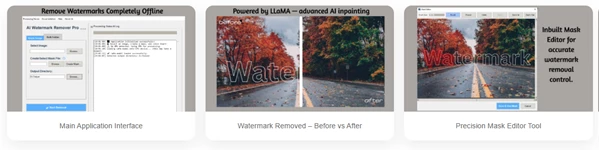
The process is straightforward: load an image, paint over the unwanted element with the Mask Editor, and start the removal process. The AI then analyzes the surrounding image information and fills the selected region.
Because the application runs completely offline, your photos do not need to be uploaded to an external server. This provides an additional level of privacy for photographers, designers, content creators, and anyone working with personal or confidential images.
AI-Powered Content Fill
The AI-powered inpainting system analyzes surrounding pixels and generates replacement content for masked areas. This helps reduce the obvious smudges and artifacts that can occur with simpler removal techniques.
It can be useful for cleaning backgrounds, repairing small damaged areas, removing distracting objects, or restoring sections of older photographs.
Precision Mask Editor
Good object removal starts with an accurate selection. The built-in Mask Editor lets you paint directly over the element you want to remove.
Brush, zoom, and eraser controls provide additional precision, allowing you to refine the mask before processing the image. A carefully created mask can help the AI preserve more of the original image while concentrating reconstruction only where it is needed.
Bulk Watermark Removal
When multiple images contain an unwanted element in the same location, editing every photo individually can become repetitive.
AI Image Watermark Remover Pro includes bulk processing that allows one mask to be applied across an entire folder of images. This can significantly speed up workflows involving large collections, product catalogs, or other sets of consistently formatted images.
Completely Offline Processing
All image processing takes place locally on the Windows computer. Images are not required to be uploaded to an online service.
This offline workflow can be particularly valuable when working with private photographs, unreleased creative projects, client materials, or other images that should remain on the local machine.
GPU Acceleration
Users with compatible NVIDIA CUDA-enabled GPUs can take advantage of GPU acceleration for faster processing.
A compatible GPU is not mandatory, however. The application can fall back to CPU processing when CUDA acceleration is unavailable, although processing may take longer.
Multiple Image Format Support
The software supports common image formats including PNG, JPG, JPEG, BMP, TIFF, and WebP. Processed results are saved in PNG format.
More Than Just Watermark Removal
Although its main purpose is removing watermarks and overlays, AI Image Watermark Remover Pro can handle several other image-cleanup tasks.
It can remove text and date stamps from old photographs, clean up small logos and overlays, repair scratches and dust spots, reduce visible blemishes, and eliminate small unwanted background objects.
For photo restoration, for example, you can carefully mask a scratch running across an old scanned photograph. The AI can then use the surrounding visual information to reconstruct the damaged area.
For a cleaner composition, you might instead mask a small distracting object in the background and allow the software to generate replacement pixels that better match the surrounding scene.
A Simple Three-Step Workflow
Using AI Image Watermark Remover Pro does not require a complicated editing process.
First, open the image you want to edit. Next, use the Mask Editor to paint over the watermark, text, logo, scratch, or unwanted object. Zoom in when necessary and use the eraser to refine the edges of your selection.
Once the mask is ready, start the removal process. The AI analyzes the surrounding pixels and attempts to reconstruct the selected area with matching colors, textures, and patterns.
For batches of similarly composed images, you can use the bulk processing feature instead of repeating the same removal process manually.
Tips for Cleaner and More Natural Results
Mask accuracy can have a noticeable effect on the final result. Try to cover the unwanted element completely without unnecessarily masking large areas of the surrounding image.
Zooming in before creating the mask can be particularly helpful around detailed edges. If the mask extends too far beyond the unwanted object, use the eraser to refine it before processing.
AI inpainting generally has more surrounding visual information to work with when the unwanted element does not cover a major subject. Watermarks or objects positioned over relatively consistent backgrounds such as walls, skies, floors, or repeating textures may therefore be easier to reconstruct naturally.
For larger or more complicated unwanted elements, consider working on smaller sections rather than masking a huge area at once. This can give the AI more useful surrounding context for each reconstruction.
When processing a folder in bulk, check several sample images first. Make sure the unwanted element appears in a consistent position and that your mask accurately covers it across the entire collection before processing a large batch.
A Practical Tool for Faster Image Cleanup
AI Image Watermark Remover Pro brings AI-assisted image cleanup into a simple desktop workflow. Its combination of intelligent inpainting, precise masking, bulk processing, GPU acceleration, and completely offline operation makes it useful for much more than removing a simple text overlay.
Whether you are cleaning distracting elements from a photograph, restoring an older image, removing date stamps, or processing a folder of similarly formatted photos, the software can reduce the amount of repetitive manual retouching required.
The most important part of the workflow is still a careful mask. Give the AI a precise selection and enough surrounding image information, and AI Image Watermark Remover Pro can become a practical tool for producing cleaner, more polished images while keeping the entire editing process on your own computer.

Files Password : gfxplugin.com OR 123456