Downloadable Files
You can download AiBow Ink for free from the end of this page.
Bring Real Fluid Motion Into After Effects
Creating convincing ink, smoke, or liquid effects can quickly become complicated when you want the motion to interact naturally with text, logos, shapes, or footage. Pre-rendered overlays may look attractive, but they usually do not respond to the actual shape of your design.
AiBow Ink takes a different approach by bringing real 2D fluid simulation directly into Adobe After Effects. Instead of placing a stock ink animation over your composition, the effect generates fluid motion based on the layer itself. Change the text, logo, or shape, and the resulting simulation changes with it.
This makes it possible to create organic ink reveals, drifting smoke, flowing liquid, dripping effects, colorful blooms, and stylized transitions without leaving After Effects.
What Is AiBow Ink?
AiBow Ink is a GPU-accelerated fluid simulation effect designed for Adobe After Effects on Windows. It can generate ink, smoke, and liquid-style motion from text, logos, shapes, and footage.
The effect uses a real 2D fluid simulation rather than pre-rendered animation. As a result, the movement can grow directly from the alpha and structure of your source layer.
For example, you could make ink gradually spread through a title, transform a logo into rising smoke, create liquid-like motion around a graphic, or use an expanding fluid effect to reveal the next shot.
Because the simulation reacts to the source layer, the effect can feel much more integrated with the design than simply adding a generic fluid overlay.
Why Fluid Simulation Can Improve Your Visuals
Organic movement is difficult to recreate convincingly with ordinary keyframes. Smoke curls, ink spreads unpredictably, and liquids naturally develop small variations as they move.
AiBow Ink provides controls for properties such as vorticity, viscosity, dissipation, gravity, buoyancy, turbulence, and wind. These parameters allow the simulation to develop more naturally while still giving you creative control over the final appearance.
This can be particularly useful for title sequences, logo animations, music visuals, cinematic transitions, experimental motion graphics, and stylized promotional videos.
Instead of manually building dozens of animated shapes, you can start with your existing layer and allow the simulation to generate the complex fluid movement.
Real 2D Fluid Simulation
At the heart of AiBow Ink is a real fluid simulation based on Stable Fluids with vorticity confinement. The simulation can run on the GPU using CUDA, with CPU processing available as a fallback.
Simulation grids of 128, 256, and 512 are available, allowing you to balance detail and processing requirements depending on your project.
Three Flexible Emitter Modes
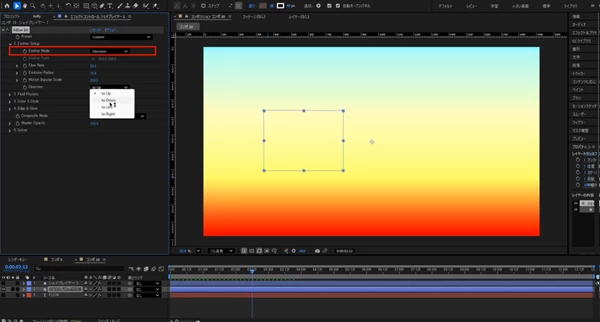
AiBow Ink includes three emitter modes for creating different styles of movement.
Layer Alpha generates fluid from the actual shape of the source layer. This is particularly useful for text, logos, and graphic elements.
Direction produces directional movement suitable for effects such as rising smoke or falling liquid drips.
Bloom creates radial bursts and expanding fluid patterns.
Switching between these modes gives you several ways to transform the same source graphic into completely different animations.
Detailed Fluid Physics Controls
You can customize how the simulation behaves using controls for viscosity, vorticity, dissipation, gravity, buoyancy, wind, and multi-octave turbulence.
For example, increasing turbulence can produce more energetic and irregular motion, while adjusting viscosity can help move the result toward a thicker liquid or softer flowing appearance.
These controls are useful when you want to move beyond presets and develop a look specifically for your project.
Advanced Color and Styling
AiBow Ink also provides extensive controls for the appearance of the fluid.
You can use gradient ramps, sample colors directly from the source layer, or create custom palettes containing up to six colors. Both RGB and perceptual OkLab interpolation are supported.
Additional styling options include contour bands, glow, bloom, rim lighting, edge darkening for a paper-bleed appearance, and texture layer input.
There is also a draggable Appearance Curve editor for further shaping the visual result.
This combination makes the effect suitable for everything from traditional ink-inspired visuals to bright neon fluid graphics.
Built-In Reveal and Erase Transitions
AiBow Ink is not limited to decorative fluid effects. It can also become part of your editing and transition workflow.
The built-in Reveal and Erase matte modes allow the fluid simulation to hand one shot over to another. A keyframeable Transition Progress parameter gives you precise control over when the transition completes.
Because the progress can land on an exact frame and can also run backwards, it is easier to synchronize the effect with cuts, music, or other animation events.
12 Starter Presets
The plugin includes 12 starter presets that provide useful starting points for different visual styles.
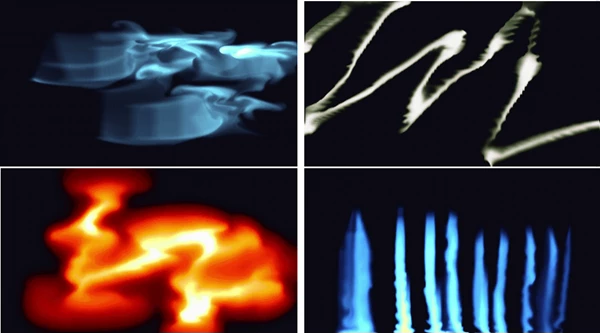
Examples include Sumi-e Bleed, Neon Glow, Rising Smoke, Ink in Water, Liquid Flame, Falling Drip, and Ink Reveal.
These presets are helpful when you want a quick result, but they can also serve as foundations for your own customized effects.
Deterministic and Scrub-Safe Simulation
AiBow Ink is deterministic, meaning the same frame produces the same result.
This is especially important for production work because you can move around the timeline without getting unpredictable changes in the simulation. The effect also supports After Effects Multi-Frame Rendering.
Simple Workflow Inside After Effects
Getting started with AiBow Ink requires only a few steps.
Apply Effect > AiBow Tools > AiBow Ink to your text, logo, or other source layer. Choose one of the included presets and play the composition to see the fluid grow from the layer.
From there, you can adjust the emitter, physics, colors, and appearance settings to develop your own style.
For transitions, change the Composite Mode to Reveal and animate Transition Progress with keyframes.
This workflow keeps the entire effect inside After Effects and reduces the need to prepare separate fluid footage or external simulation assets.
Practical Ideas for Using AiBow Ink
One interesting approach is to apply Layer Alpha mode to typography and let the letters gradually develop into flowing ink. For a darker cinematic composition, Direction mode can turn a logo into rising smoke.
For music videos or energetic promotional graphics, Bloom mode combined with bright gradients and glow can create colorful fluid bursts.
You can also use Ink Reveal to introduce footage organically instead of relying on conventional wipes. A textured source combined with edge darkening can create something closer to ink spreading across absorbent paper.
The same simulation system can therefore produce very different results depending on the emitter mode and styling choices.
Tips for More Natural Fluid Effects
Try not to maximize every physics parameter at once. Subtle combinations of turbulence, viscosity, wind, and dissipation usually provide more controllable results than extreme settings.
Start with one of the presets that is closest to your desired look, then gradually adjust the simulation.
When creating smoke, experiment with buoyancy and directional movement to establish the main flow before increasing turbulence. For ink and liquid effects, viscosity and dissipation can significantly change how dense or persistent the result feels.
Color also plays an important role. Sampling colors from the source layer can help integrate the simulation with an existing design, while custom palettes are useful when you want the fluid itself to become the main visual element.
For transitions, animate Transition Progress around the exact cut or musical beat you want to emphasize. Since the parameter is keyframeable and deterministic, precise timing is much easier to maintain.
Final Thoughts
AiBow Ink brings something unusual directly into the After Effects workflow: real fluid behavior that can originate from the graphics already inside your composition.
Its combination of fluid physics, three emitter modes, extensive appearance controls, customizable colors, starter presets, and built-in transition tools makes it useful for much more than simply creating an ink effect.
You can use it for smoky typography, liquid logos, abstract motion graphics, ink reveals, dripping effects, colorful blooms, and cinematic transitions while keeping the workflow inside After Effects.
The most interesting part is how much the result can change from a single source layer. A simple piece of text can become spreading ink, rising smoke, or glowing fluid depending on how you configure the simulation.
For motion designers who frequently work with organic effects, AiBow Ink provides a flexible way to experiment with fluid motion while maintaining direct control over the final animation.

Files Password : gfxplugin.com OR 123456