Downloadable Files
You can download WebMotion for free from the end of this page.
Turn a Website Into an Animation-Ready Composition
Have you ever wanted to animate a website in After Effects, only to realize that recreating the entire page takes longer than the animation itself?
Text has to be recreated, shapes and buttons have to be recreated, images imported, and all elements placed in their correct positions. Even a fairly basic website can become a time-consuming setup process prior to animation.
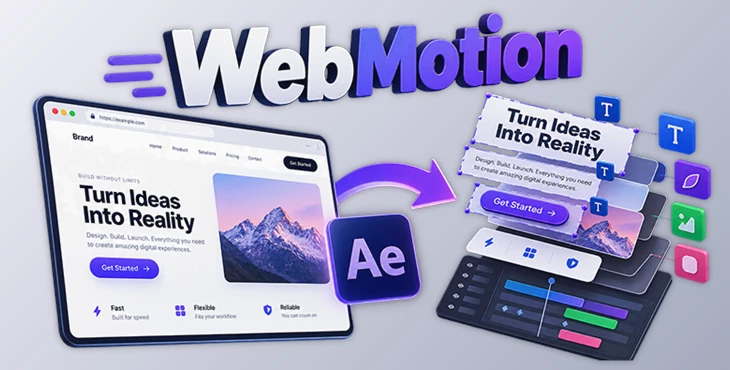
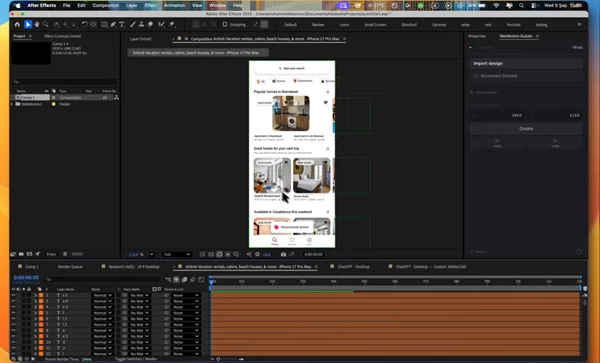
WebMotion offers a much faster approach. It captures a webpage from Google Chrome and rebuilds it inside Adobe After Effects as an organized composition with editable layers.
Instead of spending your time recreating the interface, you can focus on what actually matters: animation.
From Web Page to Editable After Effects Layers
The key idea behind WebMotion is simple: turn a website's visual structure into elements you can edit and animate in After Effects.
A normal screenshot gives you a flat image. You can zoom, move, crop, or distort it, but individual elements such as headings, buttons, images, and shapes are no longer independent.
WebMotion approaches the process differently.
It captures the webpage and reconstructs its elements as organized layers inside After Effects. Text remains editable, shapes can be adjusted, and images and other assets become part of the composition.
This makes a major difference when creating website animations, UI presentations, product showcases, promotional videos, and motion graphics based on existing web designs.
For example, imagine you want to animate a landing page. Instead of rebuilding the navigation, hero text, buttons, images, and background elements manually, you can bring the page into After Effects and start creating entrance animations, camera movements, transitions, and reveals much sooner.
Meet WebMotion
WebMotion is designed specifically to reduce the repetitive work involved in recreating websites inside After Effects.
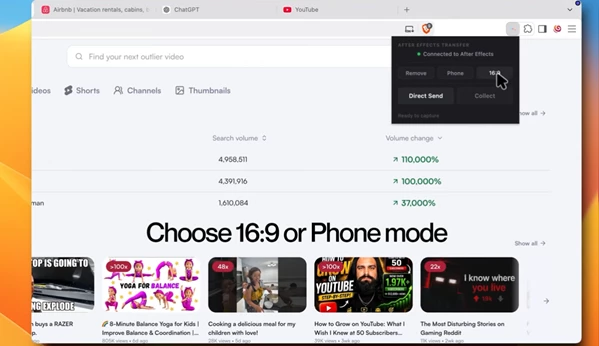
The workflow connects Google Chrome with After Effects. You capture the website using the WebMotion Capture Chrome extension and then send that captured page to the WebMotion extension inside After Effects.
Once imported, the webpage is rebuilt as an editable composition.
The result is a much more animation-friendly starting point than a screenshot or manually reconstructed interface.
Editable Text
Text from the captured webpage can be brought into After Effects as editable elements.
This is particularly useful when you want to animate headlines, navigation items, labels, or other typography independently rather than treating the entire webpage as one flat image.
You can build text reveals, staggered animations, transitions, and other typography-based motion directly around the imported design.
Editable Shapes
WebMotion also reconstructs compatible visual elements as editable shapes.
That gives you considerably more flexibility when animating interface components such as buttons, cards, backgrounds, containers, and decorative elements.
Instead of being locked into a flattened screenshot, you have individual elements that can become part of your motion design.
Images and Assets
Images and other webpage assets are collected as part of the composition.
This helps preserve the visual structure of the original website while giving you individual elements that can be incorporated into your animation.
For a product landing page, for example, you could animate the product image separately from the headline, buttons, and surrounding interface elements.
Organized After Effects Compositions
One of the most useful aspects of WebMotion is organization.
Recreating a webpage manually often results in a large amount of setup work. WebMotion rebuilds the captured page as organized layers, giving you a cleaner starting point for animation.
That means less preparation and more time for keyframes, timing, transitions, and creative decisions.
Direct Chrome-to-After Effects Workflow
WebMotion is designed around a straightforward workflow between Chrome and After Effects.
Open your target website in Chrome, capture it using the WebMotion Capture extension, and send the result directly to WebMotion inside After Effects.
This reduces unnecessary steps such as taking screenshots, exporting individual assets, and manually reconstructing the interface.
Multiple Capture Formats
The workflow includes capture modes suitable for different formats, including 16:9 and Phone layouts.
This makes WebMotion useful for both desktop-style website animations and vertical or mobile-oriented compositions.
You can also upscale the captured composition for other output formats when required.
Manual Import
A manual import option is available as an alternative to the direct sending workflow.
This gives you additional flexibility when moving captured website data into your After Effects project.
Where Can WebMotion Be Useful?
WebMotion can fit into many motion design workflows where websites or interfaces need to become part of an animation.
For a website promo, you could capture the real landing page and animate its sections one by one.
For a product presentation, you could bring the product website into After Effects and create dynamic camera movements between different parts of the page.
It can also be useful for social media content. A webpage can be captured in a suitable format and transformed into a short animated showcase without recreating the original design from scratch.
UI and web designers can also use the workflow to present existing designs with motion, turning static website elements into more engaging visual demonstrations.
The main advantage in all of these situations is the same: you begin with the existing webpage rather than rebuilding it manually.
Tips for Better Results
Choose the Right Capture Format First
Think about your final delivery format before capturing the webpage.
If you are creating a traditional widescreen presentation, the 16:9 option can provide a practical starting point. For mobile-focused animations or social media content, a phone-oriented capture may make more sense.
Choosing the right format early can reduce unnecessary repositioning later.
Check Your Layers Before Animating
Once the webpage has been imported, spend a moment reviewing the generated composition and its layers.
A little organization before animation can make a large project much easier to manage, especially when the captured page contains many visual elements.
Animate in Groups
You do not necessarily need to animate every layer individually.
Related interface elements can be grouped logically. For example, a headline, supporting text, and call-to-action button can form one animation group, while a product image or visual section can form another.
This often creates cleaner and more natural motion.
Keep Website Motion Purposeful
Because WebMotion gives you access to individual elements, it can be tempting to animate everything.
In many cases, subtle movement works better.
Use animation to guide attention toward important content. Smooth reveals, controlled scaling, gentle position changes, and well-timed transitions can make the page feel polished without overwhelming the viewer.
Use the Original Design as Your Foundation
The imported website already contains an established visual hierarchy.
Try to preserve that hierarchy when adding motion. Important headlines and primary buttons should generally receive more visual attention than secondary elements.
Motion should enhance the existing design rather than compete with it.
Stop Rebuilding and Start Animating
Recreating websites manually inside After Effects can involve a surprising amount of repetitive work. Every text element, image, shape, and interface component needs to be rebuilt before the creative animation process can even begin.
WebMotion changes that workflow by turning webpages into organized, editable After Effects compositions.
With editable text, shapes, images, assets, multiple capture formats, direct Chrome integration, and manual import support, it provides a practical bridge between web design and motion graphics.
For motion designers who regularly create website showcases, UI animations, product presentations, or promotional content based on existing webpages, WebMotion can significantly reduce setup time.
Instead of rebuilding the page first, you can start with its existing structure and put your energy into the part that matters most: bringing it to life through animation.

Files Password : gfxplugin.com OR 123456