Downloadable Files
You can download Punchframe for free from the end of this page.
Ever Wonder Where Your After Effects Hours Actually Go?
You open an After Effects project, start working on an animation, make a few revisions, render some previews, check references in your browser, jump into Photoshop for a quick edit, and eventually return to After Effects. By the end of the day, you know you worked for hours—but exactly how much time belonged to that project?
This becomes especially important for freelancers who bill clients by the hour and studios that need accurate project records.
Punchframe is designed to solve this problem automatically. Instead of asking you to start timers, choose activities, or remember when you stopped working, it quietly tracks the real time spent on each After Effects project.
The idea is simple: you create, while Punchframe keeps track of the time.
Automatic Time Tracking Without the Extra Work
Traditional time tracking can easily become another task you have to manage. You start a timer, forget about it, switch projects, render something, leave your desk, and suddenly your time report no longer represents what actually happened.
Punchframe takes a different approach.
Once installed, it runs in the background whenever After Effects is open. You do not even need to keep its panel open. When you open a project and start working, Punchframe automatically starts tracking the session.
For example, imagine spending an afternoon creating a promotional animation. During that session, you may animate compositions, render previews, search for references online, and edit an asset in Photoshop. Punchframe is designed to build a more realistic picture of that work, rather than relying entirely on a manually controlled timer.
This can make project reports more accurate while reducing the chance of forgetting billable hours.
Meet Punchframe: Time Tracking Built Around After Effects
Punchframe is an automatic time-tracking tool created specifically for Adobe After Effects workflows.
Its biggest advantage is that tracking does not become another part of your creative routine. You don't have to remember start and stop buttons, and you don't have to manually categorize every activity.
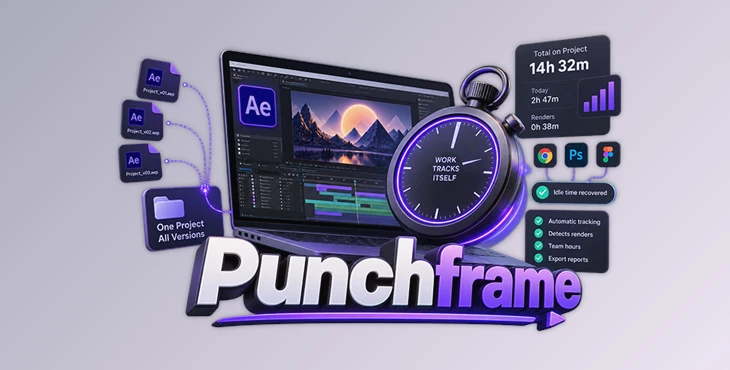
It can track individual projects, recognize renders, help recover relevant idle time, combine different project versions, and even merge hours from multiple team members.
Features
Zero-Touch Time Tracking
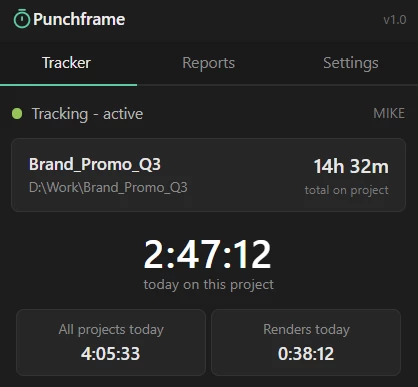
Punchframe automatically starts tracking when you work on an After Effects project. It continues operating in the background, so its panel does not need to remain open.
You can see both today's working time and the total time spent on a project without manually managing a timer.
Automatic Render Detection
Rendering is part of the production process, and Punchframe detects renders and RAM previews automatically.
Render time is reported separately, giving you a clearer understanding of how the project's total time was spent.
This can be particularly useful when working on demanding motion graphics, compositing, or VFX projects where rendering represents a significant part of production.
Smart Idle-Time Recovery
Creative work does not always happen inside After Effects.
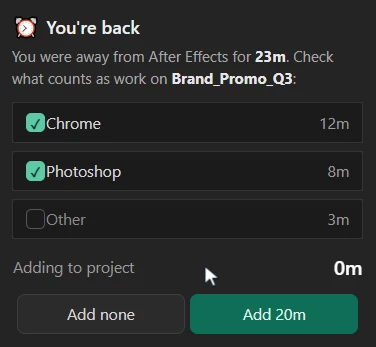
You might leave AE to research references in Chrome, edit an image in Photoshop, or use an AI tool related to the current project. Punchframe monitors which applications were used while you were away.
When you return, it can show that activity and let you decide which time should count toward the project.
Instead of automatically losing those minutes, you can determine which activities were genuinely part of the job.
Punchframe can also be configured to always count certain applications, ignore others, or only consider selected apps.
Project-Based Tracking Instead of File-Based Tracking
After Effects projects often go through many versions:
Promo_v01.aep
Promo_v07.aep
Promo_v15.aep
Promo_v27.aep
Treating every version as a completely separate job would make time reports unnecessarily fragmented.
Punchframe tracks projects by their project folder, allowing different saved versions to contribute to one overall project total. This makes the final number much closer to the way freelancers and studios actually organize and bill their work.
It can also credit unsaved work to the correct project after the first save and filter short accidental visits to older projects from reports.
Automatic Team Time Tracking
Punchframe is not limited to solo workflows.
Its time logs are stored inside the project's own folder. If multiple people work from the same shared project folder, their hours can be combined automatically without requiring a separate server, account, or special shared-drive configuration.
You can still see each person's contribution individually alongside the combined person-hours.
For example, if two artists each spend one hour working on the same project, the report can represent two billable person-hours rather than treating that work as a single hour.
Detailed Reports for Billing
Punchframe turns tracked sessions into organized reports that are easier to use when preparing invoices or reviewing production time.
Reports can be viewed by project, person, and day. You can use 7-day, 30-day, or all-time ranges, filter projects by name, and view render time separately.
The data can also be exported as CSV based on the filters you have selected.
These CSV files can then be opened in software such as Excel, Numbers, or Google Sheets for additional organization or billing workflows.
Offline and Private
Punchframe works entirely offline.
Your working-hour information remains on your computer and inside your own project folders. Nothing needs to be uploaded to an external service, and no Punchframe account is required.
For freelancers and studios working on confidential client projects, this local approach can be particularly valuable.
A Practical Example: From Project to Invoice
Imagine you are creating a motion graphics package for a client.
During the first day, you spend several hours designing and animating in After Effects. You also spend some time searching for visual references and preparing artwork in Photoshop. Later, you render different versions for review.
Over the next few days, you save multiple versions of the same After Effects project while making revisions.
With a conventional manual tracker, you would need to remember to start and stop timers correctly throughout all of these activities.
Punchframe handles much of that process automatically.
Your different project versions remain associated with the same job, render time is identified separately, relevant away time can be recovered, and the final report provides a clearer picture of the actual hours spent on the project.
When it is time to bill the client, you have organized time data instead of trying to reconstruct your week from memory.
Tips for Getting Better Results with Punchframe
Because Punchframe is designed to work automatically, there is not much you need to manage. However, a few simple habits can make its reports even more useful.
Keep each job in a clear project folder. Since Punchframe identifies projects by their folders, a consistent folder structure can make project totals easier to understand and manage.
Configure your common supporting applications. If Photoshop, your browser, or another creative application is regularly part of your After Effects workflow, setting sensible idle-recovery rules can reduce repetitive decisions.
Review reports before billing. Automatic tracking gives you useful raw data, but checking project, render, person, and daily totals before creating an invoice is still a good professional habit.
Use render information as production insight. Separate render totals are not only useful for billing. They can also show how much of a project's production time is being consumed by rendering.
Use CSV exports for longer projects. For projects lasting several days or involving multiple artists, exporting filtered data can make invoicing and internal production analysis easier.
Why Automatic Tracking Can Improve a Creative Workflow
The real benefit of Punchframe is not simply counting hours.
It removes a small but repetitive administrative responsibility from the creative process.
When time tracking depends on manual timers, every forgotten start, stop, or project switch can affect the accuracy of the final report. Punchframe reduces that dependency by making tracking part of the background workflow.
That allows motion designers and After Effects artists to focus more attention on animation, compositing, revisions, and creative decisions while still building a useful record of where their working hours went.
Final Thoughts
Punchframe offers a practical approach to one of the less exciting but important parts of professional After Effects work: understanding how much time a project actually takes.
Automatic project tracking, render detection, idle-time recovery, project-folder identification, team-hour merging, detailed reports, CSV export, and offline operation all contribute to a workflow that requires very little ongoing attention.
For freelancers who bill by the hour, it can help create more reliable billing records. For studios, it can provide a clearer picture of how much team time is going into individual jobs.
Most importantly, Punchframe is designed to stay out of the creative process. You can concentrate on the project while the time data builds quietly in the background—and when you finally need those numbers, they are already there.

Files Password : gfxplugin.com OR 123456