Downloadable Files
You can download AI Scorpion SFX for free from the end of this page.
Finding the Perfect Sound Effect Shouldn’t Slow Down Your Edit
Sound effects can completely change the feeling of a video. A powerful impact can make a transition feel heavier, a subtle ambience can bring a scene to life, and the right whoosh can make motion feel faster and more dynamic.
The problem is finding those sounds.
Traditional sound libraries often mean searching through huge folders, opening external audio players, downloading large sound packs, and manually importing WAV files into your project. When you only need one or two effects, this process can interrupt your creative flow.
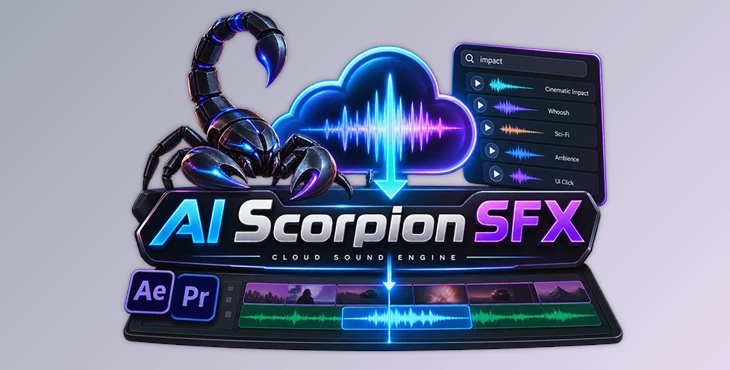
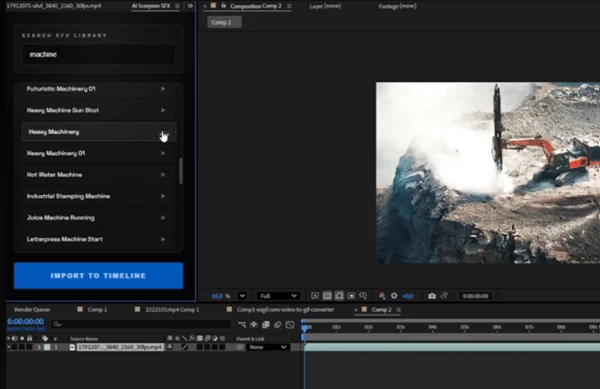
AI Scorpion SFX offers a much faster approach by bringing a cloud-based sound library directly into Adobe After Effects and Premiere Pro. You can search for a sound, preview it, and place it on your timeline without leaving your editing application.
What Is AI Scorpion SFX?
AI Scorpion SFX is a native extension designed for Adobe After Effects and Premiere Pro. It connects your editing workflow to a cloud library containing more than 20,000 sound effects.
Instead of browsing folders based on complicated filenames, you can search using simple descriptive keywords such as:
- Impact
- Fire roar
- Sci-fi whoosh
- Dark drone
- Interface click
- Cinematic ambience
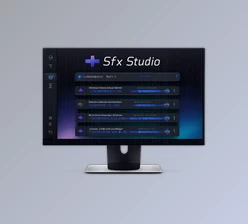
Matching sounds appear inside the plugin, where you can audition them through an interactive waveform player.
This approach makes sound design feel much closer to searching for what you actually hear in your head rather than trying to guess how a particular audio file might have been named.
Why Cloud-Based Sound Search Makes a Difference
Large local sound libraries can consume a significant amount of storage space. Even worse, downloading a massive sound pack just to use a handful of files creates unnecessary clutter.
AI Scorpion SFX takes a different approach.
Its sound library remains in the cloud, allowing you to search and audition audio without downloading everything to your computer. The plugin only needs to cache the sound you actually decide to use.
This means you can explore a large collection of audio assets while keeping your local storage much cleaner.
For editors who regularly work with cinematic videos, social content, trailers, motion graphics, commercials, or short-form videos, this can significantly reduce the repetitive work involved in finding sound effects.
Search Sounds by Mood and Description
One of the most useful features of AI Scorpion SFX is its keyword-based search workflow.
Instead of digging through categories and folders, simply describe the type of sound you need. Searching for something like “fire roar”, “sci-fi whoosh”, or “dark drone” can quickly surface relevant results.
This is especially helpful when you know the feeling or type of sound you want but do not know the exact filename or category where it might be stored.
Instant Cloud Audition
You do not have to download every sound before deciding whether it works.
AI Scorpion SFX streams audio directly from the cloud, allowing you to audition different options inside the extension. Responsive waveforms also make it easier to understand the structure and duration of each sound.
You can quickly move through several alternatives until you find the one that fits your scene.
More Than 20,000 Sound Effects
The cloud library includes over 20,000 sounds, covering everything from large cinematic effects to subtle everyday audio.
This makes the extension useful for different types of projects. You might need a heavy impact for a trailer, a short click for a UI animation, a whoosh for a transition, or atmospheric audio to give a scene more depth.
Because the library is cloud-based and designed to receive fresh audio assets, you do not have to manage a huge collection of local files yourself.
One-Click Timeline Import
Finding the sound is only part of the workflow. Getting it into the correct position on your timeline can also take time.
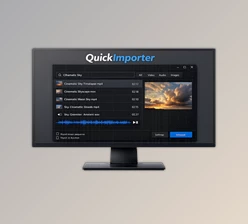
Once you find the right effect, Import to Timeline automatically caches the audio and places it directly under the current playhead position.
This removes several repetitive steps such as manually downloading the file, locating it in a folder, importing it into the project, dragging it onto the timeline, and positioning it at the desired timecode.
High-Quality 320 kbps Audio
AI Scorpion SFX provides 320 kbps master audio, giving editors high-quality sound suitable for post-production workflows.
Good source audio is particularly important when effects need to remain clear after mixing with dialogue, music, ambience, and other elements.
Works Inside After Effects and Premiere Pro
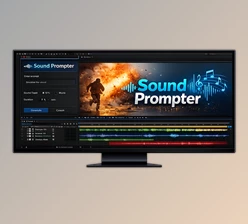
The extension provides a dockable native panel for both Adobe After Effects and Adobe Premiere Pro.
The workflow remains similar in either application: search, audition, select, and import.
A single license also unlocks the extension for both applications, making it useful for creators who frequently move between motion graphics in After Effects and editing in Premiere Pro.
Less Project and Storage Clutter
Traditional SFX workflows can quickly create folders full of sounds that were downloaded but never actually used.
With AI Scorpion SFX, you can audition sounds from the cloud first and only cache the assets you choose to import.
This helps keep both your storage and your creative workflow more organized.
Where Can AI Scorpion SFX Be Useful?
The extension can fit into many video and motion-design workflows.
For example, when creating a cinematic trailer, you could search for impacts, drones, risers, and atmospheric sounds without leaving Premiere Pro.
When building a motion graphic in After Effects, you could quickly find short whooshes, clicks, or mechanical sounds to reinforce animated elements.
For social media editing, where speed is especially important, being able to search and insert effects directly from the timeline can help reduce the amount of time spent moving between applications and folders.
It can also be useful for editors who work across many projects and do not want to maintain a massive local SFX library.
Tips for Getting Better Results
Search for the Feeling, Not Just the Object
Try using descriptive search terms instead of only literal object names.
For example, rather than searching only for “machine,” you might try terms that better describe the desired result, such as “mechanical impact,” “dark machine,” or “sci-fi mechanical.”
Thinking about mood, intensity, and context can make it easier to discover sounds that complement the scene.
Audition Several Sounds Before Importing
Since sounds can be streamed from the cloud, take advantage of the audition workflow.
Listen to several options before choosing one. Two effects with similar descriptions can create completely different impressions when combined with your visuals.
Use Your Playhead as an Import Target
Before importing a sound, position the playhead close to the exact moment where the effect should begin.
Because AI Scorpion SFX can place imported audio directly under the current playhead, preparing the timeline position first can make the workflow even faster.
Layer Sounds for More Impact
One sound effect does not always have to do everything.
For an important cinematic hit, for example, you could combine a strong impact with a low-frequency element and a short atmospheric tail. Different layers can provide weight, detail, and space.
The fast search and audition workflow makes experimenting with these combinations easier.
Match Sound Intensity to the Visual
A sound effect should support the visual rather than overpower it.
Small interface animations usually benefit from subtle clicks or short digital sounds, while dramatic transitions or cinematic sequences can handle stronger impacts, whooshes, and drones.
Choosing effects based on the scale and energy of the visual generally creates a more cohesive result.
A Faster Way to Bring Sound Into Your Creative Workflow
Sound design often involves more searching and file management than actual creative work. AI Scorpion SFX simplifies that process by putting cloud search, instant auditioning, and timeline importing inside After Effects and Premiere Pro.
Its combination of a 20,000+ sound library, keyword-based search, cloud streaming, interactive waveform previews, 320 kbps audio, and one-click timeline placement can make everyday sound-design tasks considerably more efficient.
Instead of filling your drive with enormous SFX packs or repeatedly switching between folders, browsers, and editing software, you can stay focused on the project and bring in sounds only when you actually need them.

Files Password : gfxplugin.com OR 123456