Downloadable Files
You can download ASCII For Nuke for free from the end of this page.
Turn Ordinary Footage Into Character-Based Art
Sometimes a normal image is simply too ordinary for the visual style you have in mind. You may want to transform a portrait into a field of ASCII characters, turn architecture into a structured grid of symbols, or create an experimental digital look where the original footage is still recognizable beneath hundreds of tiny glyphs.
Creating this type of effect manually can quickly become complicated. The characters need to respond consistently to brightness and image detail, the grid needs to remain stable from frame to frame, and you may also want control over color, scale, rotation, position, and animation.
ASCII For Nuke was created to enable this type of transformation. ASCII For Nuke converts video directly within Nuke into a character grid that stays consistent between frames. Additionally, the artist is given great control over the selection, rendering, transformation, and animation of the characters.
What Is ASCII Rendering?
ASCII rendering is a visual technique in which an image is represented using characters or other small graphical elements instead of conventional pixels.
Different characters can represent different brightness levels. Dense glyphs can be used for darker or stronger areas, while lighter characters can represent brighter areas. When arranged in a sufficiently detailed grid, these elements recreate the structure and tonal information of the original image.
This technique can be useful for creating:
- Stylized portraits made from characters
- Digital and cyber-inspired graphics
- ASCII landscapes and architecture
- Experimental title sequences
- Glitch and technology visuals
- Character-based motion graphics
- Halftone-style compositions
- Binary and code-inspired imagery
- Japanese character and Kanji effects
- Abstract geometric treatments
The result can still preserve recognizable details from the original footage while giving the image a completely different visual identity.
Meet ASCII For Nuke
ASCII For Nuke is a native OpenFX image effect that brings this type of character-based rendering directly into Nuke.
Instead of building complicated character systems manually, you can use a dedicated node that maps image values to font glyphs or procedural shapes. You can then control the grid, source analysis, glyph selection, colors, transforms, masks, alpha, and other properties from within your normal compositing workflow.
Most importantly, the effect produces a standard raster RGBA result. That means the output can continue through your Nuke node graph just like other image elements.
You can grade it, mask it, merge it with other footage, add effects, or integrate it into a larger composite without requiring a separate rendering workflow.
Features
Stable and Flexible Character Grid
The grid forms the foundation of the ASCII effect.
You can define the result by column count or character height, then adjust grid offset and overall grid scale. You can also scale X and Y grids separately when you need more control over proportions.
You can also preserve natural font proportions.
This flexibility makes it possible to create anything from dense, highly detailed character images to much larger and more graphic grids.
Detailed Source Analysis
ASCII For Nuke can analyze different components of the source image to determine how the characters should be generated.
Available analysis options include:
- Luminance
- RGB channels
- Alpha
- Maximum RGB
- Average RGB
After choosing the analysis method, you can further shape the result using black point, white point, gamma, contrast, inversion, and level controls.
This is especially useful when the original footage does not immediately produce the character distribution you want. Instead of changing the source image itself, you can refine how the plugin interprets its tonal information.
Multiple Glyph Sets
One of the most interesting parts of ASCII For Nuke is that you are not limited to a basic collection of traditional ASCII symbols.
The included presets cover a wide range of styles, including ASCII, alphanumeric characters, punctuation, binary, Unicode blocks, Hiragana, Katakana, Kana, Japanese punctuation, and Grade 1 Kanji.
There are also procedural sets such as:
- Halftones
- Strokes
- Glitch tiles
- Soft cells
- Bars
- Circuit grids
- Geometric shapes
- Braille
- Lines and circles
- Mosaic blocks
With 24 included presets, the same source footage can produce dramatically different visual results simply by changing the glyph set.
Custom Characters and Fonts
You are not restricted to the included glyph presets.
ASCII For Nuke allows you to enter your own characters and build custom glyph ramps. Glyphs can be automatically ranked based on their rendered density, or you can manually define their order from dark to bright.
JetBrains Mono and M PLUS 1 Code are included, and custom TTF or OTF font files can also be loaded.
This opens the door to more personalized effects. Instead of simply making an image look like traditional ASCII art, you can develop a character system that matches the visual language of a specific project.
Color and Background Control
Character-based effects do not have to be monochrome.
The plugin supports solid or sampled colors, letting glyphs inherit visual information from the source or use a more controlled graphic treatment.
Backgrounds can be transparent or filled depending on the desired result.
Because the node outputs normal RGBA imagery, you can easily combine transparent ASCII elements with other footage and graphics elsewhere in the composite.
Dithering and Glyph Rendering
Ordered dithering can help produce additional tonal detail and texture within the character grid.
You can also choose between antialiased and hard glyph rendering.
A clean, sharp character treatment may work well for graphic interfaces and technology-inspired visuals, while smoother rendering can be more appropriate for portraits or cinematic compositions.
Transform Individual Glyphs
ASCII For Nuke goes beyond simply replacing image regions with characters.
Glyphs can be transformed using separate X and Y scale controls, rotation, and X/Y position adjustments. Six selectable scale–rotate–transform orders provide additional flexibility over how those transformations are calculated.
This turns the effect into something that can be animated and manipulated rather than remaining a static ASCII conversion.
Three Mask Inputs for Local Variation
Three optional mask inputs allow different areas of the character grid to behave differently.
Mask luminance can control scale and rotation, while red and green channels can control X and Y transformation. Amount and pivot controls determine how strongly each mask affects the glyphs.
This can produce much more expressive animation.
For example, characters around a subject could gradually enlarge, rotate, or move away while another part of the image remains relatively stable.
Clean Glyph Enlargement
When glyphs are enlarged, ASCII For Nuke renders them again directly from the font rather than simply enlarging an existing rasterized character.
Large glyphs can overlap neighboring cells while maintaining clean rendering.
Importantly, changing their size does not change which character was originally selected for the brightness of that area. This helps maintain the underlying tonal interpretation while experimenting with more dramatic transformations.
From Portraits to Experimental Motion Graphics
One of the strengths of ASCII For Nuke is how many different styles can be produced from the same basic system.
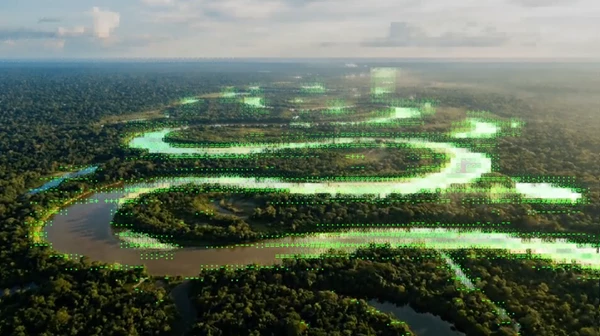
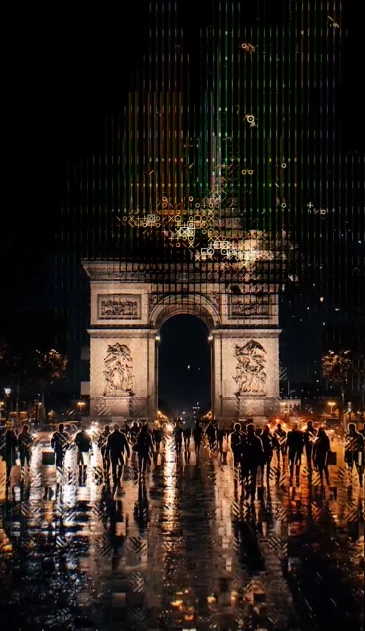
A portrait can become a high-key ASCII composition based on luminance. A cityscape can retain its original colors while being reconstructed from detailed characters. A figure can be generated from Japanese characters and Kanji, while a darker subject could use a completely custom glyph set.
You can also push the effect further with transform masks, causing parts of the character field to expand, rotate, shift, or break apart.
The tool is therefore useful for more than traditional ASCII art. It can become part of a broader experimental compositing and motion-design workflow.
Tips for Better ASCII Results
Start With the Right Grid Density
More characters do not automatically create a better image.
A dense grid preserves more detail, but it can also make the character structure harder to notice. A larger grid makes individual glyphs more visible but sacrifices some source detail.
Try balancing readability of the original subject with visibility of the characters themselves.
Refine the Tonal Range
If too many areas are using similar characters, adjust the black point, white point, gamma, contrast, or levels.
A well-balanced tonal range gives the glyph system more useful information and can make the final image feel considerably more detailed.
Experiment With Different Glyph Sets
Do not assume traditional ASCII characters are always the best choice.
Geometric shapes may work better for abstract motion graphics, binary characters can strengthen a digital theme, and Japanese glyphs can create a completely different visual texture.
Testing multiple presets on the same source is a quick way to discover unexpected styles.
Use Masks for Controlled Animation
Instead of animating the entire character grid uniformly, use masks to introduce variation only where it matters.
Subtle changes in glyph scale or rotation around a moving subject can add energy without destroying the readability of the original image.
For more experimental work, stronger mask-driven transforms can make characters appear to scatter, expand, distort, or react to different parts of the frame.
Combine ASCII With the Rest of Your Composite
Remember that ASCII For Nuke stays inside the standard Nuke image pipeline.
You do not need to treat the result as a finished effect. Use it as another compositing element. Combine it with the original footage, isolate regions with masks, grade it, add glow or distortion, or layer multiple ASCII treatments together.
The plugin itself does not make subject-isolation decisions. When you need empty cells around a subject, use source alpha or masks to define those areas.
Final Thoughts
ASCII For Nuke takes a visual technique that could otherwise require a fairly involved custom setup and turns it into a controllable OpenFX workflow inside Nuke.
Its real strength is not simply converting footage into ASCII characters. The combination of source analysis, customizable glyph sets, custom fonts, grid controls, colors, transforms, dithering, masks, and normal RGBA output gives artists plenty of room to develop their own style.
You can keep things simple with recognizable ASCII portraits or push the system toward halftones, geometric graphics, Japanese characters, glitch patterns, animated glyph fields, and more experimental compositions.
For Nuke artists who enjoy combining compositing with graphic and procedural visual styles, ASCII For Nuke provides an interesting way to turn ordinary footage into something much more distinctive.

Files Password : gfxplugin.com OR 123456