Downloadable Files
You can download Glassary for free from the end of this page.
Create Stunning Glass Effects Directly Inside After Effects
Glass has always been a favourite in motion graphics, UI, futuristic effects, and visual effects. However achieving true glass effects can be quite involved, requiring the use of many effects and complex parameter tweaks, and can require quite a long time in achieving the desired result. Glassary aims to simplify the creation of glass effects.
Glassary is a plugin for After Effects that allows you to control key parameters in glass such as: distortion, noise, lighting, colour, refraction, blur and more. Using Glassary, you can create simple transparent glass to extremely stylised glass with only a few parameter tweaks.
If you create 3D scenes, motion graphics, or creative visual effects, Glassary can help you to create more realistic glass results faster and with more flexibility.
Bring Any Shape to Life with Realistic Glass
Glass is not just about transparency. To create believable glass, you also need to consider the effect light has on the glass, the distortion of objects behind the glass, and the impact of color and texture on the final result.
Glass can be used in motion design for everything from futuristic user interfaces to high-end product animations, abstract art to titles and 3D scenes. Rather than creating glass by layering a number of individual effects, there is the option to use a plugin such as Glassary that allows full control over all the important aspects of the glass.
With lighting, refraction, frost, and other properties, we can create more realistic glass that feels part of the scene instead of a simple transparent layer.
Professional Glass Creation Made Simple with Glassary
Glassary is an After Effects plugin designed to help motion designers create customizable glass effects from any shape. Its intuitive UI panel provides quick access to essential controls, making it easier to experiment and achieve professional results.
From clean transparent glass to creative distorted materials, Glassary gives you the flexibility needed for different types of visual projects.
Features
Refraction Control
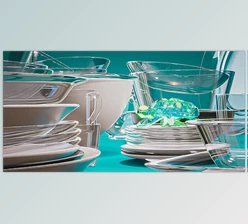
Refraction controls how light bends through the glass and changes the appearance of objects behind it. With Glassary, you can fine-tune this effect to create anything from small optical shifts to dramatic stylized distortions.
This makes it useful for creating realistic glass surfaces, crystal-like materials, and unique visual effects where light interaction plays an important role.
Frost Effect
The Frost feature adds a soft, blurred appearance to the glass by diffusing the background behind the surface.
You can create subtle hazy glass, privacy glass effects, or stronger opaque materials depending on the style of your project.
Color Tinting
Glassary allows you to add color variations while keeping transparency and refraction visible.
This makes it possible to design colorful glass elements, futuristic materials, and unique artistic styles without losing the realistic glass feeling.
Customizable Noise Texture
The Noise feature adds fine details and texture inside the glass. Lower settings create a subtle natural grain, while higher values produce stronger stylized surfaces.
This helps prevent glass effects from looking too perfect and adds more depth to the final result.
3D Layer Support
Glassary works directly with After Effects 3D layers while maintaining depth and perspective.
This allows designers to create glass objects that naturally fit into 3D environments, making them more believable in complex compositions.
Pre-composition Support and Glass Lighting
The plugin supports pre-compositions and customizable glass lighting, giving you more control over how your glass elements interact with the scene.
You can easily combine multiple layers and create detailed glass designs without rebuilding your workflow from scratch.


Professional Tips for Better Glass Effects
Creating realistic glass is not only about increasing distortion or transparency. Small adjustments can make a big difference in the final result.
- Use subtle refraction values when creating realistic glass. Strong distortion works better for creative or futuristic styles.
- Combine frost and noise carefully to add texture without making the glass look too heavy.
- Use color tinting with low intensity to maintain transparency while adding personality to your design.
- Pay attention to lighting direction because realistic highlights help glass feel connected to the environment.
- When working with 3D layers, keep perspective and depth in mind to achieve more natural results.
Experimenting with different combinations of settings is the best way to discover unique glass styles for your animations and visual effects.
Add Realistic Glass Effects to Your Creative Projects
Creating high-quality glass materials in After Effects does not have to be a complicated process. Glassary provides an easy and flexible way to design realistic and stylized glass effects while keeping full creative control over the final appearance.
With features like refraction, frost, color adjustment, noise textures, 3D support, and customizable lighting, this plugin can become a valuable tool for motion designers who want to add modern and eye-catching materials to their projects. Try Glassary and explore new possibilities for creating beautiful glass effects in After Effects.

Files Password : gfxplugin.com OR 123456