Downloadable Files
You can download Sheetah - Spritesheet Tools for free from the end of this page.
Turn After Effects Animations Into Engine-Ready Sprite Sheets
Creating an animation in After Effects is only part of the job when that animation needs to be used inside a game engine, interactive project, website, or application. You still need to render the frames, arrange them into a sprite sheet, optimize the atlas, and generate the correct data so your engine knows exactly how to read each frame.
This is where Sheetah - Spritesheet Tools makes the workflow much easier. Instead of moving between After Effects, image sequences, external packing software, and manually created data files, Sheetah handles the entire process directly inside After Effects.
With a single click, it can render your composition, pack every frame into an optimized sprite atlas, and generate the corresponding metadata required by your target engine or framework.
What Is a Sprite Sheet and Why Does It Matter?
A sprite sheet is a single image that contains multiple animation frames or graphical elements arranged together. Instead of loading every frame as a separate image, a game or application can load one texture and use specific areas of that texture to display individual frames.
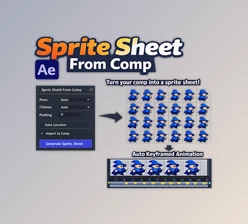
For example, imagine creating a 24-frame character animation in After Effects. Normally, you might export 24 separate images and then use another application to arrange and optimize them. Sheetah can turn those frames directly into a single organized atlas while also generating the data needed to identify the position and dimensions of every frame.
This makes sprite-based workflows easier to manage and can reduce unnecessary texture space, especially when Smart Packer is used to trim and arrange frames efficiently.
Meet Sheetah - Spritesheet Tools
Sheetah - Spritesheet Tools is an After Effects extension designed to transform compositions into production-ready sprite sheets.
Version 3 is a complete rewrite and significantly expands what the extension can do. In addition to exporting sprite sheets, you can preview packed animations, import existing sheets, reconstruct editable animations, animate sprite frames directly on the After Effects timeline, and export animation sequences as data or source code.
Everything happens inside a dockable After Effects panel, helping eliminate unnecessary steps such as manually exporting image sequences, using a separate command-line packer, or repeatedly importing files between applications.
Features
Classic Grid and Smart Packer
Sheetah provides two different packing methods, allowing you to choose between predictable frame placement and optimized texture usage.
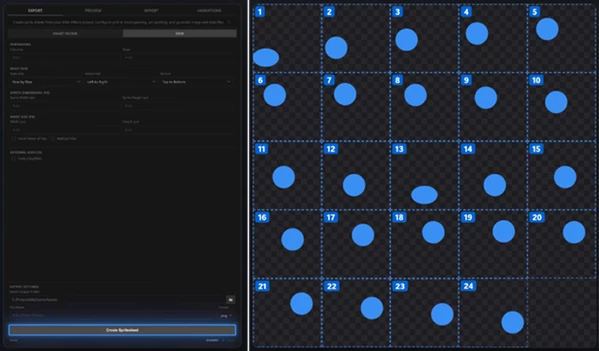
Classic Grid places every frame inside an equally sized cell according to the rows and columns you define. You can also control scan direction and axis behavior. This is ideal when your runtime expects frame numbers to correspond to fixed grid positions.
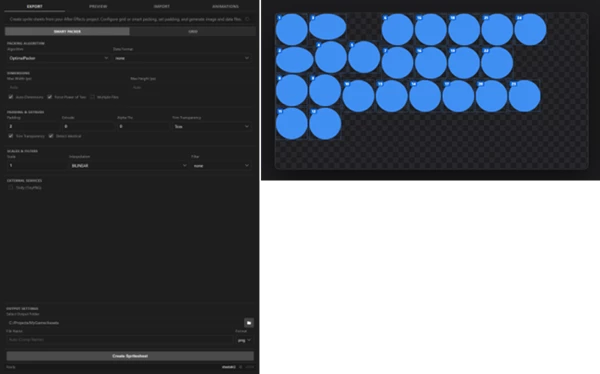
Smart Packer automatically finds a more space-efficient layout. Frames are trimmed and arranged like puzzle pieces, while options such as extrude, padding, multipack, and power-of-two dimensions can be handled within the workflow.
In the provided example, the same 24-frame animation requires a 1600 × 1600 px texture in Classic Grid mode but fits into a 1024 × 512 px atlas with Smart Packer.
Export for Multiple Engines and Frameworks
Sheetah does more than create the atlas image. It also generates the data file required for your engine or application to interpret the individual frames correctly.
Built-in exporters include:
- Unreal Engine Paper2D
- Unity
- Godot
- Phaser
- Spine
- Starling
- Cocos2d
- Pixi
- JSON
- XML
- CSS
- Egret
- UIKit
If your workflow requires another format, you can create a custom exporter using a simple Mustache template. Sheetah automatically recognizes these custom exporters.
Preview Your Animation Before Export
Sheetah V3 includes a dedicated Preview workspace for inspecting packed animations without leaving the extension.
You can play and pause animations, scrub through individual frames, adjust playback FPS, inspect packed frames directly inside the atlas, change preview backgrounds, and preview animations that span multiple atlas pages.
Because the preview uses the same metadata as the exported sprite sheet, it gives you a useful representation of what will actually be delivered to your project.
Import Sprite Sheets Into After Effects
Sheetah is not limited to exporting. Version 3 can also bring sprite sheets back into After Effects and reconstruct them as editable compositions.
Smart Import can restore individual animation frames, preserve trimmed frame positioning, reconstruct multipack animations across multiple textures, and create a live After Effects composition.
For regular sprite sheets without Sheetah metadata, Grid Import lets you select an image, define its rows and columns, choose the playback FPS and loop duration, and rebuild the sprite sheet as an animation.
This makes Sheetah useful not only for creating new assets but also for editing, refining, and touching up existing game graphics.
Animate Sprite Frames Directly on the Timeline
Sheetah includes animation tools for controlling sprite-frame animations using familiar After Effects keyframes.
The Setup Animation function automatically configures Time Remapping and adds an Animation-Frame slider to the selected layer. Instead of manually calculating timing, you simply keyframe the sprite frame number you want to display.
This provides a straightforward way to design sprite animations while staying inside the standard After Effects timeline workflow.
Export Keyframes as Code
Animations created in After Effects do not have to remain inside After Effects. Sheetah can read keyed sprite frames and export the resulting animation sequence as data or source code.
Supported outputs include:
- C#
- GDScript
- C++
- CSV
- JSON
Animation exporters also use the customizable Mustache template system, so additional formats can be created for specialized pipelines.
Multiple Image Formats
Sheetah supports several image formats to fit different production requirements. Sprite sheets can be exported as: PNG, JPG, TGA, TIFF, or layered PSD files. This gives you more flexibility when working with transparency, editable layers, image quality requirements, or different engine pipelines.
Built-In Tinify Compression
Sheetah integrates with Tinify (TinyPNG / TinyJPG) to add image compression directly to the export process.
After entering a Tinify API key, compatible PNG or JPG sprite sheets can optionally be compressed as part of the final export. This removes another manual optimization step from the production workflow.
Where Can You Use Sheetah?
One of the most obvious applications is 2D game animation. A character’s idle, walk, attack, jump, or special-effect animation can be created in After Effects and converted into an atlas for engines such as Unity, Godot, or Unreal Engine.
Sheetah can also be useful for animated interface elements, explosions, smoke, magical effects, icons, stylized motion graphics, interactive assets, and other frame-based animations.
Its import features create another useful workflow. Existing game sprite sheets can be reconstructed inside After Effects, enhanced or modified, and then exported again.
For developers and technical artists, the ability to convert animation keyframes into C#, GDScript, C++, CSV, or JSON also helps bridge the gap between visual animation and implementation.
Tips for a Better Sprite Sheet Workflow
Before exporting, make sure your After Effects composition uses the correct frame rate and animation duration. Removing unnecessary frames can help keep the final sprite sheet more efficient.
Use Smart Packer when reducing wasted texture space is a priority. This is particularly useful when frames contain different amounts of transparent space, since trimming and optimized packing can produce a much tighter atlas.
Choose Classic Grid when predictable frame positions matter more than maximum texture efficiency. Some engines and custom workflows are easier to manage when every frame occupies the same-sized cell.
Always inspect the result in the Preview workspace before the final export. Scrubbing through individual frames can help reveal problems with timing, trimming, positioning, or multipack animations.
It is also worth considering the requirements of your target engine before exporting. Settings such as padding, extrude, filtering, scaling, and power-of-two dimensions can influence how the sprite atlas behaves later in production.
Finally, if you repeatedly need a format that is not included by default, consider creating a custom Mustache exporter instead of manually converting the generated data after every export.
A Faster Bridge Between After Effects and Sprite-Based Projects
Sheetah - Spritesheet Tools connects After Effects animation with sprite-based production workflows in a practical and flexible way. It handles much more than simply arranging frames into a single image. Packing, metadata generation, previews, importing, animation controls, code export, multiple image formats, and optional compression are all brought together inside one extension.
For motion designers creating assets for games, applications, interactive experiences, or other sprite-based projects, this means fewer intermediate steps and less repetitive preparation.
Version 3 is particularly useful because the workflow now works in both directions. You can create an animation in After Effects and prepare it for an engine, or bring an existing sprite sheet back into After Effects for further editing. The result is a more connected workflow that lets you spend more time refining the animation and less time manually preparing its individual frames.

Files Password : gfxplugin.com OR 123456