Downloadable Files
You can download Light Trails Generator for free from the bottom of this page.
Turn Simple Curves Into Glowing Light Trails
Creating animated light trails can instantly make a 3D scene feel more energetic and visually interesting. From glowing lines moving through abstract environments to futuristic paths wrapping around objects, light trails are a simple effect with plenty of creative possibilities.
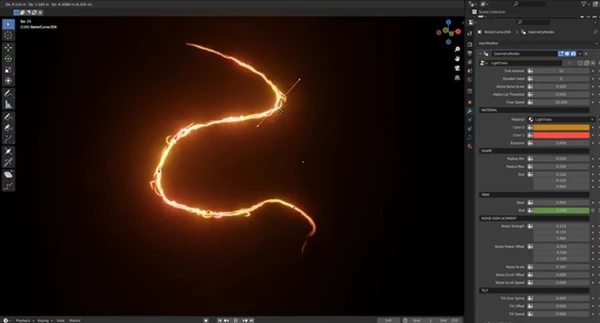
Light Trails Generator makes this process much easier in Blender by converting curves into customizable light trail effects. Instead of building the effect manually from scratch, you can start with Blender curves and quickly transform them into glowing trails that fit the style and motion of your scene.
What Is a Light Trail Generator?
A light trail is a visual of motion, energy, or light travelling along a path. Using curves in Blender is great for this as they allow for great control over the path and shape of the light and are also very editable.
Using Light Trails Generator allows Blender curves to be converted into light trails using Geometry Nodes. The curve can be designed first before being used as the base for the light trail.
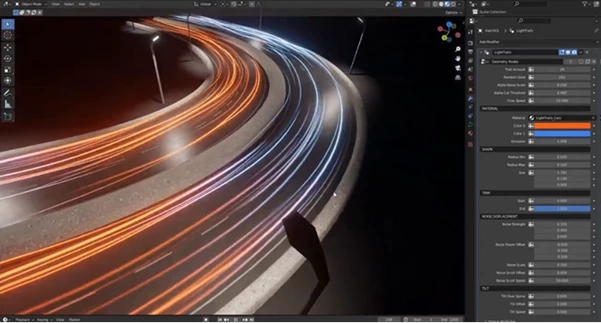
Examples of light trails include a curved glow following a product, futuristic lines within a sci-fi scene, or multiple light trails used to add energy to an abstract animation. Due to the flexibility of the light trail, there are a wide variety of styles that this can be applied to.
Light Trails Generator for Blender
Light Trails Generator is a Geometry Nodes setup designed to make creating light trails in Blender faster and more flexible. It works with both Eevee and Cycles, allowing it to fit into different Blender rendering workflows.
Another useful advantage is that it is not an addon. There is no separate addon installation process required. Instead, you work directly with the provided Geometry Nodes setup, making it straightforward to integrate into a Blender project.
The setup is also designed to be easy to configure while still providing customization options for adapting the effect to different scenes.
Features
Convert Blender Curves Into Light Trails
The core feature is the ability to transform Blender curves into light trail effects. Curves give you direct control over the shape and direction of the trail, making it easy to design anything from simple arcs to more complex paths.
Works With Eevee and Cycles
Light Trails Generator supports both major Blender rendering engines. You can therefore use the effect in faster Eevee workflows as well as projects rendered with Cycles.
Geometry Nodes-Based Workflow
The tool is built as a Geometry Nodes setup rather than an addon. You do not need to install an additional Blender extension before using it. This also makes the workflow feel naturally connected to Blender’s procedural system.
Easy Setup
The setup is designed to be straightforward to use. Once your curves are prepared, they can become the basis of the light trail effect without requiring you to manually construct every part of the result.
Fully Customizable
Different projects need different types of trails. A subtle glowing curve may work for one scene, while another might need a much stronger and more dynamic effect. The customizable setup gives you room to adapt the result to the visual direction of your project.
Seamless Loop Support
For looping animations, the Loop Time parameter can be adjusted to create seamless repetitions. Setting Loop Time to 0 disables looping, while other values are calculated in seconds.
This is especially useful for repeating animations where the beginning and end need to connect smoothly.
Make Your Light Trails Loop Seamlessly
One of the most practical features of Light Trails Generator is its approach to seamless loops.
To calculate the correct Loop Time from your animation frame count, use:
Loop Time = Time Scale × Frame Count / Frame Rate
For example, if your animation contains 100 frames and runs at 24 fps, use those values together with your chosen Time Scale to calculate the appropriate Loop Time.
This makes it easier to synchronize the light trail animation with the exact duration of your Blender scene.
Tips for Better Light Trail Effects
Start by keeping your curves relatively clean and intentional. Because the curve defines the foundation of the effect, a well-designed path usually produces a more controlled and visually pleasing trail.
When creating animation loops, calculate Loop Time based on the actual frame count and frame rate instead of adjusting it randomly. This helps the motion return smoothly to its starting state.
You can also experiment with different curve shapes depending on the purpose of the scene. Smooth sweeping curves can create elegant motion, while tighter and more complex paths can produce energetic or futuristic results.
Finally, take advantage of the customization options instead of treating every trail the same way. Matching the trail to the composition and overall visual style can make the effect feel like an intentional part of the scene rather than an element added afterward.
A Flexible Way to Add Energy to Blender Scenes
One of the benefits of the Light Trails Generator is that it allows regular Blender curves to be converted into animated light trails. The system is based on Geometry Nodes, works in both Eevee and Cycles, and has support for seamless loops as well as customization options. For these reasons, it can be very useful in many creative projects within Blender.
Use it for futuristic scenes, glowing paths, abstract motion graphics, or loopable animations. The setup provides a very flexible starting point and does not require the use of an addon. Simply draw the path desired, customize as needed, and let the curve do the work of becoming a light trail.

Files Password : gfxplugin.com OR 123456