Downloadable Files
You can download SkinMatch DCTL for free from the end of this product page.
Perfect Skin Tones Without Constantly Watching the Vectorscope
Skin tones can be one of the most difficult aspects of color grading. Sometimes the overall image may be perfect, but a slight shift towards magenta or green can make a face appear unnatural. Since human faces are so highly visible to the eye, any small color errors can be easily spotted.
Traditional skin correction typically involves the use of qualifiers, hue range adjustments, additional nodes, and repeated viewing of the vectorscope. While effective, this method can turn what should be a fairly minor operation into a rather time intensive task.
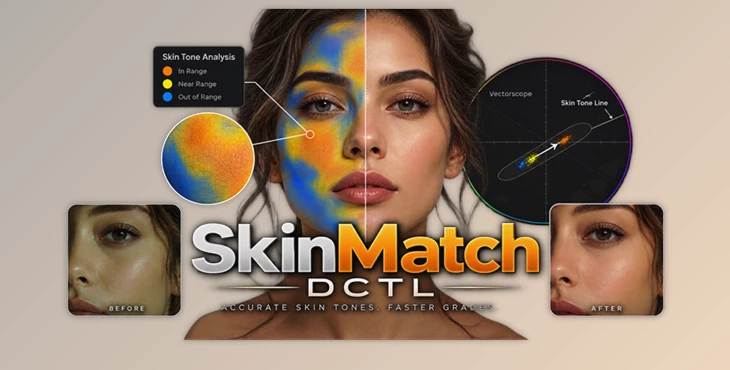
SkinMatch DCTL was created to help streamline this process within DaVinci Resolve Studio. Rather than using only your eyes and scopes, SkinMatch DCTL can provide you with visibility into skin tones and allows for more accurate skin tone correction via dedicated controls.
What Is Skin Tone Matching and Why Does It Matter?
Skin tone matching is the process of making skin colors appear more natural and more consistent while maintaining realistic texture, saturation, and brightness.
For example, when grading an interview under mixed lighting, the overall exposure may be correct, but the interviewee’s face will have a slight amount of green in their skin. Alternatively, when grading between several clips shot with different cameras, the skin may appear differently in each shot.
Such variations, however, can be challenging to identify by eye. Typically, a colorist can leverage the skin tone line within a vectorscope, in addition to qualifiers and manual controls, to isolate and fix the issue.
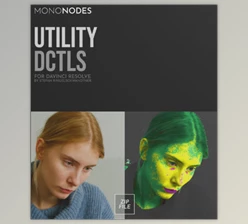
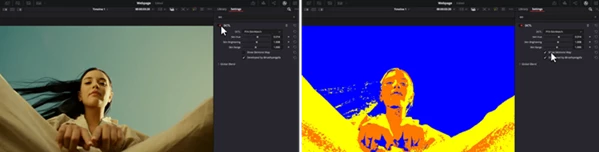
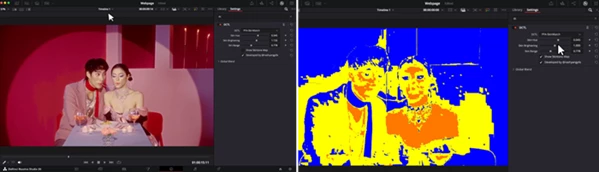
SkinMatch provides a way to translate this somewhat abstract process into something that can be more easily visually interpreted. SkinMatch’s skin checker identifies the colors involved and displays whether or not those colors are Perfect, Near, or Non-Skin.
This allows for more effective detection of undesired changes and more consistent results shot to shot.
Meet SkinMatch DCTL
SkinMatch DCTL is a dedicated utility DCTL for DaVinci Resolve Studio built around skin tone analysis and correction.
Rather than functioning like a static preset or LUT, it uses a dynamic processing approach. It analyzes relevant hue, saturation, and luminosity boundaries and provides controls specifically intended for skin.
The result is a workflow where you can quickly check a face, identify problematic color shifts, make targeted corrections, and continue grading without constantly moving between your image and vectorscope.
It can also fit into an existing professional node tree as a single node, so you don’t need to create an unnecessarily complicated structure just to manage skin.
Features That Make Skin Correction Easier
Instant Skin Tone Map
One of SkinMatch’s most useful features is its color-coded visual map. Instead of interpreting the vectorscope alone, you can immediately see how colors relate to the desired skin range.
The Perfect, Near, and Non-Skin indicators provide objective visual feedback, helping reduce subjective guesswork when making corrections.
This can be particularly helpful when matching several interview shots, commercial footage, beauty content, or scenes captured under changing lighting conditions.
Dedicated Skin Controls
SkinMatch provides dedicated sliders for adjusting important skin characteristics, including:
- Hue
- Brightness
- Smoothness
Having these controls in one place makes subtle corrections easier. Instead of making broad RGB adjustments that may affect the entire frame, you can focus on the values that matter for the skin.
For example, if a face has the right exposure but feels slightly too magenta, you can concentrate on the hue rather than unnecessarily changing the complete color balance.
Intelligent Skin Isolation
Accurate isolation is essential for natural-looking correction. Poor qualifiers can introduce unwanted artifacts or accidentally affect clothing, backgrounds, or highlights.
SkinMatch uses saturation, luminosity, and hue boundaries associated with human skin to guide where the correction is applied. This provides more confidence when making targeted changes and helps keep unrelated colors intact.
Non-Destructive Processing
SkinMatch performs its corrections non-destructively, preserving image information and helping prevent clipping in bright or dark regions.
This is especially valuable in professional grading workflows where maintaining dynamic range and image detail is important.
Real-Time Visual Feedback
Changes can be evaluated immediately while you adjust the controls. Instead of making a correction, checking the vectorscope, returning to the controls, and repeating the process, you receive direct visual feedback.
That can make skin matching considerably faster when working through many shots.
Single-Node Workflow
SkinMatch can be added to a node without requiring an elaborate skin-correction structure.
A simpler node tree is easier to understand, modify, and troubleshoot—especially on larger projects containing dozens or hundreds of graded shots.
Works Across Different Footage
SkinMatch is designed to work with different camera formats, Log profiles, and color spaces within DaVinci Resolve Studio.
That makes it useful for projects combining footage from multiple cameras rather than restricting the workflow to one specific acquisition format.
DCTL vs. LUT: What’s the Difference Here?
It’s important to understand that SkinMatch isn’t simply another skin tone LUT.
A LUT performs a predefined transformation. While LUTs can be extremely useful, the same static transformation may behave differently depending on the footage going into it. Exposure, camera profile, hue, and other image characteristics can influence the final result.
SkinMatch uses DCTL-based processing instead. Its algorithm can respond to the actual color information being processed, including the luminosity and hue range relevant to the skin.
For example, applying a static LUT to underexposed Log footage could potentially shift skin in an undesirable direction. A dedicated DCTL skin tool provides more targeted control over the correction rather than applying one fixed transformation to everything.
Where Can SkinMatch Be Useful?
SkinMatch can fit into many color-grading situations where people are an important part of the frame.
For interviews and documentaries, it can help maintain consistent faces across different cameras or lighting setups. In commercial and beauty footage, its targeted controls can make subtle skin adjustments while protecting the rest of the grade.
It’s also useful for cinematic projects, where you may want to establish natural skin first and then build a stronger creative look around it. Content creators working with mixed cameras or Log footage can similarly use the visual map as a faster reference for keeping people consistent from shot to shot.
Tips for More Natural Results
Before using SkinMatch, make sure to fix any major exposure or white balance issues. This will allow the DCTL to work with an image that is already fairly balanced.
Be subtle when applying skin adjustments. Technically accurate results does not necessarily mean that all faces should appear exactly alike. Creative intent, skin tone, lighting, and environment should continue to play a role in the final image.
Apply skin adjustments before very strong creative film looks or emulations. This will ensure that you have a solid base for skin before applying stronger creative effects.
Be mindful of smoothness and brightness in addition to color. Natural skin is not just about color. Tone and texture also play a part. Do not over-smooth skin to the point where faces may appear overly plastic or inorganic.
SkinMatch cuts down on the need for frequent scope checking, but scopes can still be useful tools for professional reference. Using SkinMatch for instant visual feedback along with occasional scope checking provides speed and technical assurance.
A Faster Route to Consistent Skin Tones
Skin correction doesn’t need to mean building complicated qualifiers and staring at a vectorscope for every adjustment.
SkinMatch DCTL turns skin tone analysis into a clearer visual workflow, combining an instant skin map with targeted hue, brightness, and smoothness controls. Its non-destructive processing and single-node approach also make it easier to integrate into an established DaVinci Resolve Studio grading workflow.
For colorists regularly working with interviews, portraits, commercials, beauty footage, or cinematic projects, the biggest advantage is consistency. You can identify problematic skin tones faster, make controlled corrections, and spend more time shaping the overall look of the image.
It doesn’t replace creative judgment—it gives you a more precise and efficient way to apply it.

Files Password : gfxplugin.com OR 123456