Downloadable Files
You can download Tapeify for free from the end of this product page.
Turn Simple Paths into Realistic Torn Tape
Adding handmade details to motion graphics can completely change the personality of a design. A simple strip of torn tape can make a clean digital composition feel more physical, imperfect, and authentic. Creating that effect manually, however, usually means spending time building irregular edges, textures, wrinkles, transparency, and other small details.
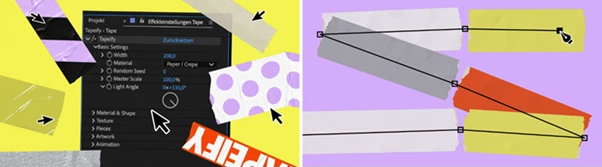
Tapeify makes this process much easier. Simply grab the Pen Tool, draw a path, and apply Tapeify. Your path is transformed into realistic torn tape that can be customized to suit collage designs, analog-inspired graphics, handmade compositions, titles, and lower thirds.
Instead of manually constructing every strip, you can concentrate on the creative side of the design while still having detailed control over its final appearance.
What Is Tapeify and What Can It Do?
Tapeify is a tool for After Effects CC 2024+ that transforms paths into realistic strips of torn tape. You draw the shape or direction you want using the Pen Tool, apply Tapeify, and then customize the generated tape.
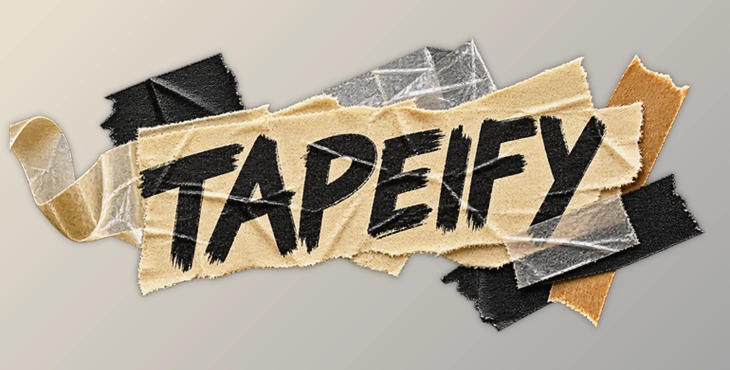
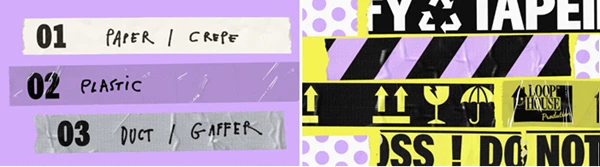
The tool includes three different tape materials: paper, plastic, and gaffer. Each material has its own visual characteristics, giving you a useful starting point for different styles.
For example, paper tape can fit naturally into scrapbook or collage compositions, while plastic tape can introduce a smoother and more translucent appearance. Gaffer tape can provide a heavier, stronger visual style for more rugged designs.
These options help make graphics feel less digitally perfect. Details such as rough edges, fibers, wrinkles, sheen, and grunge introduce the small imperfections that make handmade and analog-inspired visuals more convincing.
A Flexible Tool for Handmade Motion Design
Tapeify is designed to make realistic tape creation fast without removing creative control. You can begin with a simple path and then adjust individual characteristics until the tape matches the rest of your composition.
This makes it especially useful when you want tape to become an actual design element rather than just a static texture. It can frame typography, support a lower third, hold visual elements together, or add physical-looking details to a collage.
Features
3 Material Presets
Select from gaffer tape, plastic, or paper. Each preset offers unique look, feel, and behaviour properties. This helps you to quickly set the desired appearance of your tape.
Custom Artwork Printing
With Tapeify, you can print your own artwork onto the tape. Tapeify will automatically create artwork at the correct scale and size, meaning less setup is required when using custom artwork.
This feature can be particularly useful when printing illustrations, patterns, logos, symbols, or any other custom artwork onto your tape.
Detailed Surface Controls
You can independently fine-tune edge roughness, sheen, wrinkles, translucency, fibers, and grunge. These controls make it possible to move from relatively clean tape to something much rougher and more distressed.
Torn Edge Control
Tape can be trimmed back from either end while keeping its torn-edge appearance. This helps preserve the handmade character of the effect even when adjusting the length of a strip.
Split Tape into Separate Strips
Tapeify can split tape into individual strips, and each strip can have its own color. This opens up more possibilities for layered compositions and colorful collage-style designs.
Designed for Analog and Handmade Styles
The combination of torn edges, material textures, fibers, wrinkles, and grunge makes Tapeify particularly suitable for collage, analog, scrapbook, and handmade aesthetics.
Useful for Titles and Lower Thirds
Tape does not have to be purely decorative. It can be used behind or around titles and lower thirds to give typography a more physical and distinctive presence within the composition.
After Effects Compatibility
Tapeify is compatible with After Effects CC 2024 and later.
Practical Ways to Use Tapeify
One effective approach is to treat the tape as part of your composition rather than simply placing it randomly. Draw paths that naturally interact with typography, images, or other graphical elements.
For a collage-style title, for example, you could create several short strips around the text and give them slightly different colors. Adjusting the roughness, fibers, and wrinkles can prevent the strips from looking too uniform.
For lower thirds, try using a cleaner strip with more restrained grunge and edge roughness. This can maintain readability while still giving the graphic a handmade personality.
Custom artwork printing provides another creative direction. Instead of using plain tape, add artwork that complements the project. Because Tapeify creates the artwork composition at the correct size and scale, experimenting with printed graphics becomes much more straightforward.
Tips for More Natural-Looking Tape
Small imperfections are important when creating believable handmade effects. Avoid pushing every parameter to its maximum value at the same time. A combination of subtle wrinkles, moderate roughness, visible fibers, and carefully controlled grunge can often look more natural than an extremely distressed result.
It is also worth matching the material to the visual language of the project. Paper tape can work nicely with rough collage elements, while plastic or gaffer tape can provide noticeably different surface qualities.
When using multiple strips, vary their colors and surface settings slightly. Splitting tape into separate strips makes this easier and can prevent repeated elements from feeling identical.
Finally, pay attention to translucency and sheen. These properties can significantly affect how the tape interacts visually with elements beneath it and can help distinguish one material from another.
Bring a Handmade Touch to After Effects
Tapeify allows ordinary paths to be transformed into intricate torn tape straight within After Effects. Using paper, plastic, and gaffer materials, Tapeify allows for custom textures, maintains the torn edges, enables the use of individual strips, and allows for custom art printing. There is a large degree of freedom offered by Tapeify, but the tools are not overly complicated.
Tapeify is great for use in collage animations, analog style motion graphics, handmade text, and unique lower thirds. A simple drawn path can be transformed into something far more interesting using Tapeify. Simply draw your path, select your material, and edit the details. These small inconsistencies can add great character to your artwork.

Files Password : gfxplugin.com OR 123456