Downloadable Files
You can download the 3D Space Adjustment Tool Final Cut Pro for free from the end of this product page.
Bring a New Dimension to Your Edits
Working with three-dimensional rotation can instantly make a simple shot, graphic, or visual element feel more dynamic. Instead of keeping everything flat and static, controlling the orientation of an object in 3D space gives you more freedom to create movement with greater depth and visual interest.
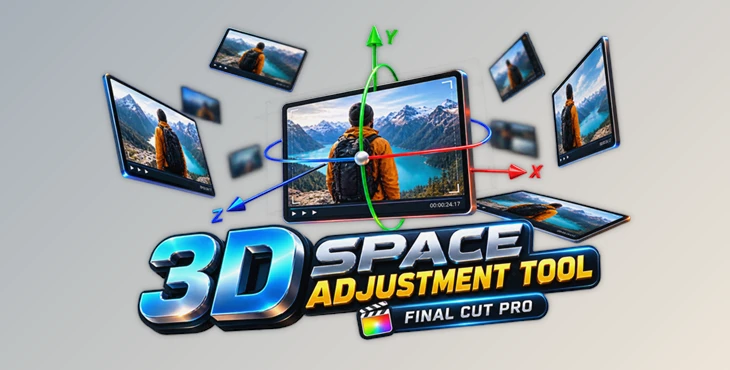
3D Space Adjustment Tool Final Cut Pro is designed to make this process beautifully simple. It provides straightforward control over rotation on the X, Y, and Z axes, helping Final Cut Pro users create three-dimensional orientation effects without making the workflow unnecessarily complicated.
Understanding X, Y, and Z Rotation
There are three axes in 3D: X, Y, and Z. Rotating around each of these axes creates different rotations. By using all three you can create more interesting and complex animations.
Rotating around a single axis can create a simple tilt. Rotating around multiple axes at once can create a more dimension turning or spinning animation. This can be useful if you want an object to appear to move naturally in 3D space rather than just rotating in a 2D plane.
By having control over all three rotation axes, you have more freedom when creating animations. Small rotations using multiple axes can create interesting depth, while larger rotations can create more dramatic 3D rotations.
Meet 3D Space Adjustment Tool Final Cut Pro
The 3D Space Adjustment Tool for Final Cut Pro is a simple but effective tool for controlling 3D space rotation. The tool provides access to the X, Y, and Z rotation axes, making 3D rotation easier to control.
This tool may be especially helpful for exploring rotation and creating more interesting motion without having to work with an overly complex tool.
Features
- X-Axis Rotation: Control rotation along the X axis to create dimensional tilting movements.
- Y-Axis Rotation: Adjust the Y axis for side-oriented three-dimensional rotation.
- Z-Axis Rotation: Control the Z axis to introduce additional rotational movement.
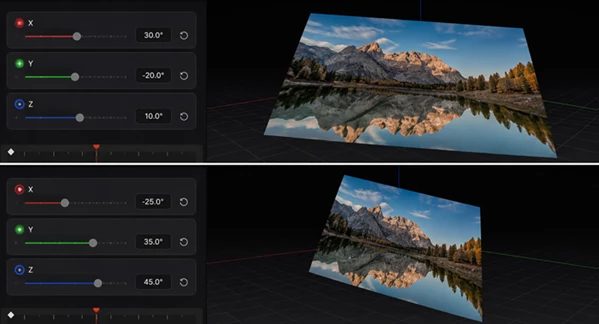
- Three-Dimensional Orientation: Combine X, Y, and Z adjustments to create more dynamic 3D rotation effects.
- Simple Controls: The tool focuses on providing an easy and accessible way to manage 3D space orientation.
- Dynamic Rotation Effects: Use different axis combinations to give visual elements more movement and dimensional character.
- Final Cut Pro Compatibility: The tool requires FCPX 10.4.8 or above.
These controls can be useful in projects where a flat rotation does not provide enough visual impact. By combining different axis movements, you can give an element a stronger sense of depth and make its motion feel more visually engaging.
Simple Techniques for Better 3D Rotation
When working with 3D orientation, you do not always need extreme rotation values. Subtle changes to the X, Y, or Z axis can often provide enough depth to make an element feel more dimensional while keeping the movement clean.
Try adjusting one axis first and then gradually introducing a second or third axis. This makes it easier to understand how each adjustment affects the final movement and helps prevent the rotation from becoming visually confusing.
For more dynamic effects, experiment with different combinations of all three axes. X, Y, and Z rotations can work together to create movements that would be difficult to achieve with a simple flat rotation.
It is also worth matching the intensity of the rotation to the style of your project. Gentle orientation changes can work well when you want subtle depth, while stronger rotations can be used when a more noticeable three-dimensional effect is appropriate.
System Requirements
In order to use the 3D Space Adjustment Tool Final Cut Pro please make sure you are running:
Final Cut Pro X 10.4.8 or above
Running this version of Final Cut Pro will ensure that your system meets the system requirements for this product.
Add More Depth to Your Final Cut Pro Projects
3D Space Adjustment Tool Final Cut Pro provides a simple method for creating 3D space using X, Y, and Z rotation. The simplicity of this tool allows for greater exploration of depth, orientation, and rotational motion.
Whether you are looking for subtle depth or more obvious 3D rotational motion, having the ability to manipulate each of the three axes provides great creative options. Try experimenting with varying combinations to turn basic motion into more interesting motion with depth.

Files Password : gfxplugin.com OR 123456