Downloadable Files
You can download Vanish BG for free from the end of this page.
Remove Backgrounds Without Leaving Your Timeline
Removing a background from an image can quickly interrupt an otherwise smooth editing workflow. You find the right photo, place it on your timeline, and then realize the background needs to disappear. Normally, that means opening Photoshop, creating a mask, exporting the image, importing it again, and reconnecting everything to your edit.
Online background-removal services can be faster, but they may require uploads, charge per image, or return a lower-resolution version of your original file.
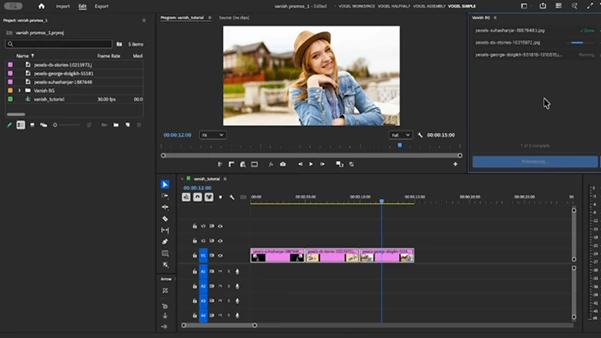
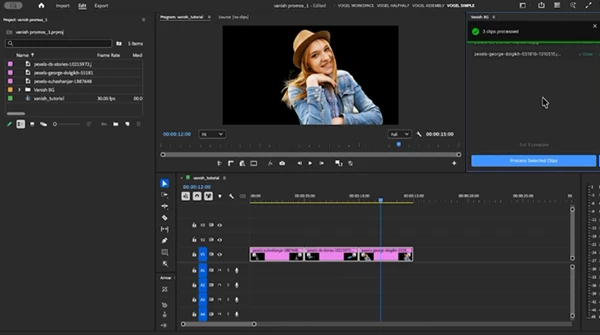
Vanish BG simplifies the entire process by bringing background removal directly into Premiere Pro and After Effects. Instead of jumping between applications, you can remove backgrounds from image clips in seconds while staying focused on your edit.
What Is Vanish BG?
Vanish BG is a background-removal tool designed for editors working in Premiere Pro and After Effects. It allows you to process images directly within your editing workflow without manually masking them in Photoshop or uploading them to an external service.
The idea is simple: choose an image, remove its background, and continue editing.
Vanish BG processes images locally on your computer, meaning your files do not need to be sent to third-party servers. This can be especially useful for client projects, embargoed campaigns, confidential images, and NDA-protected work.
Another important advantage is image quality. Vanish BG maintains the original resolution of the source image, helping prevent unexpected downsampling when integrating the processed asset into an HD or high-resolution project.
From Image to Clean Cut-Out in Seconds
Imagine you are creating a promotional video and receive several product photos with backgrounds. You want to place those products over animated graphics, gradients, or video footage.
Instead of manually opening and processing every image in another application, Vanish BG lets you remove those backgrounds within your editing environment.
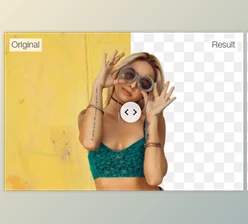
The same workflow can be useful for portraits, product photography, social media graphics, promotional images, presentation assets, and many other types of visual content.
By reducing the number of steps between the original image and the final cut-out, Vanish BG helps keep the creative process moving.
Features
Background Removal Directly From Your Timeline
Remove backgrounds from image clips without leaving Premiere Pro or After Effects. This reduces unnecessary app switching and helps you maintain your editing rhythm.
Lossless Quality
Vanish BG keeps the original resolution of your images. This is particularly valuable when working with high-resolution assets where maintaining detail and sharpness matters.
Replace in Place
Once an image has been processed, you can replace the existing timeline clip with the background-free version.
This is ideal when you simply want the cut-out image to take the place of the original asset and continue editing immediately.
Export Directly to the Project Bin
If you want to reuse the processed image elsewhere, Vanish BG can export it directly to your project bin.
The isolated asset can then be used across different sequences, compositions, or sections of your project without repeating the background-removal process.
Batch Background Removal
When your project contains multiple images, processing them one by one through external applications can become time-consuming.
Vanish BG supports batch background removal, making it easier to prepare multiple assets while staying inside your editing workflow.
Common Image Format Support
Vanish BG supports commonly used image formats, including:
- .jpg
- .jpeg
- .png
- .webp
This makes it suitable for many of the image assets editors regularly encounter in video and motion graphics projects.
Local Processing
Your images remain on your machine during processing. There is no need to upload them to a cloud-based background-removal service.
For confidential client work, unreleased campaigns, NDA projects, or other sensitive production material, keeping assets local can be an important workflow advantage.
Where Can Vanish BG Be Useful?
Vanish BG can be useful in many everyday editing scenarios.
For product videos, you can isolate products from their original backgrounds and place them over custom graphics or footage.
For social media content, portraits and objects can be separated from their backgrounds and combined with typography, branding elements, or animated compositions.
For promotional and corporate projects, image assets can be prepared without repeatedly moving between your editor and Photoshop.
It can also help with YouTube videos, advertising projects, motion graphics, marketing content, presentations, and other projects that regularly use isolated photographic elements.
Tips for a Better Workflow
Whenever possible, start with high-quality source images. Since Vanish BG preserves the original resolution, better source material gives you more flexibility when scaling and positioning the final cut-out.
If you know an isolated image will appear several times in your project, consider exporting the processed version to the project bin. This makes it easy to reuse the asset without processing it again.
For projects containing many images, batch processing can save even more time by reducing repetitive background-removal steps.
Finally, remember that removing the background is only part of creating a convincing composite. Pay attention to scale, positioning, color, lighting, and the surrounding scene so the isolated subject fits naturally into its new environment.
A Faster Way to Handle Background Removal
Vanish BG turns background removal from a separate workflow into a quick part of the editing process. Instead of moving between Premiere Pro or After Effects, Photoshop, browser-based services, exports, and imports, you can handle the task much closer to where the image is actually being used.
With lossless quality, local processing, batch background removal, timeline replacement, project-bin export, and support for common image formats, Vanish BG can save valuable time when working with image-heavy projects.
For editors who frequently need clean cut-outs without interrupting their workflow, it offers a simple way to keep the focus on editing rather than file management.

Files Password : gfxplugin.com OR 123456