Downloadable Files
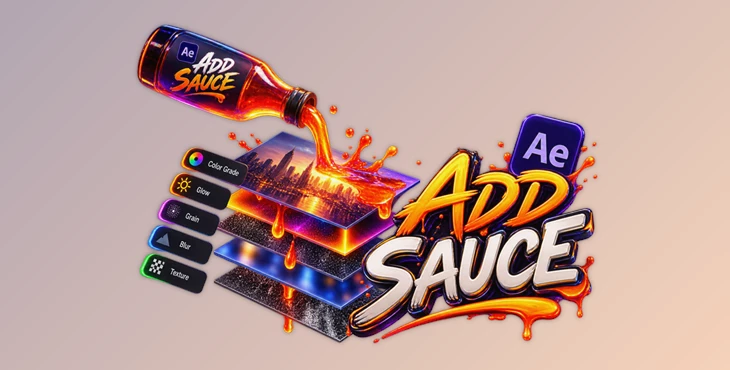
You can download Add Sauce for free from the end of this page.
Build Your Favorite Look Once, Use It Again Anytime
If you frequently use the same effects, textures, visual setups, and adjustment layers, it can get tiresome to recreate them from scratch every time. When starting a new composition, each adjustment layer you use may have effects, opacity, blending modes, masks, expressions, and other properties that must be recreated.
Add Sauce can help streamline this process. With Add Sauce you can save full layer setups and later recreate them in another composition with a single click. Rather than attempting to remember the values of every effect or manually recreating your desired stack of effects, you can save your frequently-used setups to reuse later.
This can be especially helpful if you have a few combinations of effects and/or looks that you use repeatedly throughout your project.
What Is Add Sauce and How Does It Work?
Add Sauce is a tool for saving bundles of adjustment layers or normal layers together with their important properties. You can build a visual look using adjustment layers, solids, or file-based textures, save those layers as ingredients, and then bring the complete setup into another composition whenever you need it.
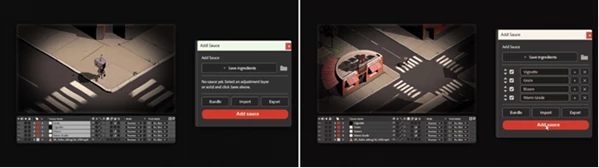
The basic workflow is simple: create your desired layer stack, select the layers, and press Save Ingredients. After that, open another composition, choose the ingredients you want, and press Add Sauce.
The selected layers are rebuilt in list order, and the complete operation is added as a single undo step.
For example, imagine you frequently use a stack containing an adjustment layer for color treatment, another layer with a stylized effect, and a texture with a particular blending mode. Instead of rebuilding these layers for every animation, you can save the entire setup and restore it whenever needed.
This not only saves time but also helps maintain consistency between different compositions and projects.
Add Sauce Features
Save Complete Layer Setups
Add Sauce can save adjustment layers, solids, and file-based textures. Each saved layer becomes an ingredient inside the panel, allowing you to gradually create your own reusable effects library.
More importantly, the tool does not simply remember the layer itself. It preserves the settings that define how that layer behaves and looks.
Preserve Effects and Property Values
Effects and their property values are saved along with your layers. This means a carefully configured effect does not have to be manually adjusted every time you reuse it.
For workflows where small parameter differences can noticeably change the final result, keeping these values intact can help produce more consistent results.
Save Expressions
Expressions are also preserved. If your saved setup contains automated or procedural behavior controlled by expressions, that logic can return with the rebuilt layers.
This can be particularly useful for reusable animation setups that go beyond simple static effects.
Keep Detailed Mask Settings
Masks can be an important part of an effect stack, and Add Sauce preserves their key properties, including:
- Mask shape
- Mask mode
- Feather
- Expansion
- Opacity
- Inversion
Because these details are restored, complex masked effects can be reused without manually recreating their original configuration.
Preserve Layer Behavior
The tool also saves blending mode, opacity, adjustment layer settings, and 3D settings. For file-based textures, the texture path and transform information can also be preserved.
As a result, your saved ingredients can behave much more like the original layers rather than simply returning as empty copies.
Create Complete Bundles
Individual ingredients can be useful, but Add Sauce also lets you save an entire stack as one named Sauce.
For example, you could create one bundle for a particular stylized look and another for a different effect treatment. When a project needs one of those looks, you can rebuild the complete stack with a single action.
You can also combine entries that are already stored in your library to create different bundles.
Choose Exactly What You Need
You do not always need every ingredient in a saved setup. Before building the stack, you can tick or untick individual entries.
If an ingredient is unchecked, it will simply be left out of the next build. This makes saved setups more flexible because you can adapt them to the needs of each composition instead of always applying an identical stack.
Portable JSON Library
Your Add Sauce library is stored in a single JSON file. You can export this file to move your saved looks to another machine or share a library with someone else.
This provides a simple way to keep reusable setups portable instead of rebuilding your personal effects collection on every system.
A Practical Example
Suppose you have created a visual treatment using several adjustment layers and a texture. One layer controls the main effect, another introduces a secondary treatment, and the texture uses a specific blending mode and opacity.
Normally, reproducing the exact same result in another composition would mean recreating the layers and checking every setting individually.
With Add Sauce, you can save those layers as ingredients or combine the entire stack into a bundle. When another composition needs the same treatment, select the desired entries and press Add Sauce.
The complete stack is then rebuilt in the saved order.
This workflow becomes particularly valuable when the same visual treatment appears across multiple compositions or projects.
Tips for a Cleaner Add Sauce Workflow
A good approach is to organize your saved ingredients around reusable visual purposes. Instead of saving random layers, build setups that you know will be useful again.
For example, if several layers always work together to create a particular look, saving them as one named Sauce can make your library easier to navigate.
It is also useful to take advantage of the ability to disable individual ingredients. A larger bundle can contain several complementary layers, while you selectively leave out the elements that do not suit the current animation.
When using file-based textures, keep in mind that Add Sauce stores the texture path and transform. Keeping your source assets organized can therefore make moving between projects and machines smoother.
Finally, once you have created a useful collection of ingredients and bundles, exporting the JSON library gives you a convenient way to preserve or transfer those setups.
Turn Repetitive Layer Stacks Into Reusable Tools
Add Sauce solves a relatively common and simple problem: repeating stacks of layers and effects.
Instead of repeating effects and layers, Add Sauce allows frequently used components such as effects, expressions, masks, blending modes, opacity, solids, textures, adjustment layers, and other important components to be saved and become reusable components. These components can remain individual or can be bundled together to recreate a full look with a single click.
This method can be very useful to those who often repeat the same stacks of effects across multiple compositions. Not only does it allow for the inclusion or exclusion of individual components as desired, but it can also help to create a more consistent, easier-to-manage, and faster workflow.

Files Password : gfxplugin.com OR 123456



![Download The Secret Sauce [Everyday Skin + Image Finishing Action Set]](https://dls3.gfxplugin.ir/Download_Files/19510/SearchSmall/banner.jpg)