Downloadable Files
You can download Smart Remesh for free from the end of this product page.
Clean Topology Without Losing the Original Shape
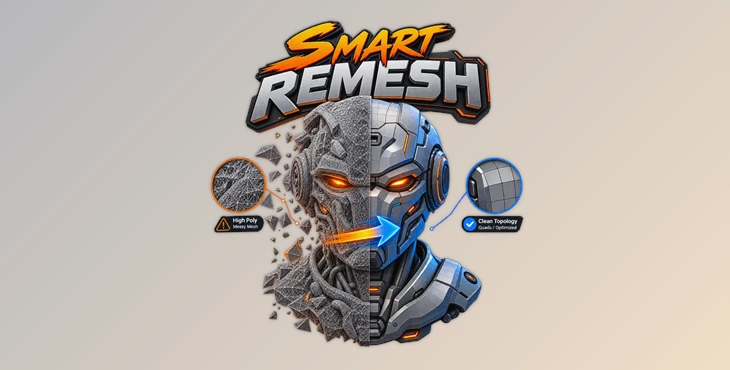
Retopology can be a very impactful part of the 3D process. However, manually cleaning up messy or dense topology can be time consuming. Hard-surface objects can have hundreds of unwanted edge loops. Scanned, sculpted, or AI created objects can have very dense topology that can be problematic for editing, animation, and exporting.
Smart Remesh helps with this. Smart Remesh creates clean and intentional topology for both hard surfaces and organic objects, whilst also being mindful of the details important to the object. Flat surfaces can be transformed into clean n-gons, unwanted loops can be removed, and dense organic geometry can be transformed into an even quad mesh.
Smart Remesh 2 also maintains a number of details from the original object such as materials, UV layouts, UDIMs, baked data, mesh names, and viewport configurations. This allows retopology to focus more on cleaning up an existing object, rather than recreating it.
What Does Smart Remeshing Actually Do?
A dense mesh is not automatically a useful mesh. A model can contain thousands—or even millions—of faces while much of that geometry contributes very little to its actual shape.
Smart remeshing focuses on rebuilding that geometry into a structure that better represents the surface.
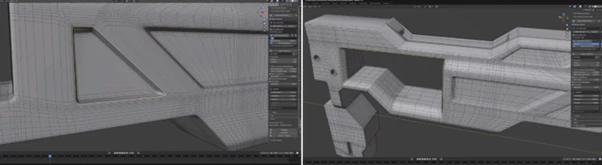
Imagine a concrete barrier containing 8,960 faces even though most of its surfaces are large, flat panels. Smart Remesh can reduce an example like this to just 137 faces, a 98.5% reduction, by rebuilding those panels as clean n-gons and removing geometry that does not contribute to the shape.
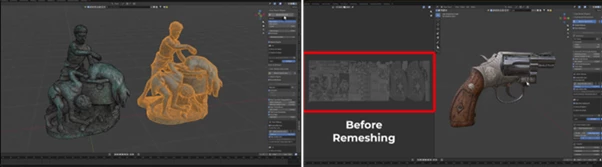
Organic models require a different approach. A heavy sculpt with around 2 million faces, for example, can be rebuilt as a clean 20,000-face quad mesh. Instead of manually constructing topology across the entire sculpt, Organic mode creates an even grid at the density you choose.
The result is lighter geometry that is easier to inspect, work with, and export while retaining the important characteristics of the source model.
Meet Smart Remesh
Smart Remesh combines two different retopology approaches inside one panel: Organic and Hardsurface. Rather than forcing every model through the same remeshing method, each mode is designed around a different type of geometry.
Organic mode is intended for curved, sculpted, and scanned surfaces. It rebuilds the complete model as an even quad grid according to your chosen face count.
Hardsurface mode is aimed at machine parts, panels, props, and similar assets. It identifies meaningful edges, converts suitable flat areas into minimal n-gon geometry, and removes loops that do not affect the shape.
This makes Smart Remesh useful not only for simplifying geometry but also for turning difficult source meshes into topology that is much more practical for production.
Features
Smart Cleanup
Retopology can sometimes leave behind small areas of unnecessary or messy geometry. Smart Cleanup adds an additional cleanup pass after the remesh.
It dissolves unwanted geometry and repairs messy areas, so the final topology contains fewer elements that need manual attention. This can be particularly useful when processing complicated assets where manually inspecting every section would take too much time.
Remove Useless Edge Loops
Not every edge loop contributes to the shape of a model. Smart Remesh analyzes loops based on what they actually change and automatically removes geometry that serves no useful purpose.
For hard-surface models, this can dramatically simplify flat areas while keeping important edges and details intact.
You can also use Limit by Selected Edges to restrict cleanup to a specific region instead of processing the entire model.
Flat Panels Become Clean N-Gons
Hard-surface assets frequently contain flat surfaces divided by many unnecessary edges. Smart Remesh can rebuild these areas as single clean n-gons.
This is especially valuable for props, machine parts, kitbash assets, and other models dominated by flat panels. You retain the geometry needed to describe the object without carrying around loops that add complexity but no visible shape.
Preserve the Original Shape
One of the most interesting aspects of Hardsurface mode is its approach to shape preservation.
Every resulting vertex comes from the original model. The tool builds the result using the mesh’s existing vertices rather than moving them into new positions. As a result, unnecessary topology can be removed without introducing unwanted surface drift.
For hard-surface work where precise dimensions, panels, fillets, and silhouettes matter, this can be particularly important.
Preserve UVs and Baked Details
Retopology becomes much less convenient when it means throwing away completed texturing work.
Smart Remesh 2 can carry UV layouts onto the rebuilt mesh and preserve UDIM layouts as well. Multi-tile UV setups therefore remain available after remeshing.
With Organic retopology, fine detail can also be baked onto the cleaned low-poly result. This allows a dense source mesh to become significantly lighter while retaining the visual detail of the original.
Keep Existing Materials
Material assignments survive the rebuilding process.
Instead of receiving a clean mesh and then having to manually relink materials or assign them to individual faces again, the new topology keeps the materials and their existing assignments.
For finished or partially finished assets, this makes remeshing much easier to integrate into an existing workflow.
Organic Retopology
Organic mode is designed for models where an evenly distributed quad surface is more useful than large n-gons.
Sculpts, scans, curved objects, and other organic meshes can be rebuilt into a uniform quad grid at a selected face count.
A dense sculpt containing millions of faces can therefore be transformed into a much lighter quad-based model without manually rebuilding the entire surface.
Hardsurface Retopology
Hardsurface mode takes a different approach.
Instead of covering everything with a uniform quad grid, it finds the model’s meaningful edges, rebuilds flat areas efficiently, and removes geometry that does not contribute to the form.
This makes it better suited to machine parts, manufactured objects, panels, props, and similar hard-surface assets.
Built for Messy AI-Generated Models
AI-generated 3D meshes can contain dense and chaotic geometry with large numbers of loops that contribute little to the final appearance.
Smart Remesh 2 can strip away this unnecessary complexity and rebuild the model into cleaner topology.
That makes it useful as a cleanup stage between generating an AI model and actually using that asset in a production workflow.
Symmetry and Density Control
For mirrored models, Symmetry Retopology helps maintain an appropriate workflow across symmetrical geometry.
Density can also be adjusted depending on the model. Areas that need more geometry can remain detailed, while simpler surfaces can be reduced more aggressively.
Smart Remesh also provides Detail, Balanced, and Flat Panels presets, with the option to save your own settings for workflows you use repeatedly.
A Scene-Friendly Workflow
Small workflow details become important when working with many assets.
Smart Remesh 2 keeps the original mesh name, supports managed renaming, preserves viewport settings, and includes a wireframe mode for quickly inspecting the resulting topology.
These features help keep the scene organized while making it easier to evaluate what the remeshing process has actually changed.
Where Can Smart Remesh Be Useful?
The tool can fit into several common 3D workflows.
For hard-surface props, it can simplify panels and machined surfaces without changing their silhouette. For heavy sculpts, Organic mode can replace millions of polygons with a more manageable quad grid.
It can also be useful with 3D scans, purchased assets, dense kitbash parts, and AI-generated models that arrive with topology that is unnecessarily complicated.
For example, a purchased production model may look perfectly good but behave poorly in the viewport because of excessive geometry. Running it through the appropriate Smart Remesh mode can produce a lighter mesh that is easier to manipulate and export.
Tips for Getting Better Results
Choosing the correct mode is the most important starting point. Use Organic for curved, sculpted, or scanned objects where an even quad distribution is desirable. Use Hardsurface when preserving precise panels, edges, and mechanical forms matters more.
Avoid reducing density simply for the sake of achieving the lowest possible polygon count. Curved transitions, fillets, and fine features still need enough geometry to preserve their appearance. Reduce aggressively on genuinely flat areas and retain more density where the surface actually changes.
For complicated models, use Limit by Selected Edges when only a specific region needs cleanup. This gives you more control and prevents areas that are already satisfactory from being unnecessarily processed.
Wireframe mode is also useful after each remesh. Inspect the topology and compare where geometry has been removed against the areas where important detail remains.
Finally, if you regularly work with similar assets, create your own presets after finding settings that produce reliable results. This can make repeated cleanup jobs much faster.
From Dense Geometry to Purposeful Topology
Smart Remesh aims to solve a common and useful issue: many 3D objects contain excessive geometry over and above what is actually needed to represent the object.
Smart Remesh has different tools for hard surface and organic objects. Hard surface objects can maintain their original shapes while removing excess geometry. Organic objects can be converted to even, clean quad geometry.
Selective retopology, symmetry, density control, baked-detail retention, UV and material preservation, UDIM support, and Smart Cleanup make Smart Remesh useful even when applied to objects that are quite far in the creation process.
Whether you're cleaning up a mesh created by an AI, optimizing a purchased object, simplifying a hard surface prop, or converting a heavy sculpt into desirable topology, Smart Remesh provides a quicker path from dense to purposeful topology.