Downloadable Files
You can download Moth Generator for free from the end of this page.
Bring Your Scenes to Life with Moving Moths
Small elements in the environment can provide a significant amount to a 3D scene. A quiet forest, an abandoned structure, a mysterious night scene, or a bright outdoor scene can all be immediately more immersive with the addition of small creatures moving naturally within the scene.
Animating multiple moths by hand can be a bit tedious, however. Creating individual objects, adding keyframes, tweaking the motion, and ensuring the animation isn't too obvious can all be time consuming.
With Moth Generator, there is a much simpler solution. The animated moths within the node system will move on their own. You can then apply additional motion and immersion to your scene without having to create keyframe animation for each moth.
What Is a Moth Generator?
A moth generator is essentially a setup designed to populate a scene with animated moths. Instead of manually placing and animating every moth, you can use an existing node system to handle their movement.
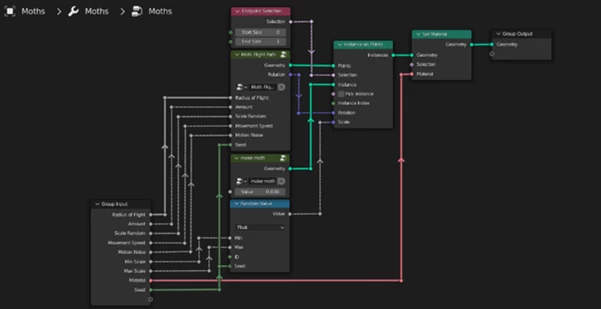
With Moth Generator, the node setup can be copied and pasted directly into any scene where you want moths to appear.
The most useful part is that the moths are already animated. Their movement works without requiring keyframes, making it much easier to introduce continuous activity into an environment.
This can be especially useful for scenes where subtle background motion matters. Moths moving around an environment can help a static render feel more active, atmospheric, and visually interesting.
Moth Generator: Simple Setup, Automatic Motion
Moth Generator focuses on making one specific task easier: adding animated moths to your scenes.
Rather than spending time building the animation manually, you can bring the node setup into your project and use its existing animated behavior. This makes it practical both for quick experiments and for scenes where moths are only a small environmental detail rather than the main subject.
For example, you could use the setup to add movement around a dark environment, bring subtle life to a nighttime scene, or create additional activity in an atmospheric animation.
Features
Copy-and-Paste Node Setup
The complete node setup can be copied and pasted into any scene where you want to introduce moths. This makes it easier to reuse the system across different projects.
Automatically Animated Moths
The moths are already animated and move automatically, so you do not have to animate each one manually.
No Keyframes Required
One of the main advantages of Moth Generator is that its movement does not depend on manually created keyframes. This reduces repetitive animation work and keeps the setup convenient.
Easy Environmental Detail
Because the animation is already handled by the setup, moths can be used as an additional layer of environmental motion without turning them into a separate animation task.
Reusable Across Scenes
Since the node setup can be copied into other scenes, you can reuse it whenever a project needs animated moths rather than rebuilding the effect from scratch.
Where Can Moth Generator Be Useful?
Moth Generator works particularly well when you want small moving elements to make an environment feel less static.
Imagine a nighttime scene where several moths are moving through the environment. Even if they are only visible in the background, their motion can add another layer of activity to the shot.
It can also complement atmospheric or mysterious scenes where subtle creature movement helps reinforce the overall mood. Since the moths move without keyframes, you can focus more of your attention on the composition and appearance of the main scene.

Tips for Better-Looking Moth Scenes
Although the moths are automatically animated, their placement within your overall composition still matters. Try to use them as part of the environment rather than making every moth compete for the viewer’s attention.
Consider how much movement your scene actually needs. In some compositions, subtle moth activity may be enough to make the environment feel alive without distracting from the main subject.
It is also worth viewing the animation from your final camera angle. A setup that looks interesting from one viewpoint may feel too busy or too subtle from another. Checking the movement in context will help you achieve a more balanced result.
Finally, think of the moths as an atmospheric layer. Combining their automatic movement with a carefully composed environment can make the final animation feel richer while keeping the workflow straightforward.
Final Thoughts
Moth Generator is a tool that allows animated moths to be added to 3D scenes without having to animate them by keyframes themselves. The node setup is reusable and can be copied and pasted into other scenes. The moths themselves are automatically animated.
The benefit here is the simplicity. Rather than individually animating small environmental objects, motion can be quickly added, and attention can be given to the rest of the scene.
For projects requiring some extra movement, life, or atmosphere, Moth Generator can be a great tool to transform a static scene into something that feels more animated and interesting.

Files Password : gfxplugin.com OR 123456