Downloadable Files
You can download Ease Stash for free from the end of this product page.
Stop Hunting for the Same Keyframes Again and Again
Editing animation in a large After Effects composition isn't always challenging. What can be frustrating is finding the keyframes you need to make an adjustment.
You might make an adjustment to an animation, keep editing other layers, switch to another composition, and then later need to return to the same keyframes. In a long composition with many layers and properties, searching and selecting the keyframes over and over can disrupt the editing process.
Easing can add to this problem. When multiple properties affect the same animation, keeping all of their easings consistent often requires meticulous editing and multiple passes.
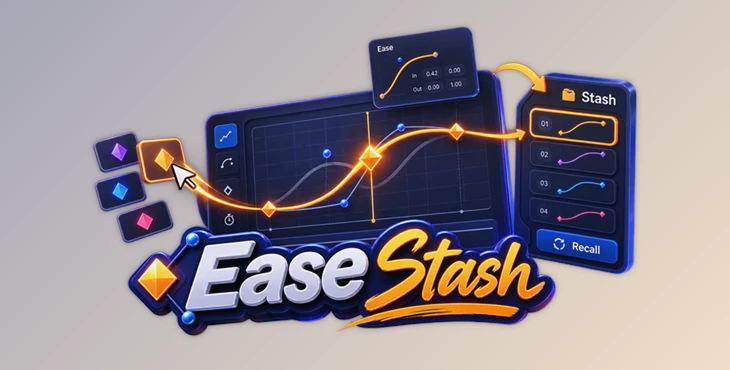
Ease Stash takes a different approach. Rather than requiring you to locate useful keyframes over and over again, Ease Stash allows you to store selections of keyframes into slots, recall them with one click, and tweak the easing from within the panel.
What Is Ease Stash?
Ease Stash is a panel extension for After Effects designed to make working with frequently used keyframes faster and more convenient.
The basic concept is simple: select the keyframes you want to keep accessible and stash that selection into a slot. Whenever you need those keys again, you can recall them instantly instead of searching through the timeline and rebuilding the selection manually.
.This becomes especially useful in long-form or complex projects.
Imagine an animation where the same movement needs several rounds of fine-tuning. Rather than navigating back through layers and properties every time, you can stash the important keys once and return to them whenever necessary.
Even better, saved selections can be recalled and edited from any composition. That means animations spread across multiple comps can be adjusted from one place without constantly switching between them.
The result is a workflow that keeps your attention on the motion itself rather than timeline navigation.
Why Keyframe Easing Matters
Keyframes define important moments in an animation, but easing determines much of what happens between those moments.
A movement can technically start and finish at the correct positions while still feeling mechanical or unnatural. Carefully shaped easing can make that same animation feel smoother, heavier, softer, faster, or more responsive.
The challenge becomes greater when several properties or layers are involved in the same motion.
If their timing and easing do not work together, the final animation may feel inconsistent. Ease Stash helps address this by allowing multiple speed graphs to be viewed and edited together, making it easier to keep related motion coordinated.
Features
Stash Keyframe Selections into Slots
One of the core features of Ease Stash is the ability to save keyframe selections into slots.
Once a selection has been stashed, you can recall it with one click. This eliminates repetitive reselection and is particularly useful for keyframes that require frequent adjustments throughout a project.
Instead of remembering where every important animation lives, you can keep the keyframes you regularly use immediately accessible.
Edit Easing Directly from the Panel
Ease Stash lets you work with easing without requiring the Graph Editor.
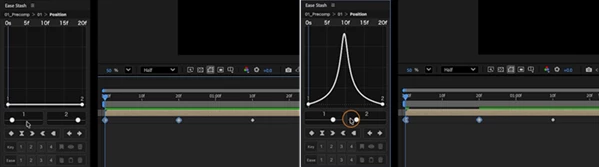
Select your keys and hover over the panel to instantly display the easing graph. You can then shape the curves using sliders while seeing the changes reflected in your composition in real time.
This creates a more immediate relationship between adjusting the curve and seeing how the animation responds.
Work with Up to 8 Properties at Once
Complex animation rarely depends on a single property.
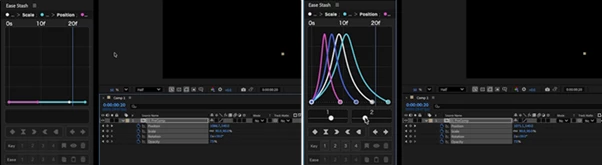
Ease Stash can overlay color-coded speed graphs for up to 8 properties, allowing you to inspect and edit related animations together.
Dragging, nudging, and interpolation switches can be applied across properties and layers simultaneously. Slots and Reveal also support multi-property selections.
For example, if several animated properties contribute to one movement, you can adjust them together instead of repeatedly moving between individual properties.
Recall Keyframes Across Compositions
One of the most useful features for larger After Effects projects is the ability to work across compositions.
Saved slots can be recalled and edited from any composition. This means you can adjust animations spanning multiple comps without constantly opening and switching between them.
For projects containing many nested or related compositions, this can significantly reduce unnecessary navigation.
Reuse Easing Curves
Consistency is important when several animations are supposed to feel like they belong to the same project.
Ease Stash allows you to stash easing curves and apply them to other keys or properties. Curves can be reused normally or reversed depending on the movement you need.
This makes it easier to establish a consistent motion language instead of manually recreating similar easing again and again.
Jump Straight to the Original Property
Sometimes you still need to inspect the actual source of a saved keyframe.
Ease Stash lets you jump directly from a stashed key to its original layer and property with one click.
Rather than manually searching through the composition and timeline, you can move directly to the source whenever deeper editing is required.
Where Ease Stash Can Make a Difference
Ease Stash can be particularly useful when refining the same animations repeatedly.
For example, in a long-form animation, there may be a small number of keyframes that need to be refined repeatedly as the rest of the animation changes. By stashing these keyframes, you keep them available as you continue to work.
This principle also translates to animations that span across multiple compositions. Rather than having to switch between compositions multiple times, you can store and access those animations from a single location using saved selections.
Ease Stash is also useful when multiple objects all require the same style of animation. Using saved easing curves, you can apply the same motion qualities to multiple similar animations without having to create the easing curves over and over again.
Tips for a Faster and Cleaner Workflow
A useful approach is to reserve your slots for keyframes you genuinely expect to revisit. Frequently adjusted transitions, important movement beats, or properties shared across several compositions are good candidates.
When multiple properties form one visual movement, try editing them together rather than treating each property as an isolated animation. The color-coded speed graphs can make it easier to understand how those properties interact.
It is also worth creating reusable easing curves for movements that appear repeatedly throughout a project. Instead of manually trying to reproduce the same feel each time, reuse the stashed curve to maintain greater consistency.
For larger projects, take advantage of cross-composition recall. The less time you spend jumping between compositions and searching through timelines, the easier it becomes to concentrate on the actual quality of the animation.
Finally, use the jump-to-source feature whenever a saved animation needs deeper investigation. It gives you quick access to the original layer and property without turning your timeline into a search exercise.
Keep the Motion Close, Not Buried in the Timeline
The concept behind Ease Stash is that useful keyframes should be easy to access.
Ease Stash allows users to stash and recall selections with a click, edit easing directly within the plugin interface, edit multiple properties, reuse curves, and access animations across compositions, eliminating many of the repetitive tasks involved in keyframe heavy After Effects projects.
The primary benefit is most apparent in larger projects that require the repeated use of the same animations. Rather than having to search for keyframes and reestablish selections over and over again, the useful aspects of your motion workflow can remain readily available.
Motion designers that often edit easing and work with animations across multiple compositions will likely find the features of reusable easing, multi-property editing, and the stash to significantly improve the everyday task of working with keyframes.

Files Password : gfxplugin.com OR 123456