Downloadable Files
You can download Code Runner for free from the end of this page.
Turn Repetitive After Effects Tasks Into One-Click Actions
Working in After Effects often means jumping between scripts, presets, expressions, menu commands, and keyframe settings. Even when each action only takes a few seconds, constantly searching for the right tool can interrupt your creative flow.
Code Runner brings these frequently used actions together inside one customizable After Effects panel. Instead of keeping scripts and presets scattered across different locations, you can turn them into organized buttons and access them whenever you need them.
From running a favorite script to applying an expression or custom easing curve, Code Runner is designed to make repetitive actions faster and your workspace easier to manage.
What Is Code Runner and How Does It Work?
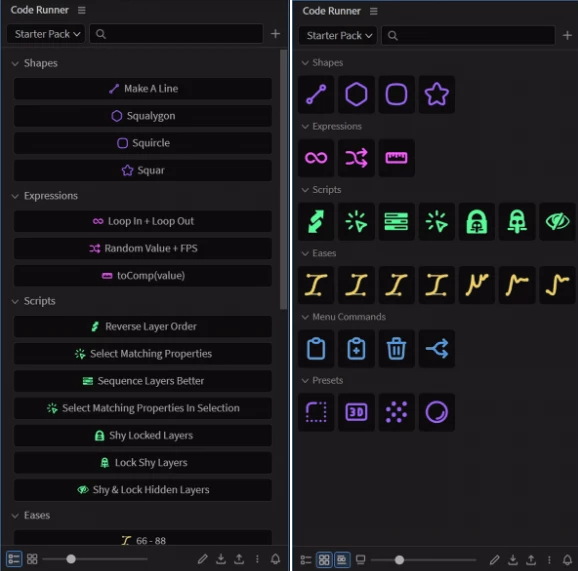
Code Runner is an After Effects panel that lets you store different actions as clickable buttons. These buttons can be organized into collections and folders, giving you a centralized library for the tools and commands you use regularly.
For example, imagine that you frequently apply the same expression to animated properties, use several animation presets, and rely on specific scripts throughout the day. Instead of finding each resource separately, you can create dedicated Code Runner buttons for them.
One click can run the required action, helping reduce unnecessary navigation and keeping your attention on the actual animation or motion design work.
Your library can also be imported and exported, making it easier to maintain an organized collection of actions or use an established setup as part of a studio workflow.
Code Runner Features
Run Scripts From Custom Buttons
Code Runner lets you create buttons for script files. Clicking a button can run the associated script directly, while scripts can also be opened as floating panels when needed.
This is particularly useful if you regularly work with multiple scripts and want a cleaner way to reach them without searching through separate locations.
Apply Expressions Faster
Expression buttons allow you to apply an expression directly to selected properties.
If certain expressions are used repeatedly across your animations, storing them as buttons can turn a repetitive setup process into a much quicker action. Select the relevant properties, click the appropriate button, and continue working.
Keep Animation Presets Close at Hand
Code Runner can also store animation presets as buttons and apply them to selected layers.
This gives frequently used presets a permanent, organized place in your panel. It can be especially convenient when building projects that repeatedly use similar animation treatments or predefined setups.
Apply Custom Easing to Keyframes
Easing plays an important role in how an animation feels. Code Runner allows you to store custom easing curves and apply them to selected keyframes.
Instead of repeatedly recreating a preferred easing style, you can keep it available as a button. This can help you work faster while maintaining more consistent motion across different parts of a project.
Run After Effects Menu Commands
Another useful button type is the Menu Command. It allows Code Runner to execute After Effects menu commands directly from the panel.
Commands you use frequently can therefore sit alongside your scripts, expressions, presets, and easing options rather than requiring repeated navigation through menus.
Organize Everything Into Folders
A large tool library is only helpful when you can actually find what you need. Code Runner allows buttons to be organized into collections and folders.
You might create one folder for scripts, another for expressions, and separate groups for presets or easing curves. Alternatively, you can organize everything according to different types of projects or stages in your workflow.
The goal is simple: build an organization system that makes sense to you.
Customize the Panel Around Your Workflow
Different artists organize their After Effects workspaces differently, so Code Runner provides customization options for its interface. You can adjust the UI size, colors, layout, and other elements to better match your workflow and personal preferences. This helps the panel feel like a natural part of your existing workspace rather than another tool you need to work around.
Import and Export Your Library
Once you have created an organized collection of buttons, Code Runner allows you to import and export your library.
This can be particularly valuable for studios that want a more standardized workflow, as well as individual artists who want to maintain an organized setup.
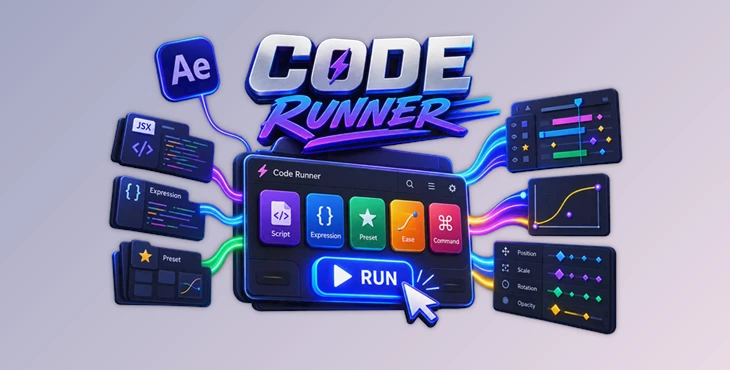
One Panel, Five Useful Button Types
The core strength of Code Runner comes from combining several common After Effects actions in one place:
- Script: Run a script file or open it as a floating panel.
- Expression: Apply an expression to selected properties.
- Preset: Apply an animation preset to selected layers.
- Ease: Apply a custom easing curve to selected keyframes.
- Menu Command: Execute an After Effects menu command.
Rather than treating each resource as a separate part of your workflow, Code Runner turns them into a unified collection of accessible buttons.
Practical Ways to Use Code Runner
A useful Code Runner setup does not necessarily need dozens of buttons. Start with the actions you repeat most often.
If you constantly use several scripts, add those first. If you regularly apply the same expressions, convert them into expression buttons. Frequently used presets can have their own section, while your favorite easing curves can be stored together for quick access during animation.
For a larger workflow, folders can be created around specific tasks. You could keep animation-related tools together while placing utility scripts and commonly used commands somewhere else.
The best organization is the one that lets you recognize and trigger the right action without interrupting your work.
Tips for Building a Better Code Runner Workflow
Avoid putting all of your buttons in your panel at once. It is often faster to find what you need in a smaller collection of the most common actions than in a larger panel of all available actions.
Create folders and collections according to the way that you work. If your way of working is task-based, for instance, organize your buttons according to your common tasks.
Lastly, consider making custom easing buttons for actions that use the same easing style. This will save you time having to create the same easing when you need it over and over again.
Finally, make use of the interface customization options for Code Runner to ensure that the panel fits well alongside the other panels that you use in After Effects.
Final Thoughts
Code Runner was made to fill a simple yet common gap in After Effects. Many of the same actions that are frequently performed within After Effects are found in scripts, presets, expressions, menus, and within the animation properties for the various items within your composition.
The tool gathers these actions into customizable buttons to help you find and use them quickly. With the ability to configure scripts, expressions, animations, presets, easing presets, and menu commands, Code Runner can be configured according to your preferred editing and animation workflow within After Effects. With the available options to create folders, collect items within the panel, customize the interface, and import and export your favorite presets and buttons, this tool can easily be configured to match the way in which you or your team works within After Effects.
Any motion graphics designer or team that performs the same actions within After Effects regularly can benefit from Code Runner.

Files Password : gfxplugin.com OR 123456