Downloadable Files
You can download Stair Builder for free from the end of this page.
Build Procedural Stairs with More Freedom
Creating detailed staircases manually can quickly become a repetitive part of 3D modeling, especially when a design includes multiple steps, supports, railings, walls, and custom shapes. Stair Builder offers a procedural approach that makes this process more flexible while still giving you control over the individual elements.
Built around a complex Geometry Nodes graph, Stair Builder creates complete stair systems from handcrafted elements. Instead of modeling every step and railing separately, you can define the overall structure and customize how its different components are generated.
This approach can be especially useful when working with staircases that need to follow unusual paths, change shape during design, or include variations across repeated elements.
What Is Stair Builder?
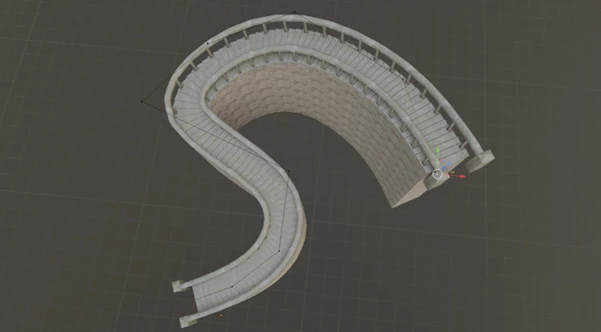
Stair Builder is a procedural staircase creation tool that generates stairs with base steps, step tops, supports, and railings. Its curve-based workflow allows the staircase to follow curves or connected edges, making it possible to create much more flexible shapes than a simple straight flight of stairs.
For example, you can use a curve to establish the path of a staircase and then adjust its structure without rebuilding every individual step. Because the step shapes can adapt to their position, the resulting geometry can respond more naturally to the layout you create.
The tool also includes options for extrusion, walls, step sides, transformations, skewing, UV generation, and element randomization. Together, these controls make it easier to develop anything from relatively simple stairs to more customized procedural structures.
Stair Builder: Procedural Control for Detailed Staircases
The main advantage of Stair Builder is the combination of procedural generation and customizable handcrafted elements. You can establish the overall staircase structure while retaining control over how individual parts are shaped, positioned, and varied.
Instead of treating a staircase as one fixed model, the tool lets you build it as a configurable system. This can make design changes much easier, particularly when experimenting with different staircase shapes or adapting an existing setup to a new environment.
Features
Curve-Based Stair Generation
Stair Builder can use curves or connected edges to define flexible staircase shapes. This gives you more freedom when designing stairs that need to follow a specific path rather than remaining completely straight.
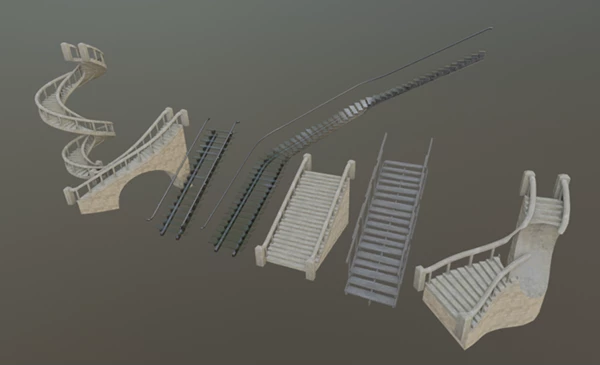
Support for Different Stair Types
The system is highly customizable and can be configured to create various kinds of stairs. Adjusting the procedural setup allows the same tool to serve different designs instead of requiring a completely new model each time.
Complete Stair Components
The generated staircase can include base steps, step tops, supports, and railings. Having these elements integrated into the procedural setup helps keep the overall structure consistent while you modify the design.
Automatic Bottom Smoothing and Extrusion
Automatic bottom smoothing helps the generated structure adapt more cleanly, while extrusion controls provide additional flexibility for defining the staircase geometry.
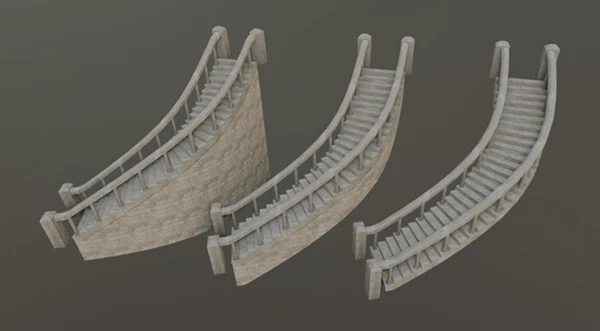
Adaptive Step Shapes
Step shapes can adapt according to their position. There is also an extrusion option that can align the geometry with the floor, helping the staircase fit more naturally into its surrounding structure.
UV Generation
Built-in UV generation can simplify the next stages of the workflow by preparing generated elements for texturing rather than leaving all UV-related work to be handled manually afterward.
Walls and Step Side Controls
You can work with walls and step sides as part of the staircase setup. Transform and skew controls provide additional ways to adjust the appearance and proportions of these elements.
Element Randomization
Random elements can be selected from a group and randomized by scaling and flipping. This is useful to create a variety of components for staircases that are otherwise the same.
Customizable Railings
The software includes the ability to position the railings on the stairs. In version 2.01, a railing offset fix and an upper top railing offset setting were added.
Improved Curve Alignment
Version 2.02 includes a fix for incorrect Bezier curve alignment, improving the curve-based workflow when defining staircase paths.
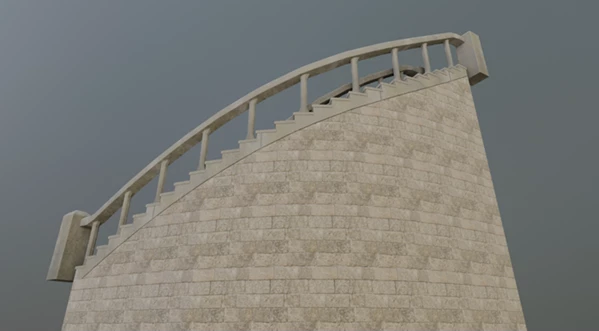
Practical Ways to Use Stair Builder
One of the easiest ways to use the software is to begin with the path of the stairs and then to fine tune the details of the stairs afterward. The ability to work with curves and the placement of edges allows the designer to establish the path that the stairs will take before continuing with the project.
For a simple staircase, the path can be kept simple. For unusual designs, curves can be used to create less standard staircase designs.
Randomizing elements can be used for designs that incorporate some handcrafted pieces. Using different elements from a collection of similar elements can introduce some variation to the model without having to manually place each component of the staircase.
When adjusting the extrusion, step sides, and walls parameters, it is important to consider the connection between the stairs and the remainder of the floor and architectural design. The option to align the extrusion with the floor can help to ensure that the stairs model connects well with the remainder of the architectural design.
Finally, use procedural controls as a way to experiment with the staircase. Because the plugin is based upon a configurable arrangement of Geometry Nodes, it is often faster to experiment with the curve and its elements than to start from scratch constructing the staircase.
A More Flexible Way to Create Stairs
Stair Builder turns staircase creation into a flexible procedural workflow built around curves, Geometry Nodes, and customizable elements. It can generate the essential parts of a staircase—including steps, tops, supports, railings, walls, and sides—while providing controls for shape, extrusion, transformations, UVs, and variation.
Its biggest strength is the ability to combine repeated procedural construction with handcrafted components. Curve-based generation makes different staircase shapes easier to explore, while adaptive geometry and randomization provide additional control over the final result.
For Blender projects where staircases need to remain editable and customizable, Stair Builder provides a practical way to build detailed structures while reducing repetitive manual modeling.

Files Password : gfxplugin.com OR 123456


![Download [Blender] Archipack PRO 2.6.0 (Blender 3.x)](https://dls3.gfxplugin.ir/Download_Files/20586/SearchSmall/banner.png)