Downloadable Files
You can download XML2AE for free from the end of this page.
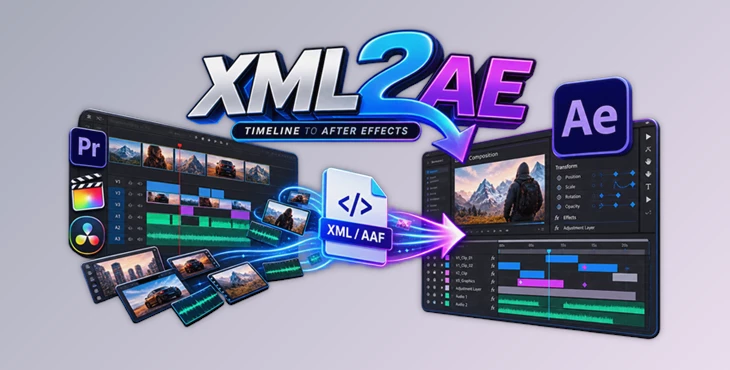
Turn Editorial Timelines into Working After Effects Comps
Conforming edits from nonlinear editing systems into After Effects can be a tedious task. Locating the necessary footage, ensuring the correct timing of the video clips, and dealing with missing or duplicated clips can all consume hours of effort during the editing process.
XML2AE was created to make this process more manageable. XML2AE will read your FCP7 XML or AAF file and scan your footage folders for the media files, creating a working composition within After Effects that conforms to your original edit.
This makes it particularly useful for VFX, finishing, motion graphics, and other packages where an edit needs to go from editorial into After Effects.
What Is XML2AE?
XML2AE is a conforming tool for Adobe After Effects. Instead of treating an XML or AAF file as a simple list of clips, it uses the timeline information as a blueprint for reconstructing the edit.
You provide the XML/AAF file and one or more folders containing the source footage. XML2AE recursively scans those folders and creates a media catalog. It then attempts to match timeline clips against the real files using information such as filename or stem, reel, timecode, duration, and strict fallback rules.
Importantly, embedded source paths from the XML or AAF are not used as matching criteria. This is helpful when a project has moved between computers, drives, studios, or folder structures and the original paths are no longer valid.
For example, imagine receiving an edited commercial along with an FCP7 XML and several folders of camera footage. Rather than manually finding every shot and recreating its in/out points in After Effects, XML2AE can scan those folders, resolve the matches, and construct the timeline for you.
Why Timeline Conforming Matters
A successful conform is about much more than placing the correct clips in the correct order. Editorial timing, source trims, transforms, opacity changes, crop information, keyframes, and other properties may all influence how closely the reconstructed composition resembles the approved edit.
XML2AE preserves supported information wherever possible and adds diagnostics when something cannot be recreated automatically.
This gives artists a stronger starting point for compositing. Instead of spending the beginning of a VFX session reconstructing an edit, they can focus more quickly on the shots themselves while still having tools to inspect anything that needs manual attention.
Features
FCP7 XML and AAF Timeline Support
XML2AE can parse FCP7 XML sequence data as well as AAF through its bundled helper. Sequence information such as the timeline name, frame rate, duration, and included clips is displayed before the build begins.
Recursive Footage Scanning
Add one or multiple footage folders, and XML2AE scans their contents and subfolders recursively.
This is especially useful on projects where media has been organized into separate folders for cameras, renders, grades, VFX deliveries, or different shooting days.
Intelligent Media Matching
The tool compares timeline media against its scanned catalog using multiple criteria, including:
- Filename and filename stem
- Reel information
- Timecode
- Duration
- Strict fallback matching rules
The rules operate from top to bottom, allowing another method to be attempted when an earlier rule cannot find a suitable match.
Missing Media Detection
When required footage cannot be found, XML2AE identifies it instead of silently creating an incorrect match.
Missing footage can be represented inside the generated composition with a solid and detailed diagnostic text, making problem areas much easier to identify.
Conflict Resolution with Visual Previews
Sometimes multiple files share similar identifying information. Rather than automatically choosing one and potentially introducing the wrong shot, XML2AE can present the conflict to the user.
Candidate files can be displayed with thumbnails and useful metadata such as names, locations, and timecode. You can select the correct candidate or manually browse for another file.
This human-in-the-loop approach is particularly valuable when working with complicated productions containing duplicated filenames or multiple versions of the same media.
Automatic After Effects Composition Building
Once matching is complete, XML2AE imports the selected media and creates a video-only After Effects composition.
The generated timeline attempts to preserve editorial information such as:
- Layer timing and source trims
- Disabled clip states
- Basic Motion scale
- Position and center data
- Anchor and center offset
- Rotation
- Opacity
- Supported crop information
- Mapped blend/composite modes
- Supported keyframes
- Source-in-aware keyframe timing for trimmed footage
This can dramatically reduce the repetitive setup normally required before compositing begins.
Optional Reference Video
A reference video can be added alongside the XML/AAF. After the composition is built, the reference appears at the top of the layer stack.
This gives you a convenient visual target for checking the conform and spotting discrepancies in framing, scaling, timing, repositioning, or other editorial decisions.
Diagnostics for Unsupported Elements
Not every effect or editorial construct can be translated perfectly into After Effects.
When XML2AE encounters unsupported or unresolved information, it can create diagnostic text describing the issue. This gives the artist useful clues for manually reconstructing the missing element rather than leaving the problem unexplained.
Built Timelines History
XML2AE keeps track of generated timelines through its Built Timelines panel.
History can also be saved to a sidecar file next to the saved After Effects project, allowing the conform workflow to continue later.
Non-Destructive Timeline Updates
One of the most practical features is the ability to update an earlier conform.
Suppose several shots were missing when the first composition was created. Later, the studio delivers the missing footage or a newer graded version. You can add the new footage folders, run Scan and Match again, and update the previous timeline from the latest results.
Instead of overwriting your original composition, XML2AE duplicates the earlier build and modifies the duplicate. New or replaced media receives a distinct color label, while the previous timeline remains available.
This creates a much safer workflow for productions where media continues to arrive throughout the project.
A Simple XML2AE Workflow
Start by adding your FCP7 XML or AAF file to the Setup page. XML2AE parses the sequence and displays important information about the timeline.
Next, add the footage directories you want the tool to search. Multiple folders are supported, and their subfolders are scanned automatically.
You can then review the matching rules. The default order is designed for normal use and is generally a good starting point.
Press Scan and Match to catalog the footage and compare it against the timeline. A progress indicator shows the scanning process, while the status area reports found, missing, and conflicted media.
If conflicts exist, inspect the candidate thumbnails and metadata and choose the correct files. Missing files can also be located manually.
Once everything is ready, build the timeline. XML2AE imports the necessary media and generates the After Effects composition based on the parsed edit.
Professional Tips for Better Conforms
Whenever possible, include a reference video. Even when most media is matched correctly, a reference makes it much easier to verify scaling, repositioning, timing, retiming, and other visual differences.
Check the generated composition settings as well. Resolution and frame rate information comes from the XML/AAF data, so it is worth confirming that these settings are appropriate for your actual compositing workflow.
For ambiguous media, avoid choosing candidates based only on filenames. Compare thumbnails, timecodes, locations, and other metadata before confirming the match.
When updating an existing conform with newly delivered footage, consider removing older search folders from the Setup page and scanning only the new delivery folders. This can make it easier to identify the files that should replace older or missing material.
Network folders can also take longer to scan, particularly when XML2AE needs to generate thumbnails for conflicts. For large productions, keeping the footage organization clean can make the conform process smoother.
Finally, treat automatic conforming as a powerful starting point rather than a replacement for visual verification. Effects, complex retiming, unusual transformations, or constructs that cannot be interpreted correctly may still require manual reconstruction.
Built for VFX and Conform Workflows
Behind the interface, XML2AE separates filesystem-heavy processing from After Effects operations.
The CEP/Node side handles jobs such as XML parsing, folder scanning, metadata indexing, image-sequence grouping, media matching, conflict detection, thumbnail extraction, reports, build queues, and timeline history.
The ExtendScript host side is focused on modifying After Effects itself: importing footage, creating compositions and layers, applying timing and supported properties, generating diagnostics, placing reference video, and managing XML2AE-generated compositions.
This separation keeps matching decisions outside the After Effects host and allows the tool to concentrate AE-side operations on actually constructing the project.
Final Thoughts
XML2AE was made to fix one specific issue in the post-production process that takes up a lot of time.
The features that make it useful for the VFX/animation industry are the recursive scanning of the footage for media to match, the automatic composition of the composition within After Effects based on the edit, and the diagnostics to help the VFX artists understand any issues with the edit.
The biggest advantage of XML2AE is that it reduces the amount of work that has to be done to reconstruct the edit from the media files, although it still allows the VFX artists to have control in cases where the editing media is incomplete.

Files Password : gfxplugin.com OR 123456