Downloadable Files
You can download LP Pencil & Charcoal Brushes for free from the end of this page.
Bring the Feel of Real Charcoal Into Your Digital Art
If you’ve ever tried to draw with charcoal, you know how that can feel - very different from digital charcoal. Where digital is smooth, clean, and precise, real charcoal has grains, stains, rough edges, and imperfections that make every stroke unique.
LP Pencil & Charcoal Brushes were made to give your digital art the same feel. Instead of trying to mimic the feel of a dark charcoal pencil, these brushes were made with the intention of giving digital artists the same feel as real charcoal on paper.
Ideal for anyone looking to produce expressive artwork with a traditional feel, LP Pencil & Charcoal Brushes allow you to produce expressive drawings without the need for charcoal dust.
What Makes Digital Charcoal Feel Natural?
A convincing charcoal drawing is not only about using black or gray strokes. Much of its character comes from the interaction between texture, pressure, blending, and irregular marks.
Real charcoal can produce everything from a thin, controlled line to a broad mass of soft value. It can be blended into smooth shadows, dragged across a textured surface, erased back into highlights, or layered to create rich dark areas.
LP Pencil & Charcoal Brushes give digital artists tools for recreating these different behaviors. You can use fine brushes for delicate facial details, flat brushes for blocking large shadow shapes, shaders for building values, and smudgers for softening transitions.
This variety helps prevent artwork from looking overly polished or digitally uniform. Instead, different marks can work together to create a more organic and traditional appearance.
Meet LP Pencil & Charcoal Brushes
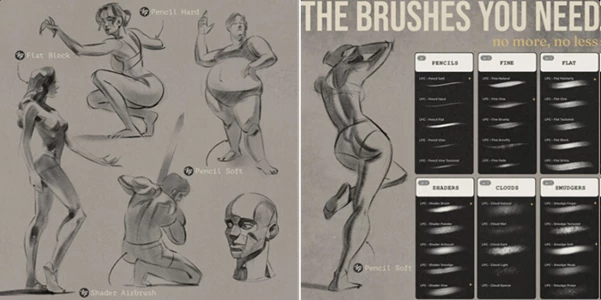
LP Pencil & Charcoal Brushes is a collection of more than 30 textured brushes created for digital artists who enjoy the look and feel of traditional charcoal.
The collection includes multiple brush categories rather than relying on a single charcoal effect. This makes it possible to move naturally between sketching, shading, blending, erasing, and adding expressive texture throughout the same artwork.
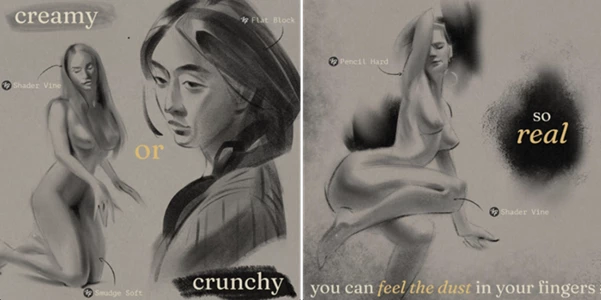
The brushes are particularly useful for gesture drawing, figure studies, portrait work, value studies, and classical draftsmanship. Depending on how you combine them, you can create either soft and creamy tonal transitions or rough, crunchy, expressive marks.
Features
5 Pencil Brushes
The five pencil brushes are useful for initial sketches, construction lines, contours, and controlled details. They can help establish proportions before heavier charcoal textures are introduced.
For portrait drawing, for example, you might use a pencil brush to define the eyes, nose, lips, and major facial planes before moving into broader shading.
5 Fine Brushes
Fine brushes provide more precise charcoal marks while maintaining a textured appearance. They are useful when an illustration needs controlled details without losing its traditional character.
These brushes can work especially well for facial features, hair strands, small folds, edges, and refined line work.
5 Flat Brushes
Flat brushes are better suited to broader strokes and larger shapes. They can help artists quickly establish shadow masses and simplify complex forms into readable areas of light and dark.
For figure studies, this can be an efficient way to define the major value structure before adding smaller details.
5 Shader Brushes
The five shader brushes are designed for building tone and creating dimensional forms.
Instead of relying only on outlines, you can gradually establish light, midtones, and shadows. This is especially valuable for portraiture and classical studies where the illusion of volume depends heavily on accurate values.
5 Cloud Brushes
Cloud brushes can introduce softer and more atmospheric charcoal textures. They are useful for broad tonal areas, subtle backgrounds, loose shading, and softer transitions.
Combined with sharper charcoal marks, these brushes can create an interesting contrast between controlled details and atmospheric areas.
5 Smudger Brushes
Smudging is an important part of traditional charcoal drawing, and the five included smudger brushes provide tools for blending and manipulating existing marks.
They can soften transitions between values, push charcoal into surrounding areas, and reduce harsh digital edges. Rather than making every transition perfectly smooth, you can retain some texture to preserve the natural charcoal appearance.
2 Eraser Brushes
The two eraser brushes are not only useful for correcting mistakes. They can also become creative drawing tools.
Try using them to pull highlights out of shaded areas, define reflected light, separate overlapping forms, or introduce bright accents into hair and facial features.
2 Erodible Brushes for Photoshop
Photoshop users also receive two erodible brushes. These provide another way to introduce changing, irregular marks into the drawing process and reinforce the unpredictable character associated with physical drawing materials.
From Soft Blends to Expressive Marks
One of the strengths of LP Pencil & Charcoal Brushes is the ability to explore two very different charcoal aesthetics with the same toolkit.
For a refined portrait or academic value study, you can gradually layer shaders and use smudgers to create soft transitions. Fine brushes can then restore important edges and details.
For gesture drawing or expressive illustration, you can work more aggressively with flat, pencil, and textured brushes. Leaving visible strokes, broken edges, and irregular textures can give the artwork more movement and energy.
This flexibility makes the brushes useful for both carefully rendered drawings and quick exploratory sketches.
Great Uses for LP Pencil & Charcoal Brushes
The collection can fit naturally into several types of digital artwork.
For gesture drawing, loose charcoal strokes can quickly capture movement, rhythm, and the overall action of a pose.
For figure studies, broader brushes can establish major shadow masses while fine brushes refine anatomical landmarks and important contours.
For portrait drawing, artists can combine precise marks around facial features with soft shading across the cheeks, forehead, and neck.
For value studies, shaders and smudgers make it easier to concentrate on light and shadow rather than color.
And for artists inspired by classical atelier and academic drawing, the combination of pencils, charcoal textures, blending tools, and erasers provides a workflow that feels much closer to traditional draftsmanship.
Tips for More Convincing Charcoal Artwork
Start Loose Before Adding Details
Avoid beginning with tiny details. Use larger brushes first to establish the overall silhouette, gesture, and major value shapes. Once the composition feels right, gradually introduce finer brushes.
This creates a more natural drawing process and helps prevent the artwork from becoming stiff.
Mix Hard and Soft Marks
Real charcoal drawings usually contain a combination of sharp edges, rough strokes, soft gradients, and partially blended areas.
Try using pencil or fine brushes around important focal points while allowing shaders and smudgers to create softer transitions elsewhere.
Don’t Blend Everything
Smudgers are powerful, but excessive blending can remove the texture that makes charcoal interesting.
Leave some visible strokes and rough transitions. These imperfections often provide the traditional character that perfectly smooth digital shading lacks.
Use the Eraser as a Drawing Tool
After building darker values, use an eraser brush to carve light back into the drawing.
This technique can be particularly effective for highlights on the face, strands of illuminated hair, reflected light, and bright edges.
Build Dark Values Gradually
Instead of immediately pushing every shadow to maximum darkness, develop your values in layers. Start with broad midtones, establish the shadow structure, and then strengthen the deepest dark areas.
This gives you more control over depth and helps maintain variation within the charcoal texture.
Experiment With Different Brush Combinations
There is no need to use every brush in every drawing. A simple combination of a pencil, flat brush, shader, smudger, and eraser may be enough for an entire portrait.
For another project, a rougher combination can create a completely different result. Experimenting with a smaller selection of brushes can also help you develop a recognizable personal workflow.
Who Is LP Pencil & Charcoal Brushes For?
LP Pencil & Charcoal Brushes is particularly suitable for digital artists who enjoy traditional drawing aesthetics but prefer the flexibility of working digitally.
It is designed for Procreate, Photoshop, and Clip Studio Paint users looking for authentic charcoal tools, as well as portrait artists, gesture drawing enthusiasts, figure artists, and creatives interested in classical or academic drawing techniques.
Whether you’re producing a quick five-minute gesture sketch or spending hours developing a detailed portrait, the variety of pencils, shaders, flats, smudgers, and erasers gives you different ways to approach the drawing.
Final Thoughts
LP Pencil & Charcoal Brushes brings together the roughness, softness, smudging, texture, and expressive imperfections that make traditional charcoal so visually appealing.
With more than 30 carefully crafted brushes covering pencils, fine marks, flats, shaders, clouds, smudgers, erasers, and Photoshop erodible brushes, the collection provides tools for multiple stages of the drawing process.
Its biggest advantage is flexibility. You can create smooth and carefully rendered value studies or embrace rough, energetic strokes for expressive sketches and figure drawings. By mixing textures, preserving imperfections, and using blending selectively, digital artwork can retain much more of the personality associated with real charcoal.
For artists who enjoy traditional charcoal aesthetics but want the convenience and control of a digital workflow, LP Pencil & Charcoal Brushes offers an interesting toolkit to explore.

Files Password : gfxplugin.com OR 123456