Downloadable Files
You can download Manhattan 2049 for free from the end of this product page.
Turn Your Photos Into a Dystopian Cityscape
If you shoot into the night, you already know that the atmosphere of night photography is unique. However, with the proper color treatment in post-production, your nighttime photos can be transformed entirely.
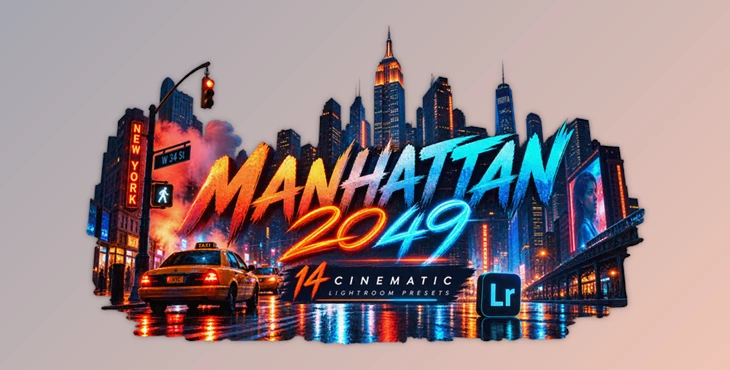
Manhattan 2049 includes 14 presets inspired by the dystopian visual design of Blade Runner. Each of these color palettes is a starting point that you can adjust to find your perfect look.
Rather than being one-click filters that make every image look the same, these presets give photographers creative starting points for editing their photographs.
What Does a Cinematic Preset Actually Do?
A Lightroom preset is essentially a collection of predefined editing adjustments that can quickly establish a particular visual direction for an image.
Instead of manually experimenting with multiple settings every time you edit a photograph, a preset gives you an established starting point. You can then adjust elements such as exposure or other image-specific settings until the result fits your shot.
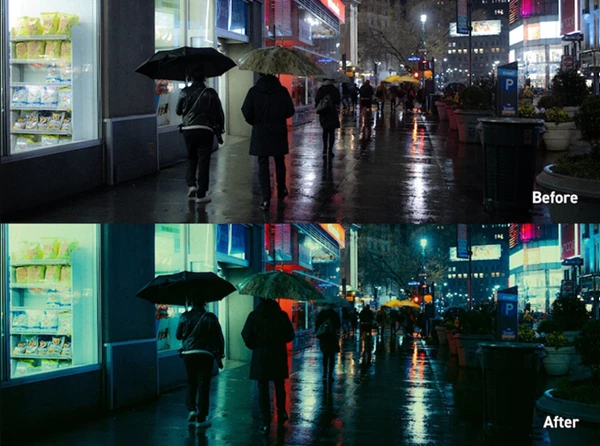
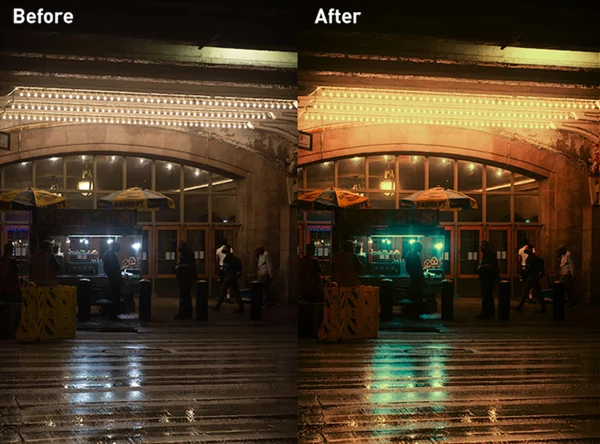
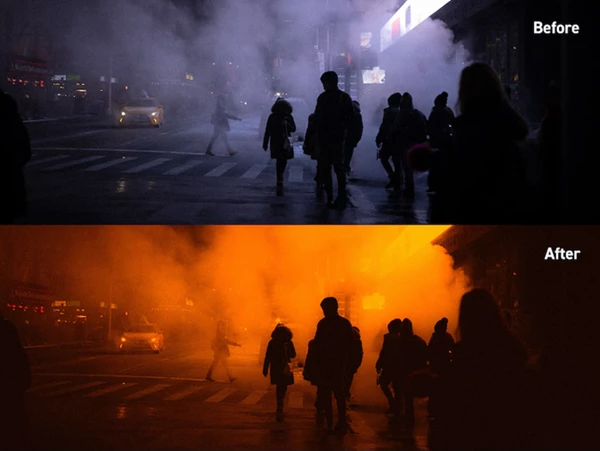
With a dystopian or futuristic aesthetic, color becomes especially important. A normal nighttime city photograph can feel completely different once its existing lights, shadows, and colors are pushed toward a more stylized cinematic atmosphere.
Imagine a photograph of a downtown street at night. The original image might contain colorful storefronts, headlights, streetlights, dark buildings, and reflections. Applying a cinematic preset can bring those individual elements together into a more intentional visual style.
This can make the photograph feel less like a straightforward digital capture and more like a frame from a futuristic movie.
Meet Manhattan 2049
The collection is particularly optimized for night photography, making it a natural match for urban environments filled with artificial lighting. However, it isn’t restricted to nighttime images. The presets can also be applied to daytime photography, although some additional adjustments may be necessary.
One of the most useful aspects of the pack is that its presets are intended as starting points rather than rigid finished edits. Different photographs have different exposure, lighting, white balance, and colors, so having room to fine-tune the result is important.
Features
- 14 Cinematic Presets: The collection provides 14 different looks inspired by a futuristic dystopian city aesthetic.
- Optimized for Night Photography: The presets are especially suitable for nighttime photographs, where city lights and darker environments can complement the cinematic color treatment.
- Usable With Daytime Images: Although designed primarily around night photography, the presets can also work with daytime photographs after minor adjustments.
- Desktop and Mobile Support: The package includes 14 XMP preset files for desktop workflows and 14 DNG preset files for mobile editing.
- Lightroom Compatibility: Manhattan 2049 works with Lightroom CC and Lightroom Classic.
- Free Lightroom Mobile Support: The DNG versions can be used with the free Lightroom app on iOS and Android.
- Photoshop Camera Raw Compatibility: The presets can also become part of a Photoshop-based photography workflow through Camera Raw.
- RAW and JPG Support: You aren’t limited to one specific image format. The presets can be applied to both RAW photographs and standard JPG files.
- PDF User Guide: A PDF guide is included to help users get started with the preset collection.
Where Can You Use These Looks?
The strongest environment for Manhattan 2049 is naturally the city at night. Neon storefronts, illuminated architecture, subway entrances, traffic, reflections, signs, and other artificial light sources provide plenty of visual information for cinematic color grading.
Street photography is an obvious example. A relatively ordinary night scene with a person walking beneath glowing signs can become much more atmospheric after applying one of the presets and balancing the edit around the available lighting.
Urban architecture can also benefit from this approach. Modern skyscrapers and illuminated windows already have a futuristic quality, and cinematic colors can push that atmosphere further.
You can also experiment with portraits photographed around city lights. Instead of treating the preset as the final result, use it to establish the overall mood and then refine the image according to the subject and lighting.
Even daytime city photographs can be interesting candidates. Because the presets are optimized primarily for nighttime photography, daytime shots may require more adjustment, but this also gives you an opportunity to create less conventional interpretations of the original scene.
Tips for Better Results
The first thing to remember is simple: don’t expect every preset to look perfect immediately on every photograph. The collection itself is designed to provide starting points, and images naturally vary in lighting and exposure.
Try several of the 14 presets before committing to one. A look that works beautifully with neon-heavy street photography may not be the strongest choice for a daytime architectural image.
After selecting a preset, pay particular attention to exposure. Night photographs can contain both extremely bright lights and very dark areas, so small adjustments can significantly improve the overall balance.
It is also worth checking white balance. Because the Manhattan 2049 aesthetic depends heavily on color, changing the temperature or tint of the original photograph can influence how the final grading feels.
RAW photographs generally provide plenty of flexibility for further editing, but JPG compatibility means you can still experiment even when RAW files aren’t available.
Most importantly, use the preset as the beginning of your edit rather than the end. The cinematic character should support the photograph, not overpower it.
Build Your Own Dystopian Atmosphere
The future of color grading in photography can be explored through a product called Dystopia for Manhattan 2049. This product includes 14 different presets in both XMP and DNG versions, and it is compatible with both Lightroom and Photoshop Camera Raw, as well as RAW and JPG images.
This effect would work best for nighttime photography of cities, as many of these presets would highlight the artificial lights, architecture, and colorful environments of such cities.
As with any plugin or color grading tool, experimentation is the key to discovering what small adjustments are necessary to transform the dystopian look into one that best suits the photograph that is being edited.

Files Password : gfxplugin.com OR 123456