Downloadable Files
You can download Real World High Detailed Skyscrapers and Buildings for free from the end of this page.
Build Bigger, More Realistic 3D Cities
Building cities from scratch can become a very taxing modeling process. Each skyscraper within a city requires some modeling, and each building requires further detailing. If the project is to incorporate multiple skyscrapers into the project, the amount of modeling that is required begins to build up to a very high level.
The Real World High Detailed Skyscrapers and Buildings pack was created to make it easier than ever to create cities with hundreds of highly detailed buildings and skyscrapers. This 3D kitbash resource includes over Real World High Detailed Skyscrapers and Buildings that can be used to build cities, urban environments, architectural backgrounds, and more.
Instead of modeling every structure individually, start with ready-made assets to save yourself some time.
What Is a Building Kitbash Bundle?
A building kitbash bundle is essentially a collection of ready-made 3D architectural assets that can be mixed, matched, duplicated, and arranged to quickly construct larger environments.
Think of it like having a digital box filled with skyscrapers and city buildings. Rather than modeling an entire city block by block, you can place existing structures into your scene, adjust their materials, change their arrangement, and gradually build the skyline you need.
This approach is especially useful for scenes where dozens of buildings may appear at the same time. A cinematic aerial shot of a metropolis, for example, can require a huge amount of geometry. Starting with a diverse asset library dramatically reduces the amount of repetitive modeling involved.
It also helps create more visual variety. Different building heights, silhouettes, architectural styles, and landmarks make a skyline feel much more believable than repeatedly duplicating the same few models.
Meet Real World High Detailed Skyscrapers and Buildings
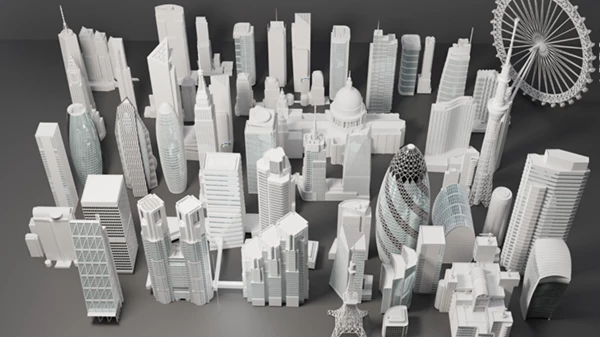
Real World High Detailed Skyscrapers and Buildings contains 130 3D assets, with buildings that are uniquely modeled rather than simply being repeated variations of one basic structure.
The collection combines general-purpose high-rise architecture with recognizable real-world landmarks. Some models are based on the real-life scale of popular skyscrapers and buildings, making the bundle particularly useful when you want a stronger sense of realism and recognizable urban architecture.
The assets can be used as individual hero buildings or combined into much larger city environments.
Features
130 Ready-to-Use 3D Assets
The bundle includes 130 building assets, giving you enough variety to create anything from a relatively small city block to a much larger skyline.
Using different structures across foreground, midground, and background areas can help prevent obvious repetition and make large scenes feel considerably richer.
High-Detailed Towers and High-Rise Buildings
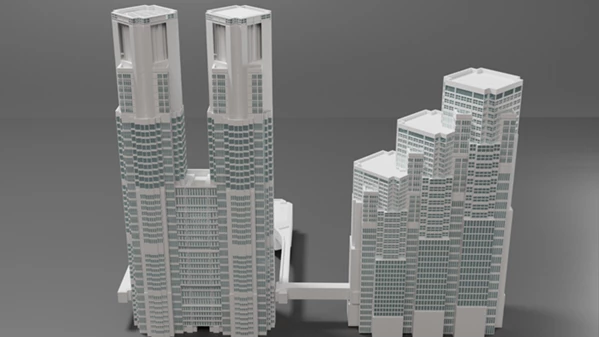
The collection includes detailed towers and high-rise structures suitable for modern metropolitan environments.
These models can become important visual anchors in your composition. A few distinctive towers surrounded by simpler buildings, for example, can instantly create a more convincing skyline.
Famous Real-World Landmarks
One of the most interesting parts of the bundle is its inclusion of recognizable architecture.
The collection features structures such as:
- Tokyo Tower
- Tokyo Skytree
- Empire State Building
- Chrysler Building
- Flatiron Building
- Important skyscrapers from London
- Major buildings inspired by New York, Tokyo, Los Angeles, and London
These recognizable structures can be especially useful when creating scenes inspired by real-world metropolitan areas.
Easy to Texture
The buildings are designed with texturing flexibility in mind. Each building includes separated material slots, allowing different architectural areas to be controlled independently.
This makes customization much easier. You could modify glass, concrete, metal, walls, windows, or other surfaces to better match the lighting and visual direction of your project.
Changing materials is also a useful way to reuse the same architecture across different scenes without making the result feel identical.
Procedural Buildings Included
Procedural building assets add another layer of flexibility to the collection. They can help expand environments and provide additional variation when constructing larger cityscapes.
Combined with the uniquely modeled buildings, these assets can be particularly useful for filling distant areas where architectural diversity matters but every building does not need to become a hero object.
Multiple 3D Formats
The package is available in:
FBX, OBJ, and BLEND.
Having several common formats makes the assets easier to incorporate into different 3D workflows. The native BLEND format is particularly convenient for Blender users, while FBX and OBJ provide useful options for transferring geometry into other compatible 3D applications.
Where Can You Use This Building Collection?
The most obvious use is creating large 3D cityscapes, but the collection can support many different types of projects.
You could build the background of a cinematic city shot, populate an architectural visualization, construct environments for animations, prepare urban concept art, or create establishing shots where a recognizable skyline is needed.
The models can also work well as starting points for more stylized environments. By changing materials, lighting, atmosphere, and surrounding elements, realistic architecture can be transformed into cyberpunk cities, futuristic megacities, nighttime skylines, disaster environments, or other creative settings.
For example, combining skyscrapers with fog, volumetric lighting, illuminated windows, and strong nighttime reflections could produce a dense cinematic metropolis without requiring every building to be modeled manually.
Tips for Creating Better Cityscapes
Having plenty of detailed buildings is useful, but their arrangement plays an equally important role in making a city feel natural.
Start by varying building heights. Avoid placing structures with similar heights evenly across the scene. Instead, create groups of low, medium, and very tall buildings to produce a more interesting skyline.
Keep your most recognizable or detailed structures around important composition points. Landmark buildings can work especially well as focal points rather than being lost among dozens of similar towers.
Materials are another opportunity to introduce variation. Even when reusing a building, changing its glass, wall colors, reflections, or roughness can make repeated assets much less noticeable.
For large environments, reserve your most detailed structures for areas close to the camera. Background buildings can usually be arranged more densely without requiring the same visual attention.
Finally, spend time on atmosphere. Fog, sunlight direction, window illumination, reflections, and depth can transform a collection of separate models into one cohesive city. The buildings provide the architecture, but lighting and composition are what make the environment feel alive.
A Faster Foundation for Detailed Urban Environments
Real World High Detailed Skyscrapers and Buildings is a collection of over 130 uniquely-modeled buildings, including famous skyscrapers from around the world. All of the buildings in Real World High Detailed Skyscrapers and Buildings are procedurally-generated, have separated material slots to allow for easy texturing, and come in FBX, OBJ, and BLEND file formats.
Instead of spending most of your project creating individual skyscrapers and architectural structures, you can immediately begin adding buildings to your scene and focusing on other creative elements of the scene.
Whether you’re creating a realistic cityscape or a collection of fictional structures, trying out different arrangements of the buildings in Real World High Detailed Skyscrapers and Buildings can yield dramatically different results for your projects.

Files Password : gfxplugin.com OR 123456