Downloadable Files
You can download the Capture One Preset for free from the product section at the bottom of this page.
Capture One Preset
Getting a beautiful film-inspired look from a digital photo is not always as simple as adding contrast or changing a few colors. A good grade needs to balance tones, highlights, shadows, and color relationships while still leaving enough flexibility for the photographer to make the image their own.
Capture One Preset – Analog Pack is designed with exactly that idea in mind. Created exclusively for Capture One, this collection provides a quick starting point for giving digital RAW images a more organic, film-inspired character without trying to perfectly imitate a specific film stock.
Instead of treating the presets as a one-click final result, you can use them as a creative foundation and then fine-tune exposure, white balance, contrast, and other settings for each photograph.
Bring a Film-Inspired Feel to Digital Photos
Film-inspired color grading is about more than simply making an image look old or adding faded colors. It is a way of shaping color and tonal relationships to create a particular mood and visual character.
For example, a clean digital portrait may technically have accurate colors and balanced exposure but still feel slightly clinical. Applying a carefully designed film-inspired grade can introduce a different tonal response and color palette, giving the photograph a more distinctive atmosphere.
The same approach can work well with street photography, lifestyle images, travel photographs, portraits, and everyday scenes where color plays an important role in the final mood.
Because every RAW image is different, presets are most useful when they provide a strong starting point rather than locking the photographer into a finished look. You can apply a style, evaluate how it interacts with your photograph, and then adjust it to suit the scene.
Meet Analog Pack
Analog Pack 3.0 is the third iteration of a film-inspired color grading collection created specifically for digital photography in Capture One.
The pack includes six styles designed specifically for Fujifilm cameras, taking advantage of Fujifilm’s film simulation picture profiles. Rather than claiming to reproduce particular film stocks exactly, the styles are simply inspired by the visual qualities associated with film.
This distinction is important. The presets are designed to give you room to develop your own look instead of forcing every photograph into the same rigid aesthetic.
They are also intended primarily for properly exposed RAW images, where Capture One provides plenty of information for making additional exposure, color, and tonal adjustments.
Features
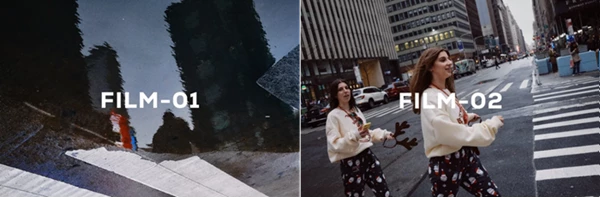
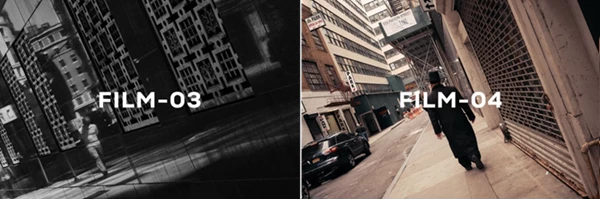
Six Film-Inspired Styles
Analog Pack 3.0 includes six different styles that provide photographers with multiple starting points for color grading.
Instead of building every look manually from scratch, you can quickly apply a style and see how its tonal and color characteristics interact with your photograph.
Designed for Fujifilm Cameras
The six included styles are specifically designed around Fujifilm cameras and their film simulation picture profiles.
This makes the pack particularly interesting for Fujifilm photographers who already enjoy the brand’s approach to color but want another creative foundation for developing their RAW photographs inside Capture One.
Made Exclusively for Capture One
The presets are built for Capture One and are compatible with Capture One 21, 22, and 23 according to the product information.
Once installed, the styles appear with your custom styles, allowing them to fit naturally into an existing Capture One editing workflow.
A Starting Point, Not a Final Edit
One of the most useful aspects of the pack is its approach to presets. The styles are not intended to replace manual editing.
After applying a preset, you can continue adjusting exposure, white balance, contrast, and other parameters according to the photograph. This makes it easier to avoid the overly processed appearance that can happen when exactly the same preset settings are applied to very different images.
Film-Inspired Rather Than Film Emulation
Analog Pack 3.0 does not necessarily attempt to replicate a particular physical film stock.
Instead, its styles take inspiration from film aesthetics. This gives photographers more creative freedom and makes the pack suitable for users who want an analog-inspired mood without requiring technically exact film emulation.
Where Can You Use Capture One Preset?
Imagine editing a set of outdoor portraits taken during golden hour. Applying one of the styles can quickly establish the overall color direction, while small exposure and white balance adjustments help adapt the look to the skin tones and available light.
For street photography, you could use a preset to establish a more distinctive color palette and then adjust the Luma Tone Curve to control how strongly the shadows and highlights are separated.
Travel and lifestyle photography can benefit from the same workflow. Instead of spending time rebuilding a similar grade for every photograph, the preset establishes the foundation while you concentrate on the adjustments that make each image work individually.
Tips for Better Results
Start with a properly exposed RAW image whenever possible. The presets were designed to work best under these conditions, and RAW files provide more flexibility for subsequent adjustments.
After applying a style, pay particular attention to exposure. The exposure setting in Capture One Preset is intentionally high, encouraging you to adjust it for the individual photograph. Think of exposure almost like an intensity control for the overall effect rather than a value that should remain untouched.
Next, check the white balance. Lighting conditions vary considerably between photographs, so even a well-designed preset may need a warmer or cooler white balance to look natural on a particular image.
If the photograph still needs more tonal definition, adjust the contrast through the Luma Tone Curve. The amount required depends heavily on how the original photograph was exposed, so subtle manual adjustments can make the final result feel considerably more intentional.
Most importantly, avoid assuming that every setting in a preset needs to stay exactly as it is. Use the style to establish a direction, then adapt it to your image. Small changes are often what turn a good preset into a grade that actually feels made for the photograph.
How to Install Analog Pack
Installation is straightforward. First, make sure Capture One is closed. Open the Capture One Styles folder inside the application’s directory, then download and extract the style files.
Copy the extracted styles into the Capture One Styles folder and reopen or restart Capture One. The new presets should then appear within your custom styles.
Final Thoughts
Analog Pack 3.0 provides a way to introduce film-like colors into one’s images within Capture One without resorting to using the presets as a means of replacing the editing process altogether.
The inclusion of six Fujifilm-focused styles, the ability to work with Capture One 21, 22, and 23, and the features that allow for further customization of each of the preset styles make Analog Pack 3.0 a tool that can be especially helpful for those looking to get to a unique color direction in their images quickly and then fine-tune the look of the images themselves.
Each of Capture One Preset should be used as a means of obtaining the starting point for one’s editing, rather than the final editing step. Adjusting the exposure, white balance, and luma tone curve of the images will allow one to find the best look for their particular photograph.

Files Password : gfxplugin.com OR 123456